Choose your mixer first according to how many people will be speaking at the same time. Then consider whether you need separate tracks via USB, on a memory card or both. In a reverberant room, microphone distance and positioning are crucial: Shure points out that a microphone cannot effectively distinguish direct sound from room reflections. Noise processing on the device is no substitute for a suitable recording environment.
Which setup is right for you?
Ensemble with multiple voices
If several cast members are recording at the same time, the number of actual microphone inputs and headphone outputs matters, as does the ability to edit voices as separate tracks. Tascam lists four microphone inputs and four separate headphone outputs for the Mixcast 4. Zoom describes the PodTrak P4next as having four XLR inputs and four headphone outputs.
Audio drama team recording in a reverberant room
If you can’t acoustically treat the room, compare microphone distances and positions using a voice test. Shure explains that a microphone can’t simply separate room reflections from the direct voice.
Director working with sound effects and editing
If you want to trigger sound effects or edit voices separately later, check the pads, storage medium and specific multitrack recording options. The specifications from Tascam, Zoom, RØDE and Yamaha vary by model and recording method.
What should you look for when buying?
| What you need |
What to check before buying |
Who it matters most to |
| Clear voices in a reverberant room |
Before buying, make a test recording from the planned speaking position and compare microphone distance and direction. Shure points out that a microphone won’t eliminate room reverberation. |
If I’m recording in an untreated room, I want to hear first whether the voice sounds clear enough from the intended position. Around 26% of consumers give room clarity the highest priority. |
| Enough inputs for the ensemble |
Count the microphones used at the same time and the headphone outputs you need. Tascam lists four microphone inputs and four separate headphone outputs for the Mixcast 4. RØDE and Yamaha each list two wired microphone inputs for the Duo and AG08 respectively. |
If you want to record several roles together, you need enough dedicated microphone and monitoring connections, not just a high total channel count. Around 26% of consumers put this need first. |
| Separate tracks for editing |
For the exact model, check separately which tracks are output to SD or microSD and which are sent via USB. Tascam describes SD multitrack recording and a USB interface mode for the Mixcast 4; Zoom lists individual channels on microSD and multitrack recording via USB-C for the P4next. |
If I want to edit dialogue separately later, I need a recording method that saves the voices as separate tracks. Around 21% of consumers give separate-track editing the highest priority. |
| Triggering sound effects during recording |
Check the number and assignment of the pads, as well as the signal routing. If you’re using someone else’s music, also check the rights for publication; GEMA explains music licensing for online podcasts. |
For a scene with carefully timed sound effects, it’s important to trigger sounds at the right moment and check the rights before publication. Around 16% of consumers prioritise live sound effects above all else. |
| Recording in different locations |
Check the power supply and storage medium for the specific device. Zoom says the PodTrak P4next can run on AA batteries or USB and records to microSD. |
If I want to record in different locations, the device needs to be powered there and recording must work without relying on my planned computer setup. Around 11% of consumers give a mobile recording setup the highest priority. |
Common buying misconceptions
-
A high number of mixer channels doesn’t mean just as many microphone inputs
According to Yamaha, the AG08 has two microphone/line inputs across eight channels; the RØDECaster Duo also has two wired combo inputs. So a high channel count alone doesn’t tell you how many cast members can each connect their own microphone at the same time.
Count the actual physical microphone inputs you need for the roles being recorded at the same time.
If there aren’t enough inputs, you may need a different device or to record in additional takes.
-
A USB connection doesn’t guarantee separate USB track recording
For the older Zoom PodTrak P4, Zoom lists four sources that can be recorded separately to a card, but its USB audio interface is 2-in/2-out. The P4next is a different model with different multitrack recording specifications.
Check the full model name and distinguish the number of USB channels from card recording.
A different recording method may mean extra file transfers or limit your editing options.
-
A mixer won’t automatically fix room reverberation
Shure explains that a microphone can’t effectively separate the direct voice from reflected sound. So advertised noise processing doesn’t prove that reverberation will disappear in your particular room.
Before recording, compare microphone positions with a voice test and listen back through headphones.
If the recording isn’t clear from your chosen position, you may have to repeat scenes.
-
A sound pad doesn’t clear the rights to use a sound
The ability to play music or sound effects says nothing about whether you’re allowed to publish third-party content.
For any music or text created by someone else, check which rights have been granted for the specific use and publication.
Key brands at a glance
Tascam
The Mixcast 4 combines multiple microphone and headphone connections with SD recording, a USB interface and sound pads.
- Tascam lists four microphone inputs, four separate headphone outputs and 14-track recording to an SD card for the Mixcast 4.
- These specifications don’t show how the device will perform in a particular recording space or confirm that a specific DAW workflow will capture every track you need separately.
Zoom
According to Zoom, the PodTrak P4next is designed for multiple microphones, separate recordings and portable use.
- Zoom lists four XLR inputs and four headphone outputs for the P4next, as well as individual channels and a stereo mix on microSD.
- Zoom advertises AI noise reduction, but that doesn’t prove it will eliminate reverberation in your room. The older PodTrak P4 is a different model.
RØDE
With its pads and multiple multitrack recording options, the RØDECaster Duo is aimed at smaller setups using wired microphones.
- RØDE lists two combo inputs and multitrack recording to microSD, USB storage or a computer.
- There are still only two wired microphone inputs. Additional wireless or USB microphones depend on compatible RØDE equipment.
Yamaha
The AG08 combines two microphone/line inputs with computer audio, faders and sample pads.
- Yamaha describes multichannel USB recording, computer routing and six sample pads.
- Eight channels doesn’t mean eight microphone inputs. Standalone recording to a card isn’t specified.
Joybuy products for audio drama recording
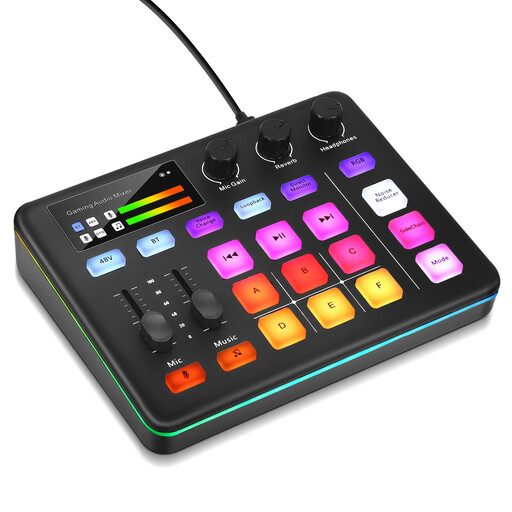
Joybuy selection for XLR microphone recording and triggering sound effects using sound pads.
 No image available
Audio mixer with six sound pads
Could be worth considering if you want to trigger sound effects using customisable sound pads or record with XLR microphones and direct monitoring.
The description lists a preamp and 48-V phantom power. Before buying, check that the specific microphone inputs and recording method suit your setup and editing software.
A mixer or noise processing won’t replace checking microphone distance and positioning in a reverberant room.
View on Joybuy
Frequently asked questions
Will built-in noise reduction remove the reverberation in my room?
You shouldn’t rely on it to. Shure explains that a microphone can’t improve the acoustics of a room, so first compare microphone distance and positioning with a test recording. Zoom advertises noise reduction on the P4next, but that doesn’t prove it will reduce reverberation in your room.
Do I really need four microphone inputs for a scene with four people?
If all four people need to use their own wired microphone at the same time, you’ll need four suitable microphone inputs. Also check how many headphone outputs you need; the total channel count may include computer or stereo signals too.
What should I set up and check before my first recording?
Assign an input to each voice, record a group voice test and listen for reverberation and background noise. Then check that the separate tracks you want have actually been saved. If you’re recording to a card, make sure the storage medium is suitable and the power supply has been checked.
Can I simply publish someone else’s music or audio drama script?
No. Owning a recording or sound file doesn’t automatically give you the right to publish it. German copyright law protects works including spoken and musical works; GEMA explains music licensing for podcasts published online. The rights you need depend on the material and how you plan to use it.
What should I look for in an electronic device for use in Germany?
When monitoring the market, the Bundesnetzagentur (Federal Network Agency) checks, among other things, for correct CE marking, identifiable manufacturer details, a declaration of conformity and German-language instructions with the necessary warnings. Check these details on the specific product listing; they don’t indicate quality and can’t be inferred from the channel count.


