Choose your mixer based on whether you want to edit several percussion microphones individually later, record without a computer running, or create a finished stereo mix straight away. For individual tracks, you need enough microphone inputs as well as USB channels that can be transferred separately. To record without a computer, the mixer needs a suitable multitrack recorder. If you set the mix while playing, stereo USB may be enough, but it gives you less flexibility for editing individual tracks later.
Who are the different recording options for?
Percussionists using several microphones
If you want to edit instruments or microphone positions separately after recording, check both how many microphones you can use at once and how many USB tracks can be sent independently to your DAW. Zoom and Allen & Heath describe multitrack options on their respective models.
Musicians who don’t want to keep a computer running
If you want to record takes directly on the mixer, consider a model with a built-in multitrack recorder and memory card. Tascam and Zoom describe these recording features for the Model 12 and LiveTrak L12next respectively.
Musicians who want quick stereo recordings
If you use a simple microphone setup and set the balance before recording, a stereo USB option may be worth considering. Yamaha specifies four mono microphone/line inputs and 2-in/2-out USB audio for the MG10XU.
What should you look for when buying?
First, count how many microphones you’ll use at once. Then decide whether you want to edit individual signals afterwards or set the mix as you play.
| What you need |
What to check before buying |
Who is it important to? |
| Separate editing after recording |
Compare the number of microphone inputs you can use at once with the USB channels that arrive separately in your DAW; check the channel routing in the manual. |
If I want to edit several percussion microphones individually later, I need separate USB tracks. Around 33% of shoppers prioritising individual tracks share this need. |
| Recording without a computer |
Check whether the mixer saves individual tracks or just the stereo mix to the card, and which storage media it supports. |
If I don’t want a computer running while I record a take, multitrack recording to a card matters to me. Around 25% of shoppers prefer this way of recording. |
| Simple stereo recording |
Check the USB recording signal and the number of microphone inputs separately; don’t assume stereo USB means you get separate individual tracks. |
If I use a few microphones and set the mix before recording, a straightforward stereo setup may be enough. About 25% of shoppers prioritise this type of stereo recording. |
| Monitoring and levels |
Check the headphone and monitor outputs against your setup; when setting levels, play the loudest hits you expect to make. |
If I want to monitor my recording in my own room and avoid clipping, I pay particular attention to monitoring and level meters. Around 17% of shoppers put these features first. |
Common buying and recording mistakes
-
Assuming mixer channels are the same as separate USB tracks
The number of mixer channels doesn’t automatically tell you how many signals will arrive individually in your DAW. Yamaha lists four mono microphone/line inputs for the MG10XU, but 2-in/2-out USB audio.
Check the exact model’s number of USB recording channels and how they’re routed before planning to use it for multitrack recording.
If you need separate signals, you may have to use a different recording setup or record the take again.
-
Treating every input as an equivalent microphone input
For the FLOW 8, Behringer specifies switchable 48 V phantom power for two XLR microphone inputs, distinguishing these from the additional combo and line inputs.
Check the microphone type, connection, preamp gain and phantom power requirements for each input individually.
Some microphones may need a suitable additional preamp or a different mixer.
-
Leaving room sound and loud hits until after the take
Microphone position and the room affect your recording. Focusrite advises avoiding clipping when setting levels; playing harder can push the input level to its limit.
Listen back to test recordings in the room you’ll actually use, adjust the microphone position and set levels while playing the loudest hits you expect to make.
Clipped or unsuitable-sounding takes may need to be recorded again.
-
Confusing past product recommendations with current production
Tascam lists the Model 12 on its download page as a discontinued product. Its documented features therefore don’t confirm that the model is currently in production or available.
Before deciding to buy this model, check its production status and condition, as well as the retailer services included with the specific offer.
Key brands and what they’re suited to
Zoom
The LiveTrak range combines mixer features with USB multitrack recording and memory card recorder functions.
- Zoom lists twelve individual recording tracks plus a stereo mix, a 14-in/4-out USB interface and five independent monitor outputs for the L12next.
- These specifications apply to the L12next and come from the manufacturer; they aren’t based on an independent sound comparison. You may not need the extra options for a small microphone setup.
Allen & Heath
The CQ range offers a digitally routed multitrack option. According to the manufacturer, the CQ-18T combines 16 microphone/line inputs with a stereo line input.
- Allen & Heath describes how individual CQ channels can be assigned to DAW tracks via USB.
- The CQ-18T may offer more features than a small percussion setup needs. Manufacturer claims about sound quality aren’t independent measurements.
Behringer
The FLOW 8 is a more compact digital option for a setup with up to four inputs that the manufacturer describes as suitable for microphones.
- Behringer lists two XLR microphone inputs with switchable 48 V phantom power, two additional microphone/line combo inputs and ten USB channels sent to a computer.
- The stated phantom power applies to the two XLR inputs and shouldn’t automatically be assumed to apply to the combo inputs.
Yamaha
The MG-XU range offers a stereo USB route. The MG10XU may suit you if a finished mix matters more than editing every microphone separately afterwards.
- Yamaha specifies four mono microphone/line inputs for the MG10XU.
- According to Yamaha, the MG10XU offers 2-in/2-out USB audio. These specifications apply to the model named, not every Yamaha mixer.
Tascam
According to the manufacturer, the Model 12 combines a mixer, USB interface, DAW control and memory card multitrack recorder.
- Tascam lists ten inputs, a 12-track recorder and a USB interface with twelve inputs and ten outputs.
- Tascam lists the Model 12 as discontinued; its feature specifications don’t confirm current production or availability.
Suitable products at Joybuy
Audio mixers at Joybuy that may be relevant to this topic.
 No image available
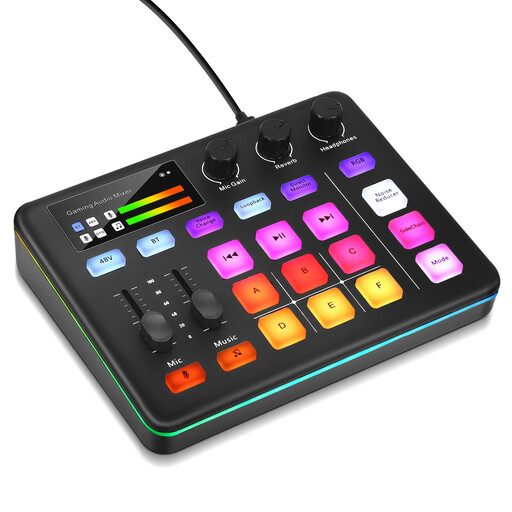
Audio mixer for live streaming and interactive entertainment
This device is listed for live streaming. Before buying it for percussion, check whether it sends individual microphones separately to your DAW via USB, and what inputs and phantom power your setup requires.
Joybuy
Frequently asked questions
Does a high number of mixer channels mean you can record the same number of microphones separately?
No. Check the microphone inputs and USB recording channels separately: Yamaha lists four mono microphone/line inputs for the MG10XU, but only 2-in/2-out USB audio. The channel routing in your DAW must also suit the model you want.
How do I set input levels for powerful percussion hits?
When setting levels, play the loudest hits you’re likely to make and watch out for clipping. Focusrite notes that you may play more forcefully during a take; the meter and controls will vary by mixer.
What should I check when recording without a computer?
Check whether the mixer records multitrack audio directly to a memory card and whether you can then transfer the saved tracks to your DAW. Also check the supported card format and export options.
What do I need to set up before recording to a DAW via USB?
Check the driver and operating system specifications for your exact model, then assign the USB inputs to the tracks you want in your DAW. Allen & Heath describes Core Audio operation on macOS and an ASIO driver for Windows for the CQ.


