Solo performers
If you’re recording a poetry reading in a booth, you’ll want to be able to control the microphone, levels and headphones without paying for inputs you won’t use.


For a single poetry reading, a compact USB mixer with a suitable microphone input and adjustable headphone output is a sensible place to start. If you want to process several voices separately or record without a computer, check the USB tracks and card recording separately from the number of mixer channels: Allen & Heath lists 2 inputs and 2 outputs over USB for the ZEDi-8; Zoom describes the PodTrak P4next as offering a stereo mix and individual channels on microSD. Microphone placement in the booth also affects the recording, and a mixer cannot compensate for it.
If you’re recording a poetry reading in a booth, you’ll want to be able to control the microphone, levels and headphones without paying for inputs you won’t use.
If you’re recording two voices, check both how many microphone inputs you can use at the same time and whether you can process the voices separately later.
If you want to record your performance directly to a storage device, look for a standalone recording function and check which tracks it saves.
When recording in a booth, consider the number of microphone inputs separately from the recording channels that are actually saved.
| What you need | What to check | Who is it important to? |
|---|---|---|
| Clear solo voice | Microphone connection and available space; whether you can adjust the microphone position during a test recording. | If I’m recording alone in a small booth, I want to be able to adjust the microphone position and monitor the sound easily. Around 36% of consumers make a clear solo voice their top buying priority. |
| Levels and headphones | Microphone gain, clipping indicator and headphone volume; whether audio played from a computer is included in the recording signal. | When recording quiet and emphatic lines, I want to keep an eye on the levels and headphone signal. Around 29% of consumers put this control first. |
| Separate voices | Count the microphones you need to use at the same time; check USB recording channels and, where applicable, card tracks separately. | If we’re reading together, I want to be able to edit each voice separately later. Around 21% of consumers prioritise separately editable voices. |
| Recording without a computer | Check for a standalone recording function and storage medium; confirm whether it saves a stereo mix or individual tracks. | If I want to leave the computer switched off during a reading, I need a suitable direct recording option. Around 14% of consumers prioritise computer-free recording. |
Even in a small booth, how much room sound is picked up depends on the microphone’s position and distance, not just the mixer.
Before buying more equipment, record test takes from several positions and listen back through headphones.
Analogue inputs, USB channels and card recording describe different signal paths. So the number of mixer channels alone doesn’t tell you which voices can be saved separately.
For the specific model, check the signal path for each voice all the way through to the saved file.
A USB audio interface for computer recording doesn’t automatically mean the device can save a recording itself.
If you want to leave the computer switched off, check specifically for a recorder function and the intended storage medium.
Features listed for the PodTrak P4next, such as recording to microSD, shouldn’t be assumed to apply to the older PodTrak P4 without checking.
Compare the full model name and the manufacturer’s specifications for the exact device on offer.
The AG03MK2 is a compact USB mixer with one microphone input, plus additional line and playback options.
The XENYX 302USB is a small USB mixer for one microphone, with the option to play audio from a computer.
The ZEDi-8 is a compact analogue mixer for two microphones and other line-level sources.
The PodTrak P4next is a recorder-mixer for multiple voices or recording to microSD.
The Notepad-5 is a small analogue mixer with a built-in USB audio interface for recording to a computer.
The RØDECaster Duo is a more advanced recorder-mixer for two microphones and several recording options.
The following Joybuy listings include audio mixers and a mixer kit. For recording poetry in a booth, check in particular that the microphone connection and actual recording path suit your setup.
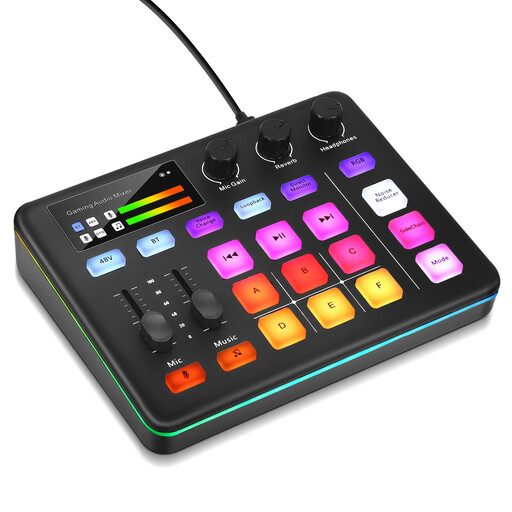 No image available
This mixer may suit booth recording if its connections and actual recording path work with your microphone and computer.
 No image available
The kit includes two 3.5 mm condenser microphones; check that their connections and the intended recording path suit your setup.
Not necessarily: you can connect a USB microphone directly to your computer. A mixer is mainly worth considering if you need compatible XLR sources, extra inputs or controls for the recording path.
Record a short test passage with quiet and emphatic sections, listen back through headphones and adjust the microphone position if needed. Shure recommends judging the position and distance by the balance you want between the voice and the room sound.
No. Check the USB recording path and any card recording separately: Allen & Heath describes the ZEDi-8 USB interface as having 2 inputs and 2 outputs; Zoom lists a stereo mix and individual channels saved to microSD for the PodTrak P4next.
Only if the specific device has a standalone recording function. A USB connection to a computer alone doesn’t prove that it can record locally; also check the storage medium and whether the device saves a stereo mix or individual tracks.
Under § 201 of the German Criminal Code (StGB), recording another person’s non-public spoken words without authorisation is a criminal offence; check in advance that you have permission to record. If a poem is still protected by copyright, performance and publication rights must be checked separately: § 19 UrhG covers the right of recitation, § 19a UrhG the right to make a work available to the public, and § 64 UrhG the general term of protection. The Federal Ministry of Justice and the Federal Office of Justice list these provisions on Gesetze im Internet; whether a particular use is permitted depends on the work, the rights involved and how you plan to use it.