For solo vocals in an untreated room, start by considering where you record and how you position the microphone: a mixer won’t remove room reflections that are already captured in the recording. A USB mixer could be a good fit if you need hands-on controls, headphone monitoring or a playback input on the device. Check, though, whether your DAW receives a dry vocal track or only the processed stereo mix. If you’re recording and mixing entirely in your DAW, an audio interface may be a better choice.
Who is a USB recording mixer for?
Solo singers who can hear the room
If you record in a living room, first check your recording position, reflections and distance from the microphone. Shure points out that a microphone can’t improve the acoustics of the space where it’s set up; Neumann explains how microphone placement can help you capture a drier lead vocal.
Singers who need headphones and playback
If you want to hear yourself while singing and occasionally play backing music, check the headphone output and exactly what signal is recorded over USB. Mackie’s information on the ProFX6v3+ shows how different recording modes can change the signal path.
Singers planning to expand to multitrack recording
If you might want to process additional signals separately or record to an SD card in future, check that the specific device has the feature you need. The number of channels on a mixer alone doesn’t confirm that it can record separate USB tracks; Zoom describes separate SD card recording tracks on the LiveTrak L-8.
What should you look for when buying?
Start with the room and microphone placement. Then decide whether monitoring, USB routing or future multitrack recording make the extra mixer workflow worthwhile for you.
This table matches shoppers’ priorities when choosing a USB recording mixer for solo vocals in an untreated room with the key points to check.
| Priority |
What to check before buying |
Who it matters most to |
| Room echo and background noise |
Test your recording position and microphone placement before choosing extra mixer features. |
If my voice sounds echoey in the room, I want to check my recording position and microphone placement first rather than rely on extra mixer features. Around 36% of shoppers put room acoustics first. |
| Headphone monitoring |
Check the headphone socket and level control, and whether computer audio is only monitored or also recorded. |
When I’m recording vocals, I want to monitor my voice and backing track through headphones without accidentally recording the computer audio. Around 29% of shoppers prioritise monitoring. |
| Vocal signal you can edit |
Check which channels are sent to your DAW in the selected USB mode and whether effects are recorded permanently. |
If I want to edit my vocals in the DAW later, I need the right USB signal path rather than just a finished stereo mix. Around 21% of shoppers prioritise having a vocal signal they can use separately. |
| Room to expand later |
Tell the difference between separate USB tracks and SD card recording, and check how many signals you want to record at once. |
If I might add more sources or record to an SD card, I want separate tracks rather than choosing based on the channel count alone. Around 14% of shoppers put expandability first. |
Common buying mistakes
-
Confusing more analogue channels with more USB recording tracks
The number of channels on a mixer doesn’t automatically tell you whether each signal reaches your DAW separately. Yamaha lists 2 IN/2 OUT over USB for the MG10XU; a USB stereo mix isn’t the same as multitrack recording either.
Check the USB routing specifications for the exact model and make sure you know which tracks your DAW will receive.
If you need separate tracks later, you may need a different recording device.
-
Recording effects or backing music by mistake
On the Mackie ProFX6v3+, the recording modes differ in whether they send unprocessed channels or the processed main mix. Loopback can also add computer audio to the recording signal path.
Choose the mode that suits the editing you have in mind, and make a short test recording before a longer session.
The wrong signal path could mean having to record your vocals again.
-
Expecting a more advanced mixer to fix the room
Room reflections and microphone placement affect the sound before it reaches any electronic processing. Extra mixer features won’t change these acoustic conditions.
First compare test recordings made in different positions, then decide which mixer features you’re actually missing.
Key brands at a glance
Yamaha
The AG06MK2 is designed for compact mixing of vocals and playback sources; the MG10XU is an analogue mixer with a USB stereo interface.
- Yamaha lists loopback and two-track USB recording for the AG06MK2.
- The MG10XU is specified as 2 IN/2 OUT over USB; this doesn’t confirm separate USB tracks for all analogue channels.
Mackie
According to Mackie, the ProFX6v3+ offers selectable USB recording modes and built-in effects.
- In Interface mode, Mackie says channels 1 and 2 are sent to the computer unprocessed.
- In Standard mode, the processed main mix is recorded; choose the mode that suits how much you want to edit later.
Zoom
The LiveTrak L-8 is designed for setups that need separate recording tracks or extra mixing features alongside solo vocals.
- Zoom lists separate SD card recording tracks and several headphone outputs.
- These extra features don’t offer an acoustic advantage when recording a single voice in an untreated room.
Soundcraft
The Notepad-8FX is a compact analogue USB mixer with built-in effects.
- Soundcraft lists USB connectivity and Lexicon effects.
- Don’t assume it can record every analogue channel separately over USB based on the channel count alone.
Behringer
The XENYX 802S is a small analogue mixer with an XLR microphone input and USB audio connectivity.
- Behringer lists USB audio input and output, as well as 48 V phantom power.
- This doesn’t confirm separate USB multitrack recording; check the signal path for the specific model.
Joybuy products for vocal recording
The products below include sound card mixers and audio mixers described for vocals and use with a computer or for live streaming. Before buying, check that each device offers the USB recording path you want and the right routing for your DAW.
 No image available
Yinkaer G10-P17-P17 sound card mixer set
This sound card mixer set is designed for singing with a computer or smartphone, and includes two 3.5 mm condenser microphones. Check whether the USB connection sends the vocal track you want to your DAW.
View at Joybuy
 No image available
Audio mixer for live streaming
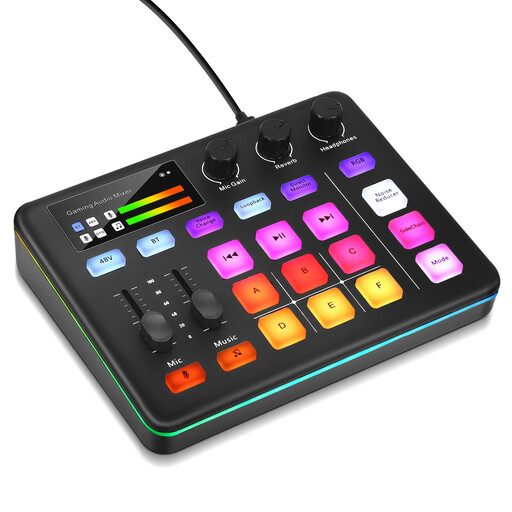
Designed for live streaming and XLR microphone recording. Listed features include direct monitoring, 48 V phantom power, loopback and six programmable sound pads. Check that the recording path suits your microphone and the DAW routing you want.
View at Joybuy
Frequently asked questions
Can a USB mixer remove the echo in my room?
No. A USB mixer can’t improve room acoustics after the fact. Compare short recordings made with the microphone in different positions; Neumann explains how setting up a more absorbent area in the right place can help you capture a drier lead vocal.
Why is the backing music on my recorded track?
Check the recording mode and loopback setting. Mackie describes a loopback mode on the ProFX6v3+ that includes computer audio in the recording, and an Interface mode that sends channels 1 and 2 without effects. For other models, check the signal path in the device manual.
How do I set up my first vocal recording?
Connect the right input for your microphone, set the level and listen to a short test recording through headphones. Only use 48 V phantom power if your connected microphone or other input device requires it; check the model’s manual for the exact connections and operating steps.
When is an audio interface a better choice than a mixer?
If you only want to record a voice in your DAW and mix it there, without needing extra mixing or streaming controls on the device, an audio interface may suit your workflow better. Check how many microphone inputs you need and whether the headphone monitoring path meets your requirements.


