A USB mixer is a good choice if you want to adjust levels on the unit and monitor your vocals and backing track through headphones. The key question, though, is which signal is actually recorded over USB. If you want to edit your vocals separately later, look for a dry recording path and check how many inputs are available in your DAW. If you only need a microphone, headphones and software, an audio interface could also be a good fit.
Who is this selection for?
Singers who want to edit their takes
If you want to edit your vocals after recording, check whether the mixer sends a dry input signal to your recording software or just a finished mix. Mackie describes the ProFX6v3+ as having an interface mode for the unprocessed inputs 1 and 2.
Singers who want to hear backing tracks through headphones
When singing along to a backing track, your headphone mix should let you hear the playback without accidentally mixing it into your vocal track. Yamaha and Mackie offer different USB and loopback settings, depending on the model.
Singers with limited booth space
In a cramped setup, you need to make sure the microphone connection, headphones, power supply and footprint all work together. Even the right mixer, however, won’t eliminate room reflections that the microphone has already picked up.
What should you look for when buying?
First, decide whether you want to record a dry vocal track for editing later or a finished mix. Then consider playback routing, the microphone connection and how much space you have in your booth.
| What you need |
What to check before buying |
Who is this important to? |
| A vocal track you can edit later |
Check the USB send mode and how many inputs are actually available in your DAW. For the ProFX6v3+, Mackie distinguishes between standard, loopback and interface modes. |
If I want to edit my vocals as independently as possible later, I need a suitable dry recording path; around 36% of consumers put an editable vocal track first. |
| Playback through headphones |
Check the headphone output and USB return path. Consult the manual to find out whether loopback includes computer audio in the recording. |
When I sing along to a backing track, I want to hear it without accidentally recording it too; around 29% of consumers prioritise controlled playback. |
| Microphone and footprint |
Check that the microphone connection and any required phantom power are compatible with the specific model. Also consider dimensions, cable clearance and power supply. |
If my microphone needs to connect properly and the mixer has to fit into a cramped setup, practical compatibility matters; around 21% of consumers put this first. |
| Room reflections and background noise |
Before buying, make test recordings from different microphone positions and listen for echo and consistent background noise. Headphones help prevent speaker playback from reaching the microphone. |
If I’m recording in a small booth, I first want to know whether the room and noise levels are suitable; around 14% of consumers prioritise the recording environment. |
Common buying mistakes
-
Assuming USB means every channel is recorded separately
A USB output may send only the main mix, even if the mixer has several analogue channels. Behringer describes the XENYX X1204USB as sending the main mix; having more analogue inputs does not automatically mean you get separate USB tracks.
Check exactly which signals the USB mode on your chosen model sends to your recording software, and how many inputs arrive separately.
If you need separate tracks only after recording, you may have to switch to a device with the right routing.
-
Overlooking loopback when recording vocals
Depending on the setting, computer audio may be included in the USB recording signal. This could mean the backing track ends up on the same track as your vocals.
Make a short test recording with playback and check in your DAW which signal appears on the vocal track.
-
Expecting the mixer to fix room echo in your booth
Reflections and background noise come from the recording environment and may already be part of the microphone signal. A different mixer won’t solve the underlying problem.
Before choosing your equipment, try different microphone positions and listen to test recordings through headphones.
Key brands at a glance
Yamaha
The AG03MK2 is a compact USB mixer with one microphone channel, designed for straightforward vocal recording or streaming.
- Yamaha lists phantom power for the microphone input, headphone monitoring and a loopback function for this model.
- A single microphone channel limits your options for adding more vocal microphones later. Check the loopback setting if you don’t want playback included in your recording.
Mackie
The ProFX6v3+ is aimed at buyers looking for a small analogue mixer with a choice of USB recording paths.
- Mackie lists two microphone preamps and standard, loopback and interface modes for this model. In interface mode, inputs 1 and 2 are sent unprocessed.
- Interface mode does not mean that every mixer channel is recorded as a separate USB track.
Behringer
The XENYX X1204USB is a larger mixer for analogue mixing tasks involving extra sources or live applications.
- Behringer lists XLR microphone inputs with switchable phantom power and a USB output for the main mix.
- Extra analogue channels don’t become separate USB recording tracks. For a single vocal, the additional features may take up more space than you need.
Soundcraft
The Notepad-8FX is an option for users looking for an analogue mixer with USB connectivity and built-in effects.
- Soundcraft lists USB audio and Lexicon effects for the Notepad-8FX.
- Before buying, check which USB signal path is available for the type of recording you want to make.
Zoom
The LiveTrak L6 adds a digital mixer/recorder to the line-up for users planning to record separate tracks or save recordings to a memory card.
- Zoom lists separate recording tracks to microSD and a multichannel USB interface function.
- These features go beyond a simple solo vocal setup and don’t prove that it sounds better than a smaller mixer.
Joybuy product selection
This selection includes audio mixers and a microphone kit whose product names indicate they’re intended for vocals or audio mixing. Before buying, check that the connections and USB routing suit your recording and monitoring setup.
 No image available
Yinkaer G10-P17-P17 podcast kit with two microphones
This set combines an audio mixer with two 3.5 mm condenser microphones. Check that the connection and USB recording path suit your microphone and playback setup.
View at Joybuy
 No image available
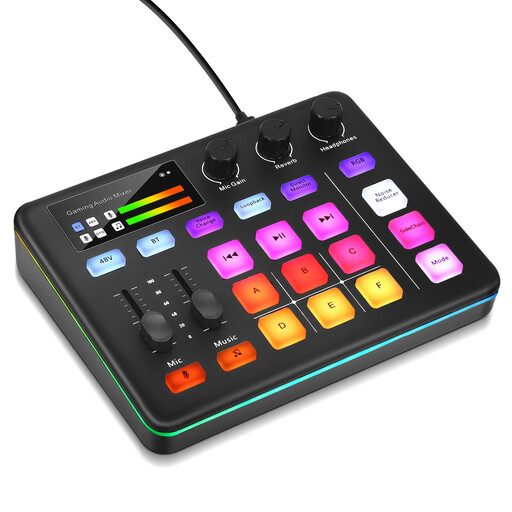
Audio mixer console for live streaming
The product name describes this console as being designed for live streaming and interactive entertainment. Before choosing it, check whether its specific USB recording path and monitoring features work for solo vocals with playback.
View at Joybuy
Frequently asked questions
Are lots of mixer channels enough to record vocals and playback on separate tracks?
No. The number of analogue channels alone doesn’t tell you how many separate USB signals your recording software will receive. Check the mode on the specific model: Mackie describes an interface mode for unprocessed inputs 1 and 2 on the ProFX6v3+. This does not mean every mixer channel is sent separately.
How can I check a small booth before my first recording?
Record a short vocal test and listen through headphones for reflections and consistent background noise. RØDE recommends taking room reflections and external noise sources into account. Headphones also prevent speaker playback from reaching the microphone. These are recording tips from the manufacturer, not a guaranteed benefit of using a mixer.
If a mixer is faulty in Germany, should I contact the retailer or the manufacturer?
For statutory consumer rights, the retailer is your point of contact. A manufacturer’s guarantee is a voluntary extra, with its own terms and conditions. The Verbraucherzentrale notes that, when a valid request for a remedy is made, the retailer covers the associated transport, labour and material costs.
What should I look for in the product safety of a USB mixer sold in Germany?
The Bundesnetzagentur lists the CE marking, product traceability and correct manufacturer details among the points to check. According to the European Commission, the responsible manufacturer must ensure compliance with the applicable EU requirements and affix the CE marking. The marking is not an independent quality seal and does not tell you whether the mixer suits your recording setup.


