What should you look for when buying?
Start with your room and microphone, then check the USB signal path. Only after that, decide whether you really need extra tracks, guests or playback sources.
| Consideration |
What to check when buying |
Who is this important for? |
| Clear solo voice |
A suitable microphone input and phantom power if needed; test the microphone position and room with a recording first. |
If I’m speaking alone, my first priority is whether my voice is clear in the room I have. Around 37% of consumers prioritise a clear solo voice. |
| Simple computer recording |
Documented USB inputs and outputs, and the signal path actually sent to the computer; check the operating system and headphone connection for the specific model too. |
If I want to record and monitor an intro directly on my computer, a straightforward signal path matters more than lots of features. Around 27% of consumers prioritise simple computer recording. |
| Separate speaker tracks |
Check whether voices can be recorded separately to a card or via USB, and how many microphones and headphone outputs can be used at the same time. |
If I want to edit several voices individually later, I need genuinely separate recordings, not just multiple inputs. Around 18% of consumers prioritise separate speaker tracks. |
| Playback sources or remote guests |
A suitable playback input or loopback for other audio sources; if you’re recording remote conversations, check whether mix-minus is documented. |
If I want to include jingles, computer audio or a remote guest, the connections and return path for the conversation need to be right. Around 18% of consumers prioritise extra audio sources or remote guests. |
Joybuy products for spoken-word intros
These products are intended for voice and audio setups with microphones and mixing features. Before buying, check which connections and signal paths your intro requires.
 No image available
Yinkaer G10-P17-P17 podcast kit with two microphones
A good option if you’re looking for a voice setup with two microphones and an audio mixer.
The product listing specifies two 3.5 mm condenser microphones, as well as computer and phone integration.
View at Joybuy
 No image available
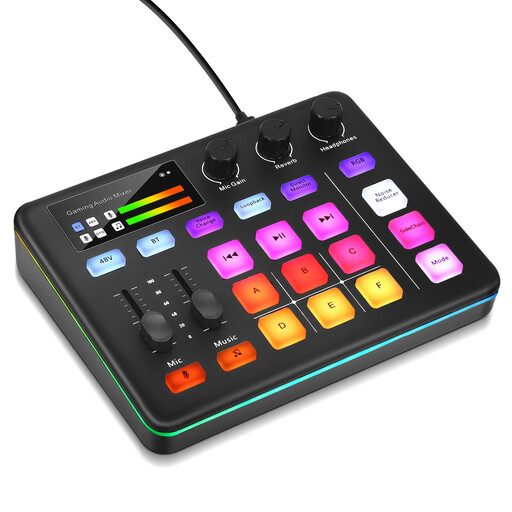
Audio mixer with XLR input and loopback
This may suit a voice recording setup if you need an XLR microphone input and monitoring controls.
The product description lists 48-V phantom power, loopback and direct monitoring.
View at Joybuy
Frequently asked questions
Will a USB mixer automatically improve a voice recording with room echo?
No. First, test your microphone position and room with a short voice recording. Shure explains that a microphone can’t effectively distinguish direct sound from recorded reverberation or improve the room’s acoustics.
How can I check that my setup works before recording?
Connect a microphone that’s suitable for the microphone input and check whether phantom power is needed. Make a short test recording, then listen back to the file actually saved on your computer or storage device, as the documented USB signal paths vary by model.
What happens if a product develops a fault after purchase in Germany?
Your statutory rights are separate from a voluntary guarantee. The Verbraucherzentrale explains that statutory rights are set by law, while a guarantee is offered voluntarily. Check any additional guarantee terms separately.
Can I record someone else for my intro?
§ 201 StGB makes it a criminal offence to record another person’s private spoken words without authorisation, as well as certain uses of such a recording. Get the necessary permission before making a recording of this kind; owning a mixer doesn’t give you that permission.
Can I use music as an intro jingle that’s available to the public?
Before publishing, make sure you have the rights to use the specific music. § 19a UrhG describes the right to make a work available to the public; GEMA describes a podcast tariff for works in its repertoire. Whether it applies to your intro depends, among other things, on the music, the chain of rights and how you publish it.


