
Lieferung heute & morgen

Qualitätsgarantie

Willkommens-Angebote freischalten: KOSTENLOSE Lieferung | Bis zu 80 % RABATT | Kostenlose 30-Tage-JoyPlus-Testphase
App herunterladen
A missing port, a slow connection, or unstable Wi-Fi—connectivity issues on your PC or laptop are disruptive, especially when working from home or gaming. A USB network adapter is often the quickest and most straightforward solution. However, the market is flooded with products whose marketing promises often suggest more than the technology can deliver.
As your Joybuy Product Recommendation Officer, I'll help you identify the key features and avoid common purchasing pitfalls. This guide will show you what really matters so you can make an informed decision.
Many users invest in devices that don't solve their problems or are unnecessarily expensive. Watch out for these three common traps:
To avoid these pitfalls, focus on the technical fundamentals. Two factors are crucial for selecting the right adapter.
The combination of the USB port and network technology determines the maximum achievable performance.
The choice between a USB LAN adapter and a WLAN dongle depends entirely on your use case.
Here are some recommendations tailored to specific user needs that avoid the pitfalls mentioned above.
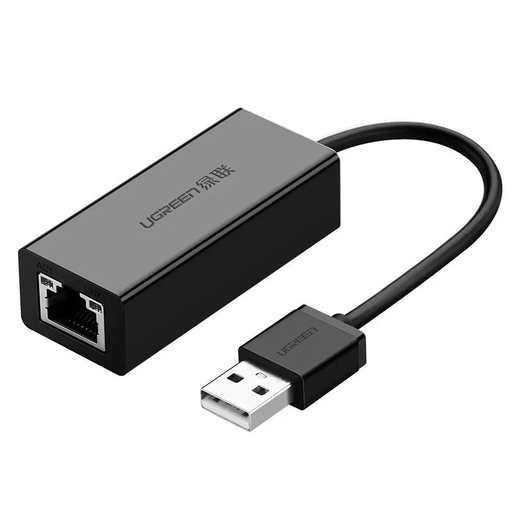
Why This Fits Their Persona: Ideal for users who need a simple, stable wired connection for everyday tasks like browsing, email, and standard-quality video streaming. Perfect for quickly and easily connecting a laptop with a broken LAN port or a desktop PC to the network.
This adapter is designed for 100 Mbps and uses the appropriate USB 2.0 standard. It doesn't promise Gigabit performance, thus avoiding the bottleneck effect. You only pay for the performance you actually get.
Broad plug-and-play compatibility with Windows, macOS, and Linux without driver installation. The reliable chipset ensures a stable connection without dropouts.
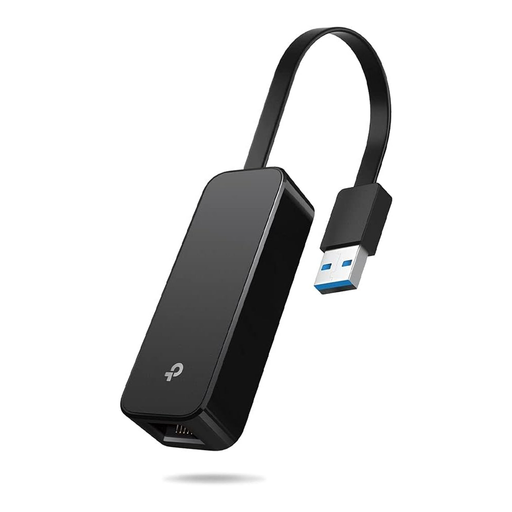
Why This Fits Their Persona: Designed for users who need maximum wired speed. Ideal for online gaming, 4K streaming, large downloads, and working with massive files in a home office. Its compatibility with the Nintendo Switch highlights its focus on a low-latency connection.
This adapter correctly pairs a 1,000 Mbps port with a USB 3.0 interface, ensuring full Gigabit speed without a bottleneck. It delivers performance instead of empty "gaming" promises.
The foldable and portable design also makes it practical for on-the-go use. Plug-and-play functionality for Windows, Linux, and Nintendo Switch ensures a hassle-free setup.
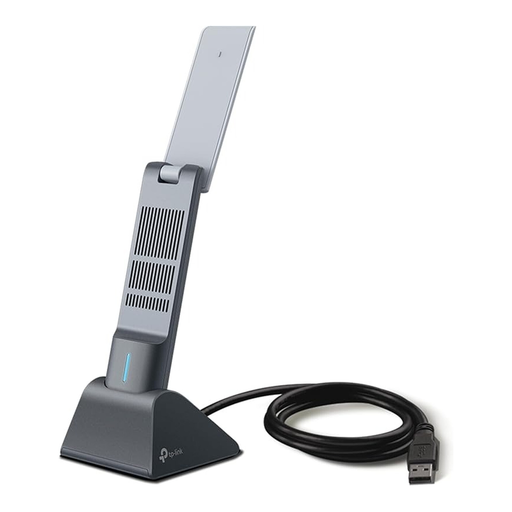
Why This Fits Their Persona: For users who want to upgrade an older PC or laptop to the modern Wi-Fi 6 standard. Ideal for benefiting from higher speeds, lower latency, and better network efficiency in environments with many Wi-Fi devices.
This adapter offers a true technology upgrade to Wi-Fi 6 with features like OFDMA and MU-MIMO. It avoids the pitfall of unstable drivers thanks to the proven quality of a brand-name manufacturer and is explicitly designed for modern operating systems (Windows 10/11).
The external high-gain antennas provide significantly better signal range and stability than compact nano-adapters. The USB 3.0 connection ensures that the high Wi-Fi speed is not throttled.
We have compiled a complete, up-to-date list of products that fully meet these strict selection criteria and all relevant safety regulations.
With many modern adapters and current operating systems like Windows 10 or 11, installation is not strictly necessary thanks to "Plug and Play." The adapter is detected automatically. However, for full functionality, especially with a WiFi 6 dongle, and for maximum stability, it is recommended to install the latest driver from the manufacturer's website. Always check the specified compatibility with your operating system before purchasing.
Yes, as a general rule. A wired connection via a USB LAN adapter offers consistently lower latency (ping) and is less susceptible to interference from other wireless networks or obstacles. This minimises the risk of lag and connection drops, which is crucial for a smooth gaming experience.
Yes, this is a real possibility and a common source of error. To utilise the full speed of a Gigabit Ethernet adapter (up to 1,000 Mbps), it must be connected to a USB 3.0 port (or newer, e.g., USB-C). A USB 2.0 port limits the data rate to a theoretical maximum of 480 Mbps, and often even less in practice. Look for the blue contacts inside the USB-A plug or the "SS" (SuperSpeed) logo to identify a USB 3.0 port.