Ensemble around the table
If you’re recording several roles at the same time, you’ll need enough suitable microphone inputs and headphone outputs for everyone. The recording method also matters if you want to edit each voice separately later.


Start by counting how many microphones and headphones you need to use at the same time, then decide how you want to record. For four people around the table, look for a device with four microphone inputs; RØDE lists two combo inputs for the RØDECaster Duo. If you want to edit each voice separately on your computer, check the USB multitrack mode on the specific model: Zoom lists this feature for the PodTrak P4next, while Tascam specifies 14-track recording to an SD card for the Mixcast 4, as well as USB use with a DAW.
If you’re recording several roles at the same time, you’ll need enough suitable microphone inputs and headphone outputs for everyone. The recording method also matters if you want to edit each voice separately later.
If you want to trigger sounds or jingles during a dialogue recording, check whether the device has sound pads and how you can record and edit the sounds afterwards.
If you share your recording space or regularly set it up and pack it away, consider the footprint and cable runs. A compact design still needs enough wired microphone inputs for your cast.
First, count how many microphones and headphones you need to use at the same time. Then decide how you want to record, and check that both suit your available space and the sounds you plan to add.
| What you need | What to check before buying | Who is this important to? |
|---|---|---|
| Voices and individual tracks | Check the number of microphone inputs and headphone outputs, as well as separate USB and memory card recording options. | If I’m recording several roles at the same time, I need a suitable input for each voice and want to edit the tracks separately later. Around 33% of consumers place the greatest importance on recording multiple voices at the same time. |
| Live sound effects | Check the sound pads, whether you can add your own sounds and how you can assign them to tracks. | If sounds need to come in at the right moment during a dialogue, I want to trigger them directly and assign them precisely when editing. Around 27% of consumers prioritise live sound effects for audio dramas. |
| Space at a shared table | Measure the space, including cable runs, and check that the design offers enough microphone inputs. | If we share the table or regularly need to clear it, the mixer and its cables need to fit without compromising on the inputs we need. Around 20% of consumers place the greatest importance on the space required. |
| Remote contributors | Check Mix-Minus, the USB channels you need and whether remote contributors can be recorded separately. | If contributors are joining remotely, I need a suitable return feed and want to record their voices separately. Around 20% of consumers say remote contributors are the deciding factor. |
A USB connection alone doesn’t tell you whether each voice reaches your computer separately or whether multitrack files are only saved to a memory card. This can affect how you transfer your recordings to your editing software.
Check the specific model to see which signals it sends in USB multitrack mode and which files it saves to its storage device.
If you first record individual channels to a memory card, you may need an extra step to import them before editing.
According to RØDE, the RØDECaster Duo has two combo microphone inputs, while the RØDECaster Pro II has four. Additional virtual channels are not extra wired combo sockets.
Before choosing a model, count all the microphones you want to connect at the table at the same time.
Being able to trigger a sound doesn’t mean you have permission to use someone else’s music in your planned release. GEMA highlights the registration and licensing requirements that can apply to music use.
Before publishing your audio drama, check the rights for the specific material and the way you plan to distribute it.
The Mixcast 4 is designed for audio drama teams looking to bring four microphones, four headphones, sound pads and SD recording together in one production station.
The PodTrak P4next is a compact recorder for up to four XLR microphones and four headphones around the table.
The RØDECaster Duo is designed for two wired table microphones; according to RØDE, the RØDECaster Pro II has four combo inputs. Both models have sound pads and several recording options.
According to Mackie, the DLZ Creator offers both a simplified and a more detailed control view, with recording via USB-C or to an SD card.
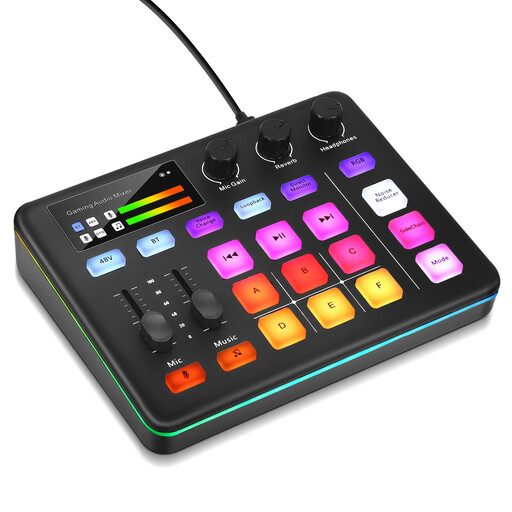
This product option is an audio mixer for live streaming, with sound pads and XLR microphone recording described in the product details. Before buying, check that the connections and recording method suit your audio drama setup.
 No image available
For a setup with XLR microphone recording and sounds you can trigger live. Check the number of inputs you need and your preferred recording method before buying.
The product description lists six programmable sound pads, 48 V phantom power, three-level noise reduction and direct monitoring.
No, it depends on the multitrack mode of the specific model. Zoom explicitly lists USB multitrack recording for the PodTrak P4next. For the Mixcast 4, Tascam lists multitrack recording to an SD card and USB use with a DAW. Check how the individual tracks are actually made available.
Plan for a suitable microphone and a pair of headphones for each person speaking at the same time. Set the levels and check each voice individually before recording the full scene. Alongside the mixer, a quiet recording space with as little room echo as possible is still important.
Before recording, check your storage device, power supply and chosen recording method. Tascam publishes information about tested storage devices, firmware and supported operating systems for the Mixcast 4. Check that these details match your specific device and computer.
No, being able to play a sound doesn’t give you the rights to use it. GEMA explains the registration and licensing requirements for using music online and on physical recordings. The tariff it lists for audio dramas applies to certain on-demand subscription services and doesn’t cover every release. Check the rights for the specific material and distribution method.
If a product is faulty, your statutory rights are against the seller; these are separate from any voluntary guarantee. For an online consumer purchase, you generally have the right to cancel, usually within 14 days of receiving the goods. Exceptions and the specific circumstances of the contract should also be taken into account.