First, choose a USB stick with a connector and file system that work with both the recording device and the device you’ll transfer the files to. Then compare the storage space you need and, if you regularly copy large files, check the write-speed figure for the exact capacity you’re considering. You should also back up important recordings to a separate storage device: a stick used for transferring files isn’t a reliable backup strategy on its own.
Who needs the right USB stick?
Fans transferring recordings from their phone
If you want to move files between a smartphone and another device without using the cloud, the connectors, file system and support for external drives all need to be compatible. Apple Support explains the requirements for using external storage devices with an iPhone.
Collectors of large recordings
For long recordings or a large collection, both the space available for your files and the speed at which they’re written to the stick matter. Microsoft Learn explains file system limits, while COMPUTER BILD compares the write performance of specific USB stick models.
Fans who want to back up recordings offline
If you want to keep important recordings without using the cloud, plan to make a separate copy and check that you can open it again. Germany’s Federal Office for Information Security considers USB sticks and external hard drives possible personal backup media.
What should you look for when buying?
| What matters when buying |
What to look for |
Who is it important to? |
| Connector and file access |
Check the ports on both devices, their support for external drives and the file system. Open a test file on the device you’ll transfer it to. |
If I switch between devices with different ports, I first check that both can recognise the stick and open the files. Around 33% of consumers are likely to prioritise connector compatibility and file access. |
| Storage space and file size |
Check the total size of your recordings and the size of the largest individual file. According to Microsoft Learn, FAT32 has a 4 GiB limit per file; both devices must support any other file system you choose. |
If you collect longer recordings, you’ll want enough space for the files you plan to store and to avoid a single recording exceeding the file system’s limit. Around 27% of consumers are likely to prioritise storage space and individual file size. |
| Write speed |
Compare the stated write speeds or independent write tests for the exact model and capacity you want. A manufacturer’s maximum figure doesn’t guarantee how long copying will take. |
If I regularly copy large files to a stick, write speed matters more to me than a high read speed. Around 27% of consumers are likely to prioritise write speed. |
| Backups and access protection |
Plan to keep a separate offline copy that you can restore. Only look for access protection if you need it and the device you’re transferring files to supports unlocking it. |
If you don’t want to lose important recordings, you should also save them to a separate storage device. For files that need protection, it may also be important to control access if the stick is lost. Around 13% of consumers are likely to prioritise backups or access protection. |
Avoid common buying mistakes
-
Assuming a high read speed means fast file transfers to the stick
Write performance matters when copying files to a stick. COMPUTER BILD assesses read and write speeds separately and reports differences between the models it tested.
Compare the stated write speed or a write test for the specific capacity you’re considering, rather than looking only at the read speed.
-
Checking only the stated capacity
A single large file may exceed the file system’s file size limit, even when there’s still space left on the stick. Microsoft Learn gives FAT32 a maximum file size of 4 GiB.
Check the size of your largest recording and choose a file system supported by both the recording device and the device you’ll transfer it to.
-
Keeping the transfer stick as your only copy
If the stick is lost or stops working, you may not be able to access the recordings stored on it. Germany’s Federal Office for Information Security points out that backed-up files also need to be recoverable.
Keep important recordings on a separate offline storage device too, and check from time to time that you can still open the files.
-
Assuming two connectors mean universal compatibility
Having both USB-A and USB-C connectors on the same stick doesn’t automatically resolve issues with support for the drive or its file system.
Test the stick with both the recording device and the playback device. If you’re using an iPhone, also check whether you need an adapter to connect it.
Brands and models to consider
The product ranges below differ in their connectors, available variants and stated write speeds. These notes apply to the specific models and conditions mentioned, not to each brand as a whole.
Kingston
According to Kingston, the DataTraveler Duo has USB-A and USB-C connectors, making it suitable for switching between devices with different ports.
- Kingston lists 128 GB and 256 GB variants, with USB 3.2 Gen 1.
- Don’t assume the write speed from the interface specification alone; compare the figures for the exact variant.
Transcend
The JetFlash 930C is a dual-connector option for transferring files between USB-A and USB-C devices.
- The manufacturer’s data sheet lists USB-A and USB-C connectors, 128 GB, 256 GB and 512 GB variants, and maximum speeds of 420 MB/s for reading and 400 MB/s for writing.
- These are manufacturer figures. Transcend states that USB-OTG support is required for use with mobile devices.
Verbatim
The Keypad Secure USB-A is aimed at consumers who want to enter an access code directly on the stick.
- For the 128 GB model, item 49429, Verbatim lists an integrated keypad and AES-256 hardware encryption.
- According to the manufacturer, the device requires reformatting after 20 incorrect code entries. Verbatim also advises users to install a security update.
Intenso
For the High Speed Line, the stated maximum write speed varies by capacity.
- Intenso lists maximum write speeds of 50 MB/s for 64 GB and 100 MB/s for 128 GB and 256 GB.
- COMPUTER BILD rated the write performance of the 128 GB variant it tested as slow. The manufacturer’s maximum figure and the test result are based on different conditions.
SanDisk
The Ultra Dual Drive Luxe is described as a USB-A and USB-C model for switching between compatible devices.
- Its two connectors can make it easier to switch between devices with USB-A and USB-C ports, provided they support the drive and its file system.
- COMPUTER BILD rated the write speed of the 128 GB variant it tested as very slow. This test result applies to that variant.
Samsung
The USB Flash Drive Type-C MUF-256DA/APC is an option for devices with a compatible USB-C port.
- For the 256 GB variant, Samsung lists read speeds of up to 400 MB/s and write speeds of up to 110 MB/s.
- These are the manufacturer’s maximum figures, not a guaranteed file transfer time. The USB-C connector won’t plug directly into a device with USB-A ports only.
Joybuy products for transferring files
The Joybuy products below include USB-A sticks and models with both USB-A and USB-C for local file transfers. Before copying files, check that your devices support the drive and its file system.
 No image available
Kexin 2 in 1 32GB USB 2.0 Flash Drive, USB-A & USB-C, 2 Pack
Both USB-A and USB-C connectors are listed, making it suitable for switching between devices with these ports.
The product description lists 32 GB, USB 2.0 and OTG support. The casing is described as rotating through 360°; the product name indicates that two sticks are included. To use it with a smartphone, the device must support external drives.
View at Joybuy
 No image available
SanDisk 64GB CZ50 Cruzer Blade USB Flash Drive
This USB-A stick may suit you if your devices support USB-A and 64 GB is enough for the files you plan to store.
The product description lists USB 2.0 and software-based password protection. Check that the software will work with your devices.
View at Joybuy
 No image available
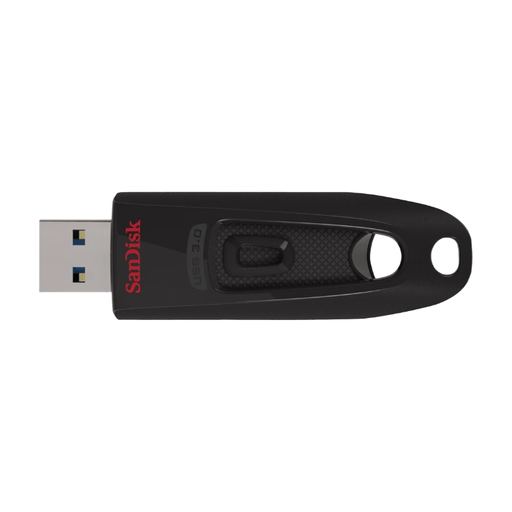
SanDisk Ultra 64GB USB 3.0 Flash Drive
This stick is an option for carrying recordings on devices with a compatible USB-A port.
The product details list 64 GB, USB 3.0, a retractable connector and a keyring loop. Maximum speeds are stated as up to 27 MB/s for writing and up to 100 MB/s for reading; these figures don’t guarantee how long copying will take.
View at Joybuy
 No image available
MOVESPEED USB Flash Drive 128GB YSUSP05-128GSR
The listed USB-A and USB-C connectors make it suitable for switching between devices with these ports.
The product details list 128 GB, USB 3.2 Gen 1 and write speeds of up to 520 MB/s. This is a product specification, not an independent test result or a guaranteed file transfer time.
View at Joybuy
 No image available
MOVESPEED USB Flash Drive 256GB YSUYC-256GSN
The stated capacity and USB-A and USB-C connectors may suit larger file transfers between compatible devices.
The product description lists 256 GB, USB 3.2 Gen 1, fingerprint access and AES-256 encryption. It gives write speeds of up to 500 MB/s and read speeds of up to 550 MB/s; these are product specifications, not a guaranteed file transfer time.
View at Joybuy
Frequently asked questions
How can I check whether my recording will fit on the stick?
Compare the total size of the files you want to take with the available storage space, and also check the size of the largest individual file. Microsoft Learn gives FAT32 a maximum file size of 4 GiB. Another file system, such as exFAT, is only an option if both devices support it.
Can I use a USB stick directly with my iPhone?
You can, with a suitable connection, if your iPhone supports the external drive and its file system. Apple Support lists a data partition and a supported file system among the requirements. Test the connection and open a file before relying on it.
How can I back up concert recordings without using the cloud?
Save important files to a separate local storage device as well, and check that you can open them again. Germany’s Federal Office for Information Security lists USB sticks and external hard drives as possible personal backup media and stresses that files must be recoverable.
What should I check about adapters and updates?
Check whether your recording or playback device needs an adapter, and whether it’s suitable for the connection you want to use. If your stick has access protection, also check the manufacturer’s guidance and any security updates for the exact model.
Am I allowed to copy concert recordings to a USB stick in Germany?
This depends, among other things, on how the recording was made and what rights apply. According to the information on § 77 UrhG on Gesetze im Internet, published by the Federal Ministry of Justice and the Federal Office of Justice, performers have the exclusive right to record and reproduce their performances. § 53 UrhG allows individual copies for private use only under certain conditions, including that the source was not obviously produced or made publicly available unlawfully. Under the conditions set out in § 95a UrhG, effective technical protection measures must not be circumvented without permission. A USB stick itself does not give you the right to record or copy.


