What should you look for when buying?
First, decide how you’ll keep and check a second local copy. Then choose a capacity and connector to suit your collection and devices. If you regularly transfer large amounts of data, compare the write speeds for the specific variant too.
| What matters |
What to check when buying |
Who is this important to? |
| Keeping separate copies |
Plan for a second storage location and check after copying that the pictures are readable. |
If keeping irreplaceable photos matters to me, I’ll plan another local copy and regular readability checks. Consumers with this priority are estimated to make up around 31 %. |
| Room for your photo collection |
Compare the size of your folders, including any versions you want to keep, with the usable capacity. |
With a large collection, I want to know in advance whether all the files I’ve selected will fit on the stick. Consumers whose main concern is having enough storage space are estimated to make up around 25 %. |
| Access across multiple devices |
Check the ports on your devices, then test copying and opening files on the devices you’ll use them with. |
If I switch between devices with different ports, I want to be able to open my photos without any extra hassle. Consumers with this priority are estimated to make up around 19 %. |
| Protecting private photos |
If needed, check the encryption, unlocking method and what happens after incorrect passcode attempts. |
When carrying my photos around or potentially sharing them, I want to make sure other people can’t easily access them. Consumers who prioritise access protection are estimated to make up around 13 %. |
| Time needed to write files |
Distinguish between read and write speeds, and check the model, variant and connection requirements. |
If I regularly copy large numbers of photos, I want to take into account how long it takes to transfer them. Consumers who particularly value shorter transfer times are estimated to make up around 12 %. |
USB sticks at Joybuy
This selection includes USB sticks for storing local photo copies. The key is to choose a capacity and connector that suit your collection and devices.
 No image available
Kingston DataTraveler Kyson 256 GB
An option for a local photo copy if your measured collection fits within 256 GB and your archive devices use USB-A.
The product listing states a capacity of 256 GB.
View at Joybuy
 No image available
Kingston DataTraveler 64 GB 220MB/s Metal USB 3.2 Gen 1 SE9 G3
The 64-GB variant may suit you if your measured photo folder, including any versions you want to keep, fits within the available capacity.
The product name states 64 GB, USB 3.2 Gen 1 and 220MB/s.
View at Joybuy
 No image available
Kingston DataTraveler Exodia M 128 GB USB 3.2 Gen 1, Black + Red
A suitable option for a local copy if 128 GB is enough for your measured collection; the product name also refers to a movable connector cover.
The product listing states 128 GB and USB 3.2 Gen 1.
View at Joybuy
 No image available
SanDisk CZ50 Cruzer Blade 64 GB
Before choosing this stick, check that 64 GB is enough for the files you want to back up locally.
The product name states the CZ50 Cruzer Blade model and a capacity of 64 GB.
View at Joybuy
 No image available
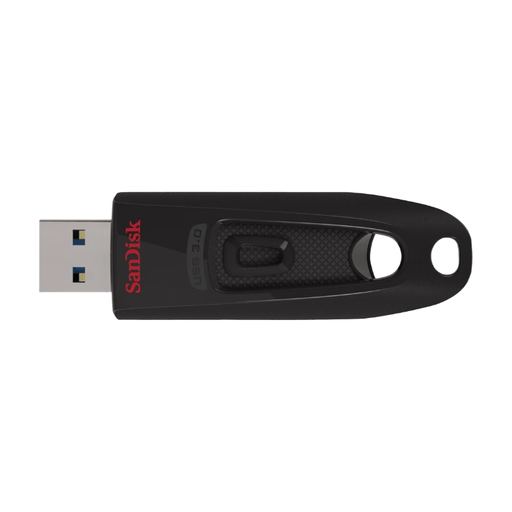
SanDisk Ultra USB 3.0 Flash Drive 64 GB
This variant may suit you if 64 GB is enough for your local photo copy.
The product name states USB 3.0 and 64 GB.
View at Joybuy
Frequently asked questions
Can a USB stick be the only archive copy of restored family photos?
A single stick isn’t a reliable backup strategy for irreplaceable photos. The German Federal Office for Information Security points out that the lifespan of storage media can’t be predicted precisely and that backups need to remain readable. If you don’t use the cloud, keep another local copy separately and occasionally check that you can open the photos.
What should I check after copying files and during later checks?
Check that all the intended folders are on the stick and that you can open selected files. A clear folder structure and descriptive file names make it easier to find things later.
What can I do if a large image or archive file won’t fit on the stick?
As well as checking the free space, check the file system and whether your devices support it. Microsoft states that FAT32 has a maximum individual file size of 4 GiB; according to Microsoft, exFAT has a higher limit. Back up any existing files elsewhere before formatting a stick that contains data.
What service terms should I check before buying?
Service terms apply to the specific model and variant. Kingston states that DataTraveler Duo comes with a five-year limited warranty and technical support. Check the terms for the product on offer; a warranty doesn’t guarantee how long your files will be preserved.
Can I put an old USB stick in household rubbish in Germany?
No. The German Environment Agency points out that old electrical equipment must be collected separately from household rubbish. You can take it to a recycling centre, among other options, or return it to a retailer under their applicable take-back terms. Back up any photos you need elsewhere first, and protect or delete your personal data before handing the stick in.


