Choose a USB stick only after adding up your original footage, project folders and all the versions you want to keep, and checking the size of your largest individual file. As Microsoft Learn explains, FAT32 limits individual files to 4 GiB. If you regularly copy large files, the write speed of the exact model is what matters. If you move files between devices, check that the connections are compatible and that each device can read the file system. Keep important videos in a separate storage location too: a single USB stick is not a failsafe archive. The German Federal Office for Information Security (BSI) recommends backing up data in case it is lost or damaged.
Who is a USB stick for home videos suited to?
Hobby filmmakers with multiple edits
If you want to keep your original footage, project files and several versions together, you need enough room for the whole collection, not just the finished film. Also check that the file system can handle your largest individual file. Microsoft Learn gives the limit for FAT32 as 4 GiB.
Keepers of irreplaceable family videos
If you want to be able to recover your videos if a USB stick is lost or damaged, you’ll need a separate copy. The BSI explains that backups can help if files are accidentally deleted, a device fails or it is stolen.
Filmmakers using multiple devices
If you transfer files between devices with different USB connections, check both the connectors and whether each destination device supports the file system.
What should you look for when buying?
Start by working out how much storage you need and checking the size of your largest individual file. Then consider write speed, device connections, the file system and a separate backup to find the right USB stick for your needs.
Each percentage represents consumers’ top purchase priority; each concern is counted only once.
| Priority |
What to check when buying |
Who is it important to? |
| Room for films and versions |
Check folder sizes and the largest file; confirm the capacity and file system of the exact model. |
If I want to keep my originals, project files and several versions, I work out the total size of all the files. Around 26% of consumers prioritise having enough room for every version. |
| Ability to recover files |
Keep an independent copy in a different location and open a sample of files from it. |
If my family videos are irreplaceable, I want to be able to recover them even if the USB stick is lost or fails. Around 26% of consumers prioritise being able to recover their files. |
| Write speed for large files |
Check the write speed for the specific model and capacity; distinguish manufacturer maximums from tests involving long copying sessions. |
If I regularly transfer large film or project folders, I want to avoid unnecessary waiting. Around 21% of consumers prioritise write speed when copying. |
| Compatibility with multiple devices |
Check the connections and file system support of every destination device; transfer and open a large test file. |
If I want to use the same files on devices with different connections, they need to connect and be readable on each one. Around 16% of consumers prioritise using their USB stick with different devices. |
| Protecting private footage |
If this matters to you, check how the device is unlocked and whether you can use it with your intended devices. |
If I take private videos with me, I want to limit other people’s access. Around 11% of consumers prioritise protecting private footage. |
Common buying mistakes
-
Planning for the finished film only
Original footage, editing projects and multiple exports all need extra storage. Microsoft Learn also explains that FAT32 cannot store an individual file larger than 4 GiB.
Before buying, check the size of all the folders you want to keep and the size of your largest individual file.
-
Assuming a high read speed means fast copying to the drive
Read and write speeds are different. A PC-WELT test of the Kingston DataTraveler Max describes a significant slowdown during very long write operations; this result does not automatically apply to other models.
Compare the write speed of the exact model and check whether tests cover long copying sessions.
-
Relying on a single USB stick as your complete archive
If the USB stick fails, is stolen or files are accidentally deleted, your only copy of a film could be affected. The BSI explains why keeping a separate backup is important.
Keep an independent copy and occasionally check that you can open the files from it.
-
Choosing a dual-connector USB stick based on the connectors alone
USB-A and USB-C can make it easier to switch between devices, but they do not guarantee that every destination device can read the file system.
Check compatibility with all the devices you plan to use and test a large file before transferring a bigger collection.
Key USB stick brands at a glance
SanDisk
According to SanDisk, the Extreme PRO Dual Drive range has USB-A and USB-C connectors. The documented SDDDE1-1T00-G46 model has 1 TB of storage.
- For this model, SanDisk quotes read speeds of up to 1,000 MB/s and write speeds of up to 900 MB/s under its own test conditions.
- Manufacturer maximums are not independent measurements of performance during long copying sessions, and they do not apply to other SanDisk ranges.
Verbatim
According to Verbatim, the Dual QuickStick combines USB-A and USB-C. Model number 32043 refers to the 1-TB version.
- Verbatim quotes read speeds of up to 550 MB/s and write speeds of up to 500 MB/s. According to the manufacturer, Nero Backup is designed for Windows.
- These maximum speeds are no substitute for testing with your own files or keeping a separate backup.
Transcend
The JetFlash 920 is a USB-A option. According to Transcend, the range is available in capacities of up to 512 GB.
- Transcend quotes read speeds of up to 420 MB/s and write speeds of up to 400 MB/s, and says the drive is pre-formatted as exFAT.
- These manufacturer figures do not indicate guaranteed sustained performance. Check that your destination devices can read exFAT.
Samsung
Samsung offers a BAR Plus range with USB-A and a separate Type-C range. 512-GB versions are documented for both.
- For the models shown, Samsung quotes sequential read speeds of up to 400 MB/s.
- The quoted read speed does not tell you the write speed. BAR Plus and Type-C are different products.
Kingston
The DataTraveler SE9 G3 is a USB-A range available in capacities of up to 512 GB. Kingston documents a five-year manufacturer’s warranty.
- Kingston quotes read speeds of up to 220 MB/s and write speeds of up to 100 MB/s for the SE9 G3.
- These specifications are for the SE9 G3 and should not be confused with those of the DataTraveler Max.
Joybuy products for home videos and project files
This Joybuy selection includes USB sticks for storing and transferring film and project files on the go. Capacity, write speed, connector and, where applicable, access protection vary by model.
 No image available
SanDisk 64GB CZ50 Cruzer Blade
With 64 GB of storage, it’s suited to storing and sharing film files on the go. The product description specifies USB 2.0.
Joybuy
 No image available
MOVESPEED USB flash drive 128GB, USB-A/USB-C, YSUSP05-128GSR
The 128-GB version is designed for switching between devices with USB-A and USB-C.
The product specifications quote write speeds of up to 520 MB/s and read speeds of up to 570 MB/s. Actual transfer speeds also depend on the devices you use.
Joybuy
 No image available
MOVESPEED USB flash drive 256GB, USB-A/USB-C, YSUYC-256GSN
The product specifications list 256 GB of storage, USB-A and USB-C, plus fingerprint access for encrypted storage.
Quoted speeds are up to 500 MB/s for writing and up to 550 MB/s for reading. According to the security notice, encrypted data may become inaccessible if both the administrator password and fingerprint recognition fail.
Joybuy
 No image available
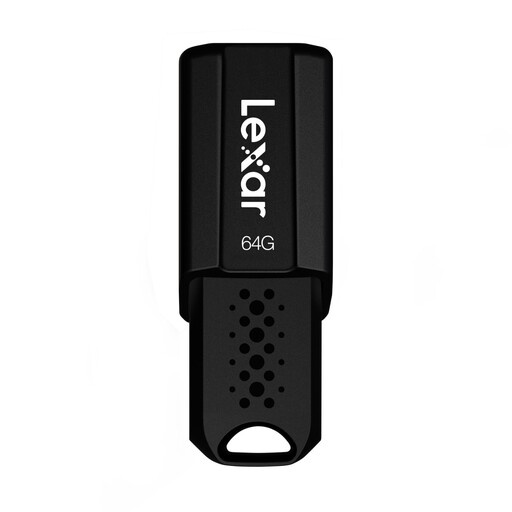
Lexar JumpDrive S80 USB 3.1, 64GB
The 64-GB version is specified for storing and transferring video and other content.
The product specifications quote read speeds of up to 150 MB/s and AES-256 encryption software. Before using it, check that the software works with the devices you plan to use.
Joybuy
 No image available
SanDisk Ultra Flair USB 3.0, 128GB
The product specifications list 128 GB of storage and video as a use case. Pay particular attention to the quoted write speed when transferring large film folders.
A write speed of 4 MB/s is specified for this version. The product specifications also mention password protection.
Joybuy
Frequently asked questions
Can I copy a single film file larger than 4 GiB to any USB stick?
No, not with every file system. Microsoft Learn gives the maximum individual file size for FAT32 as 4 GiB; exFAT does not have this limit. Before formatting, check that all the devices you plan to use support exFAT, and back up any files already stored on the drive.
How can I check that my project files are usable after copying?
Open a sample of your films and any project files you need directly from the storage location you plan to use later. Also keep a separate copy somewhere else. The BSI explains why backups are important in case of device failure, accidental deletion or theft.
What are my rights in Germany if a USB stick bought from a retailer is faulty?
For a consumer purchase in the EU, you are generally entitled to a legal guarantee of at least two years from the date you receive the goods, as explained by the European Union’s Your Europe portal. This is separate from any additional manufacturer’s warranty. The remedy available depends on the fault and the applicable legal requirements.
Can I put an old USB stick in household rubbish in Germany?
No. The German Environment Agency recommends disposing of old electrical equipment separately, for example at recycling centres or suitable take-back points at retailers. Back up any videos you want to keep first, and deal with any personal data on the USB stick before handing it in.


