Choose a USB stick based first on the ports available on the devices involved and the storage space needed for all project versions. If you’ll be copying files frequently, the write performance of the specific model and capacity is important too. Keep an additional copy of your project files on a separate storage device, and check what access protection is appropriate for confidential files.
Who is this USB stick intended for?
Workshop organisers managing multiple project versions
You want to take handouts and earlier drafts with you in separate folders, without relying on your transport stick as the only copy. Germany’s Federal Office for Information Security recommends keeping an additional copy of important data.
People using different workshop computers
You may need to copy files between devices with different ports, or between Mac and Windows computers, and open them on the destination device. Apple Support highlights differences in file system compatibility.
People responsible for confidential documents
If your files contain sensitive information, the access protection and unlocking process need to suit how you’ll use the stick. The European Data Protection Board explains that appropriate technical and organisational measures depend on the risk involved.
What should you look for when choosing one?
First check the ports and file system, then make sure there’s enough space for every version and that the write performance can handle frequent copying. If you’re storing confidential files, you should also know what access protection is needed for your workshop.
| What matters |
What to check before buying |
Who is this particularly important for? |
| Keeping project versions |
Give project folders clear, distinct names and keep a separate, accessible copy. |
If I want to find earlier versions again, my transport stick shouldn’t be my only storage. Around 33% of consumers say keeping project versions is their top priority. |
| Opening files on your devices |
Check the ports on the specific computers and the file system separately; open a test file on every destination device. |
If I’m sharing files between devices with different ports or operating systems, I want to be able to open them on the destination device. Around 27% of consumers prioritise device compatibility. |
| Space for handouts and versions |
Work out the combined size of all the folders and versions you’ll be taking with you, then choose a suitable capacity. |
If I’m keeping lots of versions, I want enough storage for all the files I need. Around 20% of consumers make storage capacity their top priority. |
| Time spent copying |
Check write speeds or test results for the exact model and capacity you want; don’t mistake read speeds for write performance. |
If I’m repeatedly writing new versions to the stick, I want to avoid unnecessary delays. Around 13% of consumers put faster copying at the top of their list. |
| Limiting access to confidential files |
Check your organisation’s requirements, and find out how codes are managed and the specific model is unlocked. |
If I’m taking sensitive workshop files with me, I want to control who can access the stored content. Around 7% of consumers prioritise access protection. |
Avoid common buying mistakes
-
Using your transport stick as the only copy
If the stick is lost or damaged, or files are accidentally deleted, you could lose the only saved version.
Keep a separate copy and check that you can open the files from it.
-
Confusing read speeds with write speeds
When copying files to a stick, write performance is what matters. COMPUTER BILD rated the write performance of the 128-GB versions of the Intenso High Speed Line and Transcend JetFlash 890 that it tested as slow. This doesn’t necessarily apply to other models or capacities.
Compare specifications and test results for the exact model and capacity you want, rather than relying only on the USB standard or a read speed.
Repeated copying can lead to longer waits and disrupt your workflow.
-
Checking only that the plug fits
A stick may fit the port but still not be writable as expected on the destination computer because of its file system. Apple Support explains that macOS can read NTFS but can’t write to it.
Check the port and file system separately, then open a test file on the workshop computer. Back up your files before formatting, as this will delete the files already on the stick.
If you need to reformat the stick, you’ll have to copy the files over again.
-
Using a secure drive without a code and backup plan
Verbatim says the Keypad Secure must be reformatted after 20 incorrect code entries and flags a security update. Access protection doesn’t replace recovery from a separate copy.
Decide who will manage the code, how the drive will be unlocked during the workshop and where a separate copy will be kept.
Managing the code and, if necessary, recovering files from another copy adds extra organisational work.
Relevant brands at a glance
Kingston
The DataTraveler Exodia is a documented USB-A option for carrying everyday documents.
- Kingston lists 64, 128 and 256 GB versions of the DataTraveler Exodia, with a five-year warranty.
- The USB 3.2 Gen 1 specification alone doesn’t indicate a particular copying speed.
SanDisk
The Ultra Dual Drive Luxe has USB-A and USB-C connectors; the Ultra Flair is a separate USB-A product range.
- The Ultra Dual Drive Luxe’s two connector types can be useful when switching between devices with the corresponding ports.
- COMPUTER BILD rated the write performance of the 128-GB Ultra Dual Drive Luxe it tested as very slow. SanDisk’s claim of up to 150 MB/s for the Ultra Flair is a manufacturer specification, not a test result for copying handouts.
Transcend
The JetFlash 890 has USB-A and USB-C connectors; the JetFlash 930C is a different model.
- The data sheet lists a 128-GB version and notes that mobile devices need to support USB OTG.
- COMPUTER BILD rated the write performance of the 128-GB JetFlash 890 it tested as slow. This rating doesn’t apply to the JetFlash 930C.
Verbatim
The Keypad Secure is a documented USB-A model with 128 GB of storage and an integrated keypad.
- Verbatim says the drive’s data is encrypted and the code is entered using the keypad.
- The manufacturer says the drive must be reformatted after 20 incorrect code entries and flags a security update. COMPUTER BILD also reported that the 128-GB model it tested failed its drop test.
Intenso
The High Speed Line is a USB-A range for transferring files. It’s different from the Speed Line and Green Line.
- Intenso advertises write speeds of up to 100 MB/s for the 128-GB High Speed Line.
- COMPUTER BILD rated the write performance of the 128-GB version it tested as slow. The manufacturer’s maximum speed and the test result are based on different conditions.
Joybuy products for handouts and project versions
The Joybuy products below include USB-A sticks and models with USB-A and USB-C for carrying handouts and project versions.
 No image available
Kingston DataTraveler Exodia M, 128 GB (Black + Red)
For carrying documents and project versions on devices with USB-A ports.
128 GB; USB 3.2 Gen 1; stated write speed: 40 MB/s.
With a sliding protective cap and attachment loop.
View at Joybuy
 No image available
MOVESPEED USB Flash Drive, 128 GB, YSUSP05-128GSR
For transferring files between devices with USB-A and USB-C ports.
128 GB; USB 3.2 Gen 1; product specifications state write speeds of up to 520 MB/s and read speeds of up to 570 MB/s.
View at Joybuy
 No image available
Lexar D40E, 128 GB, Dual USB 3.2 Gen 1 Type-C (LJDD40E128G-BNSNG)
For switching between devices with USB-A and USB-C when you need both connector types.
128 GB; USB 3.2 Gen 1; stated transfer rate of up to 100 MB/s, not specified as a write speed.
View at Joybuy
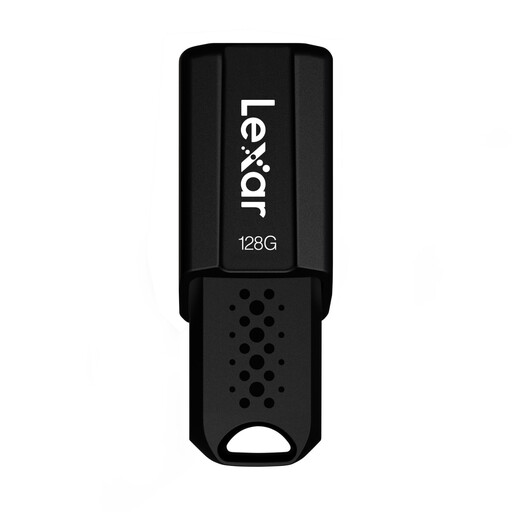 No image available
Lexar JumpDrive S80, 128 GB, USB 3.1
For carrying documents on computers with USB-A; the product description also mentions security software with 256-bit AES encryption.
128 GB; USB 3.1 Gen 1; stated read speed of up to 150 MB/s.
View at Joybuy
 No image available
SanDisk Ultra Flair, 128 GB, USB 3.0
A USB-A model for carrying handouts and project versions on compatible computers.
128 GB; product specifications state a write speed of 4 MB/s. SanDisk also advertises read speeds of up to 150 MB/s for the Ultra Flair; this is not a write speed.
Bear the stated write speed in mind if you’ll be copying files repeatedly.
View at Joybuy
Frequently asked questions
How do I prepare a stick for use with both Mac and Windows?
First check the file system and back up any files you need. Apple Support recommends exFAT for storage devices over 32 GB that will be used with both Mac and Windows; formatting deletes any files already on the device. Then open a test file on both of the devices you plan to use.
How can I avoid handing out the wrong project version?
Save each version in a separate, clearly named folder and check the file you plan to distribute on the destination device. Also keep a separate copy; Germany’s Federal Office for Information Security recommends keeping additional backups.
What warranty comes with the Kingston DataTraveler Exodia?
Kingston states that the DataTraveler Exodia comes with a five-year warranty. Before buying, check the exact model name and its warranty terms; the same warranty doesn’t necessarily apply to other USB sticks.
Does the GDPR require every USB stick containing workshop handouts to be encrypted?
No. The fact that files are described as “workshop handouts” doesn’t automatically mean they must be encrypted. If an organisation processes personal data, the European Data Protection Board says appropriate technical and organisational measures are needed to ensure a level of security appropriate to the risk. Check your organisation’s requirements before copying these files to a stick.


