
Lieferung heute & morgen

Qualitätsgarantie

Willkommens-Angebote freischalten: KOSTENLOSE Lieferung | Bis zu 80 % RABATT | Kostenlose 30-Tage-JoyPlus-Testphase
App herunterladen
Owners of modern laptops, MacBooks, or Ultrabooks know the problem: to achieve a slim design, the LAN port (RJ45) is often omitted. You are left reliant on Wi-Fi, which can become unstable at critical moments—during an important video conference, an online game, or when downloading large amounts of data. A USB-C to Ethernet adapter is the direct solution here. However, the market is flooded with products whose performance claims don't always match reality. This guide will help you avoid common purchasing pitfalls and find the right model for your needs.
Before you make a decision, you should be aware of the typical problems that can lead to a bad purchase. Many cheap adapters prove to be useless in daily use.
To avoid these pitfalls, focus on three core technical features. These define the performance and reliability of your adapter.
Speed is the most important criterion. Look for the specification 10/100/1000 Mbps, which means the adapter supports Gigabit Ethernet. This is the de facto standard for stable internet for laptops and allows you to take full advantage of most broadband connections in Germany.
The chipset built into the adapter determines its reliability and compatibility. Established manufacturers use chipsets that are natively recognized by most operating systems. Look for explicit "Plug & Play" support for your system, whether it's a network adapter for MacBook, a Windows PC, a tablet with iPadOS, or a Nintendo Switch LAN adapter. This saves you from manually installing drivers.
The physical construction has a direct impact on longevity and heat dissipation. A Type-C to RJ45 adapter with an aluminium housing dissipates heat more effectively than a plastic model, reducing the risk of overheating under load. A short, flexible cable between the plug and the housing can also reduce the strain on your device's USB-C port.
Based on the criteria mentioned, we have identified a few models that are suitable for specific user groups.
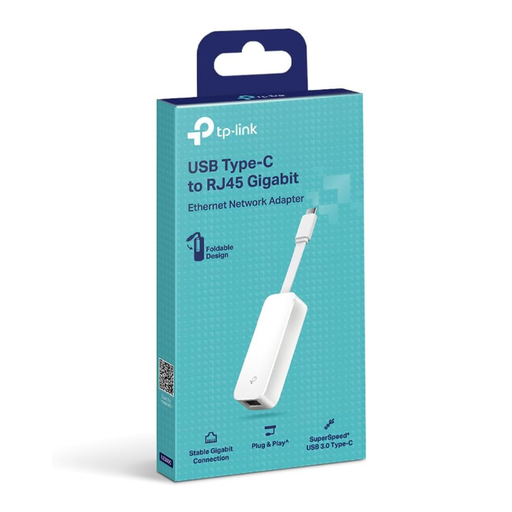
Why This Fits Their Persona: Ideal for students and home office workers who need a straightforward and portable solution. Its foldable design makes it highly travel-friendly, and the broad compatibility ensures it works with almost any modern device.
Explicitly offers Gigabit speed (1000 Mbps), bypassing the 100 Mbps trap. Its broad, driver-free Plug & Play support for nearly all common operating systems prevents compatibility issues.
Very high compatibility (Windows, macOS, iPadOS, Chrome OS, Linux); foldable and extremely portable design.
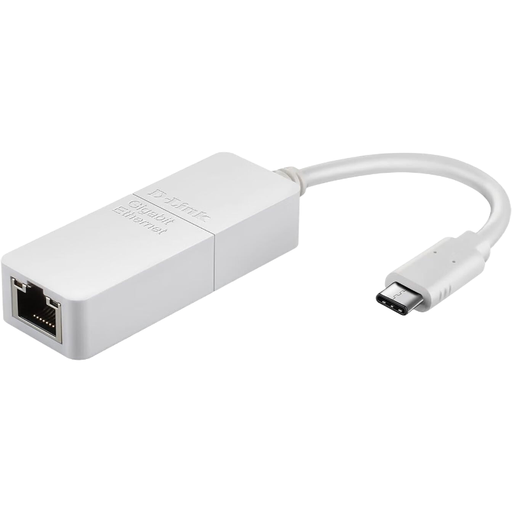
Why This Fits Their Persona: Perfect for professionals with high-end devices like MacBooks or Dell XPS. The sleek design and reliability from an established networking brand like D-Link ensure a stable connection for business-critical applications.
The robust housing and brand-name chipset prevent overheating and performance throttling. The clear compatibility statement for macOS and Windows avoids configuration problems from the start.
Stable Gigabit performance from an established networking brand; simple plug-and-play functionality for PC and Mac.
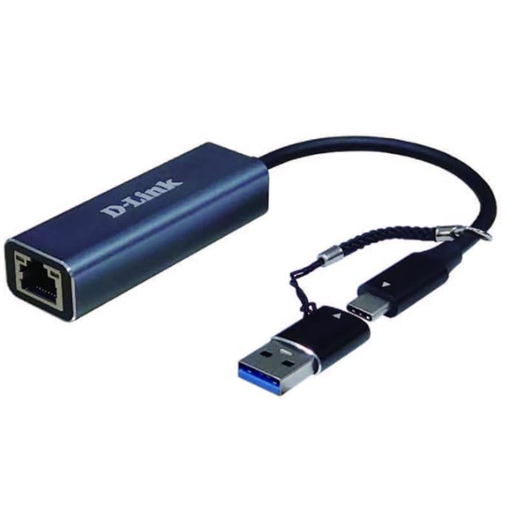
Why This Fits Their Persona: The right choice for gamers, content creators, and users with very fast fibre optic connections. The 2.5 Gbps speed minimises latency and significantly accelerates the transfer of very large files.
Significantly exceeds the Gigabit standard, thus avoiding the speed bottleneck even with the fastest internet connections. The high-quality construction minimises the risk of performance throttling due to heat during intensive use.
Up to 2.5 times Gigabit speed (2.5 Gbps); future-proof for faster internet plans; high build quality.
We have compiled a complete, up-to-date list of products that fully meet these strict selection criteria and safety standards.
Do I need a separate power supply for a USB-C to Ethernet adapter? No, typically you do not. These adapters are powered directly through your device's USB-C port (bus-powered). They do not require an external power adapter, which makes them very portable and easy to use.
Is a Gigabit Ethernet adapter faster than my Wi-Fi? In most cases, yes, especially in terms of stability and latency. While modern Wi-Fi standards (like Wi-Fi 6) can theoretically achieve high speeds, a wired Gigabit connection is less susceptible to interference from walls, other networks, or electrical devices. This results in a consistently high speed and lower latency (ping), which is crucial for online gaming and video conferencing.
Can I use any USB-C LAN adapter for my Nintendo Switch? Not necessarily. The Nintendo Switch requires an adapter with a compatible chipset. While many modern adapters will work, it is advisable to choose a model where compatibility with the Nintendo Switch is explicitly stated by the manufacturer. This ensures seamless plug-and-play functionality at the console's dock.