
Lieferung heute & morgen

Qualitätsgarantie

Willkommens-Angebote freischalten: KOSTENLOSE Lieferung | Bis zu 80 % RABATT | Kostenlose 30-Tage-JoyPlus-Testphase
App herunterladen
A USB Ethernet adapter connects a computer, laptop or tablet to a wired network via USB. This is useful when there is no LAN port available, the Wi-Fi connection is unstable, or you need the most consistent connection possible for working from home, streaming and gaming. Depending on the model, it may be a USB to RJ45 adapter for Ethernet or a USB Wi-Fi adapter that adds wireless connectivity.
Before buying, it is worth taking a close look at the technical specifications. A high advertised data rate alone does not tell you whether the adapter is compatible with your device, router and operating system.
A Gigabit Ethernet adapter can technically support speeds of up to 1,000 Mbit/s. However, several requirements must be met: a suitable USB port, a Gigabit-capable router or switch, a compatible network cable and a broadband plan or network with sufficient speed. On a USB 2.0 port or a 100-Mbit/s network, transfer speeds will be limited accordingly.
A 100-Mbit/s Ethernet adapter can be sufficient for basic internet use, emails and many video calls. For larger downloads, local network storage or fast internet connections, a USB LAN adapter with Gigabit support is generally the better choice.
A conventional USB network adapter with a USB-A plug will not connect directly to a device that only has USB-C ports. Conversely, a USB-C Ethernet adapter cannot be used with an older USB-A port without additional equipment. Adapters and hub solutions can help, but they introduce extra connection points and potential compatibility issues.
Before buying, check which port is available on your laptop, PC or tablet. It is also important to confirm that the USB-C port can actually transfer data and is not intended for charging only.
Many modern Windows, macOS and ChromeOS devices automatically detect an RJ45 network adapter. Older systems or certain Linux versions may require a driver, however. Android devices also often need an OTG adapter. The term “plug-and-play network adapter” should therefore always be considered alongside the specific operating-system version.
Two values are particularly important for a wired connection:
A USB to RJ45 adapter normally draws power through the existing USB connection. The casing may warm up during longer data transfers. This is possible with devices designed for this purpose, but the effect should not be increased by covering the adapter or restricting ventilation.
For a network adapter for a laptop, Windows and macOS compatibility, as well as the design, are particularly important. If you want to use an adapter with a tablet or smartphone, also look for Android and OTG support. With an Ethernet adapter for a PC, the length of the connection cable is often more important, as it helps prevent mechanical strain on the USB port.
Also check the manufacturer’s information regarding older operating systems. According to the product information, the HOCO UA37 may require additional drivers on very old systems such as Windows 98 or Windows XP.
A wired USB LAN adapter needs to be connected to the router or network switch. It is less affected by wireless interference and is suitable for fixed workstations. A USB Wi-Fi adapter does not require an Ethernet cable and can be useful when the router is further away. The achievable speed then depends on factors including distance, walls, frequency band and router standard.
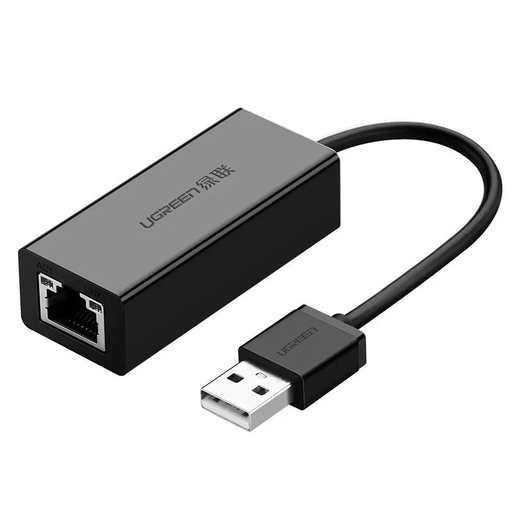
Why this product suits this profile: This compact USB-A adapter is designed for users who need a straightforward wired connection for a laptop, desktop or compatible Android device.
The maximum data rate of 100 Mbit/s is clearly specified, preventing a USB 2.0 model from being mistakenly treated as a Gigabit solution.
USB 2.0, 10/100-Mbit/s support, an approximately 15 cm integrated cable and driver support for several widely used systems.
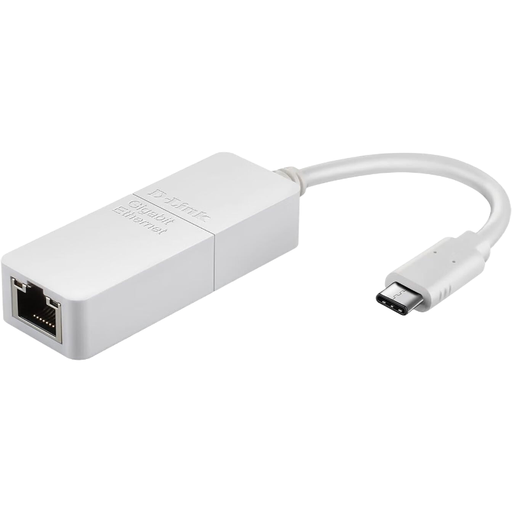
Why this product suits this profile: For USB-C laptops and desktops, this model provides direct access to wired Gigabit Ethernet.
The USB-C plug, USB 3.0 standard and 10/100/1000-Mbit/s support are listed separately. This makes it easier to check the combination of connection type and network speed.
Speeds of up to 1,000 Mbit/s, a USB-C connection, compact casing and plug-and-play support for compatible Windows and macOS systems.
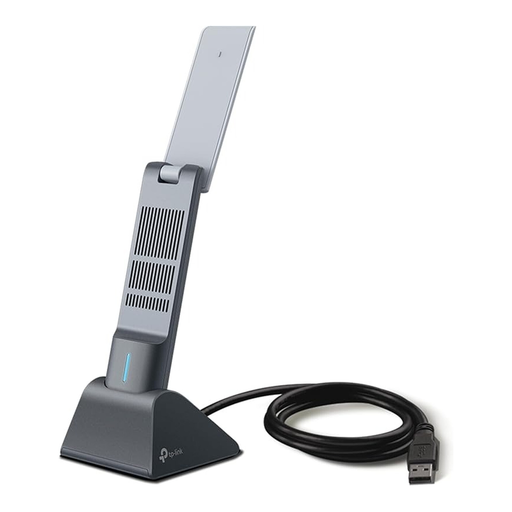
Why this product suits this profile: This USB Wi-Fi adapter is designed for PCs that need a wireless connection with dual-band Wi-Fi, for example for streaming, working from home or online gaming.
The operating-system specification is limited to Windows 10 and Windows 11. Mac and Linux users should check the manufacturer’s current driver situation before buying.
USB 3.0, dual-band Wi-Fi, a stated AX1800 data rate, adjustable aerials and a 1 m USB cable for more flexible positioning.
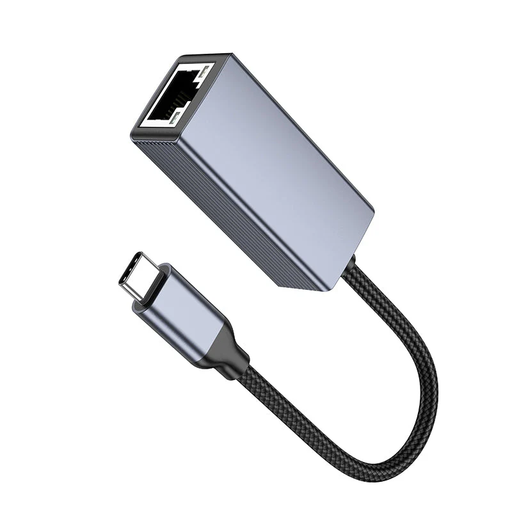
Why this product suits this profile: This compact USB-C Ethernet adapter is ideal for users who want to establish a wired connection while travelling or in the office, without an integrated LAN port.
The product specifications explicitly list USB-C, RJ45 and 10/100/1000 Mbit/s. Nevertheless, the manufacturer states that older operating systems may require a driver.
Support for speeds of up to 1,000 Mbit/s, an aluminium casing, a weight of approximately 23 g and plug-and-play support for several current systems.
We have put together a complete, regularly updated list of products that fully meet these strict selection criteria and the safety regulations applicable in the EU.
After plugging in the adapter, connect a Cat5e or higher Ethernet cable to the RJ45 port. The operating system should display the network connection in its settings. If no connection is established, these steps will usually help:
Do not pull an adapter out by the cable; hold the plug housing instead. Liquids, high humidity and sharp bends can damage the electronics or connection. During intensive use, keep the device uncovered and in a well-ventilated position.
No. The decisive factors are the available USB-A or USB-C port, the operating system and driver support. Tablets and smartphones often also require an OTG adapter. Check the compatibility list for the specific model before buying.
A Gigabit adapter technically supports speeds of up to 1,000 Mbit/s, giving it a higher maximum data rate. In practice, however, the result depends on the USB port, router, network cable, internet plan and the other device on the network. A suitably limited model is sufficient for a 100-Mbit/s connection.
Most USB Ethernet adapters draw power directly from the USB port. Their power consumption is low compared with that of a PC or laptop, but it depends on the model and network activity. When not in use, the adapter can be unplugged, particularly with mobile devices.