If you want to use your laptop without plugging in its separate charger, consider a monitor with a compatible USB-C video input and sufficient Power Delivery. The monitor itself will still need power. For colour-critical print work, choosing the right colour space and following a consistent colour workflow matter more than the highest possible charging power. For fine lines and multiple tool windows, compare the resolution and screen size at the scaling setting you normally use.
Who is this monitor comparison for?
Designers with a laptop and few power sockets
If you want to charge your laptop through the monitor cable, check that the connection supports video and that its charging power is suitable for your device. The Video Electronics Standards Association describes DisplayPort over USB-C as a way to transmit video, USB data and system power over a single connection.
Designers working with colour-critical approvals
When assessing digital or print designs, the colour mode and, where needed, calibration must suit your intended output. EIZO and ASUS list these features for certain models; the specifications apply to those models and don’t replace a consistent workflow.
Checking fine lines and layouts
If you check outlines and type or keep several tool windows open, compare the resolution and usable screen space with your software and scaling settings. EIZO highlights resolution and screen size as factors to consider when buying; the specific differences between monitors depend on the model.
What should you look for when choosing?
If you have few spare power sockets, first check video transmission and laptop charging power. Then assess colour workflow, resolution and power consumption separately.
| Priority |
What to check before buying |
Who is this especially important for? |
| Connect your laptop with one cable |
Check whether your laptop’s connection supports DisplayPort over USB-C or a compatible Thunderbolt connection. Compare your laptop’s power requirements with the monitor’s Power Delivery rating, and make sure you have a suitable cable. The Video Electronics Standards Association describes DisplayPort over USB-C as a way to transmit video, USB data and system power through a single connection. |
If I want to use my laptop with the monitor, I’d like its charger not to take up an extra socket if possible. Around 36% of consumers prioritise combining video and laptop charging. |
| Colours suited to your output |
Decide whether you’re creating designs for digital or print use, then check the colour mode and calibration options on the specific model. EIZO lists sRGB and AdobeRGB modes and hardware calibration for the CS2740. |
If I’m approving colours for a digital or print design, the display mode needs to suit my intended output. Around 29% of consumers prioritise colour checking. |
| Fine lines and workspace |
Compare the native resolution, screen size and stand with your software and scaling settings. Dell lists a resolution of 2560 × 1440 pixels for the 27-inch U2724DE; BenQ lists 3840 × 2160 pixels for the PD2705U. |
If I want to check fine lines and several tool windows at once, the display needs to work with the scaling setting I normally use. Around 21% of consumers prioritise detail and workspace. |
| Power consumption and running costs |
Compare the energy label and product information sheet for the exact model on the same basis. The European Commission includes computer monitors within the scope of its requirements for electronic displays; USB-C charging power is not a measure of monitor power consumption. |
If I’m considering running costs and any accessories I might need, I want to be able to compare information for the exact model. Around 14% of consumers prioritise power consumption and potential extra costs. |
Which buying mistakes should you avoid?
-
USB-C doesn’t automatically mean video and charging over one cable
Video transmission and laptop charging depend on the connections supported, the Power Delivery output and the cable. If the charging power isn’t sufficient, your laptop may still need its own charger plugged into a power socket.
Before planning to use just one power socket, check the connection specifications for your laptop and monitor, along with the required charging power.
Depending on the equipment you already have, you may need a suitable cable.
-
A wide colour gamut doesn’t guarantee a print match
The colour gamut, selected display mode and calibration all need to suit your intended output. A single monitor specification doesn’t, on its own, confirm that a design will look the same when printed.
Choose a colour mode that suits your intended output, and factor in the complete colour workflow for critical approvals.
Colour matching and calibration may require extra time and effort.
-
USB-C charging power isn’t the monitor’s power consumption
The Power Delivery wattage indicates how much power the monitor can supply to a connected device. It doesn’t directly tell you how much power the monitor itself uses.
To compare display power consumption, check the figures for each specific model on the same basis.
Which brands are worth considering?
BenQ
The Creative Pro and PD ranges include models for digital design work. The PD2705U combines a 27-inch 4K screen with USB-C.
- BenQ specifies 99% sRGB, a factory calibration report and 65 W Power Delivery for the PD2705U.
- Manufacturer specifications aren’t independent measurements of colour accuracy. Whether 65 W is enough for a laptop depends on its power requirements.
Dell
The UltraSharp hub models U2725QE and U2724DE differ in several ways, including their resolution and connections.
- Dell lists USB-C or Thunderbolt power delivery of up to 140 W EPR for the 4K U2725QE.
- According to Dell, the 27-inch U2724DE offers QHD rather than 4K. These differences apply to the models named, not to the brand as a whole.
EIZO
EIZO positions the ColorEdge CS2740 as a monitor for design and illustration, with features for a calibratable colour workflow.
- EIZO lists AdobeRGB and sRGB modes, as well as hardware calibration, for the CS2740.
- According to EIZO, USB-C power delivery is limited to 60 W. A wide colour gamut alone won’t calibrate the monitor for a specific output.
ASUS
According to ASUS, the ProArt PA279CRV combines a 27-inch 4K screen with USB-C Power Delivery.
- For this model, ASUS specifies 99% Adobe RGB and DCI-P3, factory calibration and 96 W Power Delivery.
- These specifications apply to the PA279CRV. They don’t demonstrate the performance of every ProArt model or guarantee a match with a particular print.
LG
The UltraFine 27UQ850V-W is a 27-inch 4K model with USB-C charging.
- For this model, LG specifies 90 W USB-C power delivery, a typical DCI-P3 value of 98% and an adjustable stand.
- The DCI-P3 figure alone doesn’t demonstrate the accuracy of an sRGB mode or guarantee a colour-critical print workflow.
Joybuy monitors for vector graphics
This selection from Joybuy includes monitors for checking vector graphics and, depending on the model, connecting a laptop.
 No image available
Portable 23.8-inch 4K monitor
Could be suitable for detailed vector graphics; check that the USB-C or Mini HDMI input is compatible with your laptop.
3840 × 2160 pixels, 60 Hz and 100% sRGB, according to the product title.
The title lists an integrated stand and USB-C and Mini HDMI inputs; it doesn’t specify a Power Delivery rating.
Joybuy
 No image available
INNOCN 40C1U, 40-inch, 5K ultrawide
The wide workspace could be useful for keeping several tool windows open alongside vector graphics; for a single-cable connection, your laptop and cable must support video over USB-C.
5120 × 2160 pixels, 100 Hz, 99% sRGB and 87% Adobe RGB, according to the product description.
The description lists USB-C with 65 W Power Delivery, a USB hub and a height-adjustable stand. Check whether 65 W is suitable for your laptop.
Joybuy
 No image available
INNOCN CB27U1, 27-inch, 4K
The 4K resolution on a 27-inch screen could be useful for checking fine details; whether a single-cable connection works depends on your laptop and cable.
3840 × 2160 pixels, IPS and 120 Hz, according to the product title.
The description lists 100% sRGB, 99% Adobe RGB, DeltaE < 1 and USB-C with 90 W Power Delivery. It also lists height adjustment and pivot functionality. Check whether 90 W is enough for your laptop.
Joybuy
 No image available
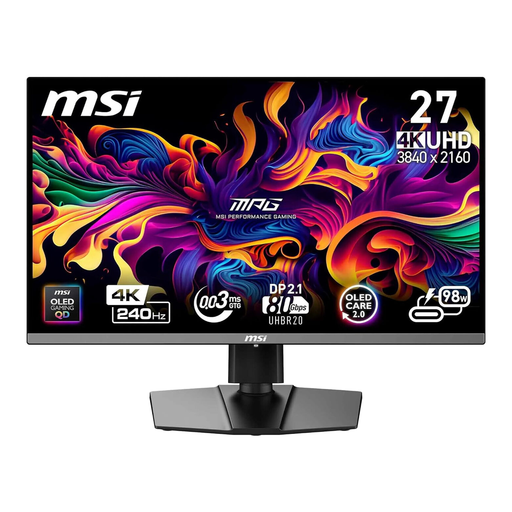
MSI MPG 272URXDE, 26.5-inch, 4K QD-OLED
Could be suitable for checking vector details; compare the screen size and resolution with the scaling setting you normally use.
3840 × 2160 pixels and 240 Hz, according to the product title.
The title lists USB-C with 98 W Power Delivery. The product description includes colour gamut specifications for Adobe RGB, DCI-P3 and sRGB, but no percentage figures that can be used here.
Joybuy
 No image available
MSI MPG 322URXDE, 32-inch, 4K QD-OLED
The 32-inch screen could be useful for viewing a design alongside tool windows; check that it will fit your workspace.
3840 × 2160 pixels and 240 Hz, according to the product title.
The product description lists 98% Adobe RGB, 99% DCI-P3, USB-C with 98 W Power Delivery, a USB hub and a height-adjustable stand.
Joybuy
Frequently asked questions
Can a USB-C monitor save you a power socket?
In the right circumstances, you may not need your laptop charger: your laptop and monitor must support video over the connection, and the charging power must be sufficient. The monitor itself will still need power.
Is USB-C enough to confirm video and charging support?
No. Check the supported video mode or Thunderbolt, the monitor’s Power Delivery output, your laptop’s power requirements and whether you have a suitable cable.
How do I set up a monitor for checking colours?
Choose a colour mode that suits your intended output and include any available calibration in your workflow. For example, EIZO lists sRGB and AdobeRGB modes and hardware calibration for the CS2740; these features alone don’t guarantee a match with a particular print.
How can I compare a monitor’s power consumption?
Compare the energy label and product information sheet for the exact model on the same basis. The European Commission includes computer monitors within the scope of energy labelling requirements for electronic displays; EPREL provides information about listed models. USB-C charging power is not a measure of the monitor’s power consumption.
What are my legal rights when buying online?
For consumer purchases in the EU, a minimum legal guarantee of two years generally applies against the seller; an additional manufacturer’s warranty cannot replace or restrict these rights. For online purchases in Germany, you generally have a 14-day right to cancel, subject to the legal requirements and exceptions.


