For a verse novel with a structure that changes frequently, start by choosing your writing software and operating system. Section navigation depends on the programme, not on extra processor or graphics power. A compact, fully equipped mini PC could suit a writing space focused on text, but before you buy, check the ports, devices you already own, software licences and a separate backup destination.
Who is this writing setup for?
Writers who frequently rearrange sections
If you often move parts of your verse novel around, look at the outlining features in your writing app. Microsoft Support explains how headings formatted with styles appear in Word’s Navigation pane; LibreOffice Help explains how to move headings and their associated text in the Navigator.
Writers with a dedicated workspace
If you have a monitor and input devices ready for your desk, the right video and USB ports matter just as much as the space available for your computer. Specifications for compact desktop models vary by device and configuration.
Writers working through lengthy revisions
If you want to restore earlier drafts, plan for a properly configured backup with a suitable destination. Microsoft Support explains File History with an external drive or network location; Apple Support explains how to back up with Time Machine and a suitable external storage device.
What matters when buying?
Compact, fully equipped Windows PC
A good fit if: you want to use Windows writing software and are looking for a small computer with a clearly specified basic setup. MSI lists Windows 11 Pro, 8 GB RAM and a 256 GB SSD for the Cubi N ADL S-217DE.
What to consider: A compact design doesn’t guarantee quiet operation or the right ports for your workspace.
Windows desktop with more configuration options
A good fit if: you need a particular operating system, storage or port configuration. HP lists Windows 11 Pro, 8 GB RAM and a 256 GB SSD for the Pro 400 Mini G9 with product code 938A5EA#ABD; Dell offers a choice of components for the Pro Micro QCM1250.
What to consider: The full configuration you order is what matters, not just the name of the model range.
Mac mini
A good fit if: your writing software runs on macOS or your existing workflow is built around it. Apple lists a Mac mini with M6 configuration featuring 16 GB of unified memory and a 256 GB SSD, among other options.
What to consider: Check your monitor and ports, as well as any software licences tied to a particular platform. You’ll need a suitable external storage device for Time Machine.
| Priority |
What to check |
Especially important for |
| Organising sections |
Try your preferred writing software with a sample manuscript. Check whether headings are easy to find and move. |
If I often rearrange sections, I want to find them quickly and move them along with their text. Around 36% of consumers put section planning first. |
| Setting up a writing space |
Check that the video and USB ports work with your monitor, keyboard, mouse and other devices. |
For a dedicated desk, I want to connect the computer to the devices I already own, without having to work around incompatible ports. Around 29% of consumers prioritise their workspace. |
| Backing up drafts |
Plan for an external drive or network location, and test restoring a file. |
If I’m working on a manuscript over a long period, I want to be able to restore an earlier version too. Around 21% of consumers put backing up drafts first. |
| Estimating the total cost |
Include only the extras you actually need, such as a monitor, input devices, software or backup storage. |
I want to know before buying which parts of my writing setup I already have and which I still need. Around 14% of consumers focus on the total cost. |
Which buying mistakes can you avoid?
-
Assuming a faster processor means better outlining
Your writing app provides the tools for navigating and rearranging sections. A more powerful processor won’t solve the problem if the programme doesn’t offer the overview you need.
First, try a typical section structure in your preferred app and check that it supports the operating system you want to use.
-
Assuming a mini PC kit is fully equipped
ASUS distinguishes between different versions of the NUC 14 Essential and a kit that doesn’t come with an operating system, memory or storage pre-installed or included.
Compare the full product code and check exactly what’s listed as included.
A kit may require you to buy an operating system, RAM and SSD, and allow for extra setup time.
-
Relying on the internal SSD as your only manuscript backup
Saving your current file doesn’t replace a backup that lets you restore earlier versions.
Plan for a suitable external drive or network location, and test that you can retrieve a backed-up file.
-
Overlooking your writing software licence when switching platforms
Literature & Latte states that each Scrivener licence covers just one platform.
Before changing computers, check the licence terms for the operating system you want to use.
Brands to consider
MSI
The Cubi N ADL S range includes compact Windows desktops. MSI lists specific specifications for the S-217DE.
- For the S-217DE, MSI lists Windows 11 Pro, Intel N200, 8 GB RAM and a 256 GB SSD.
- These specifications don’t confirm quiet operation or any particular writing performance for this configuration.
HP
The Pro 400 Mini G9 is a compact Windows option; the exact product code identifies its specifications.
- For 938A5EA#ABD, HP lists Windows 11 Pro, an Intel Core i5-13500T, 8 GB RAM and a 256 GB SSD.
- These specifications apply to this product code and not necessarily to every version of the Pro 400 Mini G9.
Apple
The Mac mini is a macOS option for writers whose software and workspace are a good match for it.
- For the Mac mini with M6, Apple lists a version with 16 GB of unified memory and a 256 GB SSD, among other options.
- Check your monitor, accessories and any software licences tied to a particular platform against your needs separately.
ASUS
The NUC 14 Essential shows why it’s important to distinguish between a fully equipped mini PC and a kit.
- ASUS lists a range of operating system, RAM and SSD configurations for the NUC14MNK series.
- According to ASUS, the NUC14MNK-B kit doesn’t come with an operating system, memory or storage pre-installed or included.
Dell
The Pro Micro QCM1250 is a configurable range of compact Windows desktops.
- Dell offers a choice of processor, operating system and storage options.
- Check the exact configuration you’re ordering rather than assuming the model range has a particular specification.
Joybuy products
This selection includes mini PCs for a dedicated writing space. Operating system, storage and ports vary by model, so check they suit your writing software and existing setup.
 No image available
SOYO Y5Pro mini PC, Intel Core i5-8250U/8350U
A compact option for a dedicated writing space; section navigation depends on the writing software you use.
Windows 11, 8 GB DDR4 and a 256 GB SATA SSD. The product title lists Intel Core i5-8250U/8350U; check the exact version in the listing.
The description lists two HDMI outputs, one Type-C output and four USB ports, as well as dimensions of 105 × 113 × 45 mm.
Joybuy
 No image available
Thunderobot mini PC Workstation AI Max+ 395
A mini PC option if you want to check the exact memory and operating system specifications against your software and workspace.
The product title lists 128 GB LPDDR5X memory at 8000 MT/s and a 1 TB SSD.
Joybuy
 No image available
FIREBAT F1 mini PC, AMD Ryzen 5 7640HS
A compact option if you want to check the listed display ports against your existing monitor setup.
The description lists 24 GB RAM and a 512 GB PCIe 4.0 SSD. The product title states that it supports 4K output for up to three screens.
USB 4.0 and HDMI 2.1 are listed. Check that the ports are compatible with your devices rather than relying on these specifications alone.
Joybuy
 No image available
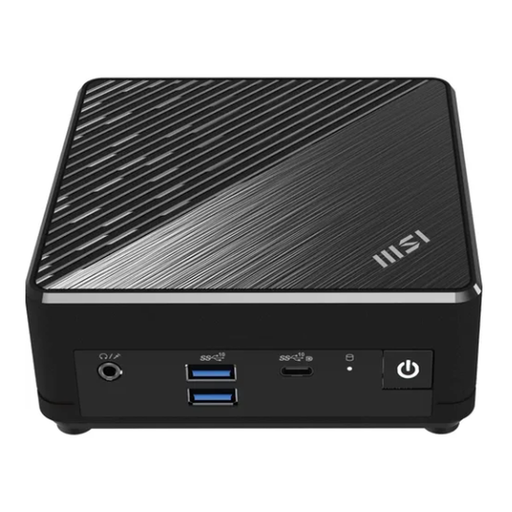
MSI Cubi N ADL S-217DE N200, 8 GB/256 GB SSD
A compact Windows PC for a dedicated writing space; the writing software provides the outlining features.
Windows 11 Pro, 8 GB RAM and a 256 GB SSD. The description lists HDMI, DisplayPort, USB-C and additional USB ports.
The description lists a VESA mounting option. Before buying, check the ports you need and the exact specifications.
Joybuy
 No image available
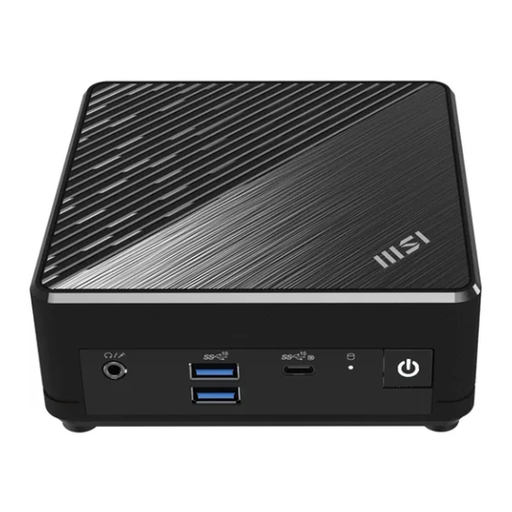
MSI Cubi N ADL S-254AT N200, 4 GB/128 GB SSD
A compact option for a dedicated workspace; check the listed specifications against the requirements of your writing software.
Windows 11 Pro, 4 GB DDR4 and 128 GB storage. The description lists HDMI, DisplayPort, USB-C and USB ports.
The description also lists VESA mounting compatibility. Check whether the stated storage specifications are right for your needs.
Joybuy
Frequently asked questions
Do I need special PC hardware to organise sections?
Not necessarily: your writing app is the first thing to consider. Microsoft Support explains how headings formatted with styles appear in Word’s Navigation pane; LibreOffice Help explains how to move headings along with their associated text in the Navigator.
How do I back up my manuscript and earlier versions?
In Windows, you can set up File History with an external drive or network location. On a Mac, Time Machine can back up your files to a suitable external storage device. Test restoring a file so you know your manuscript files are being backed up.
Can I keep using my Scrivener licence if I switch between Windows and Mac?
According to Literature & Latte, a single Scrivener licence covers just one platform. Before switching, check the licence terms for your chosen operating system; the provider lists 64-bit Windows 10 or later as a requirement for the Windows version.


