
Lieferung heute & morgen

Qualitätsgarantie

Willkommens-Angebote freischalten: KOSTENLOSE Lieferung | Bis zu 80 % RABATT | Kostenlose 30-Tage-JoyPlus-Testphase
App herunterladen
By Joybuy Product Recommendation Officer, July 28, 2026
Daily computer work puts significant strain on your hands and wrists. An ill-fitting mouse can lead to discomfort or tension. The market for ergonomic mice promises relief, but not every model delivers on its promise. Many users invest in a supposedly ergonomic product, only to find it doesn't fit their hand size or that its advertised features are irrelevant in daily use. This guide will help you understand the crucial criteria and make an informed choice.
Before you make a decision, you should be aware of three common pitfalls that lead to poor purchases:
To find the right mouse, you should focus on objective, technical parameters that match your specific needs.
The shape of the mouse is the most important ergonomic criterion. Standard mice force the wrist into a pronated, or downward-facing, position. An ergonomic mouse aims to facilitate a more natural posture.
The choice of connection technology affects flexibility and desk clutter.
The technical specifications of the sensor and buttons determine precision and functionality.
Instead of making a one-size-fits-all recommendation, we have selected models tailored to specific user profiles and their requirements.
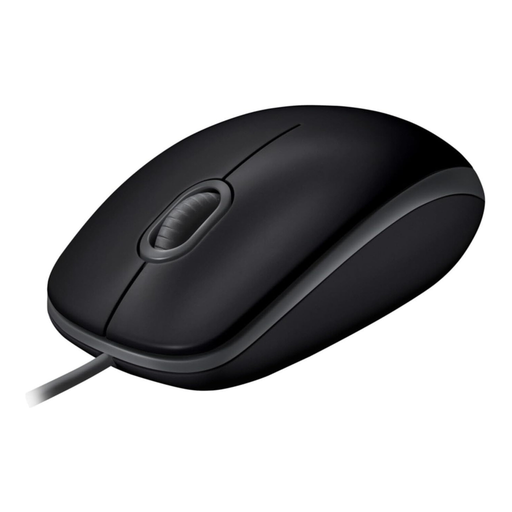
Why This Fits Their Persona: This model is a straightforward and reliable solution for standard office tasks. The wired connection eliminates the need for battery changes, and the ambidextrous design suits many users. Ideal for work environments where a low noise level is important.
The B110 avoids exaggerated marketing promises. It has a fixed DPI value suitable for office applications and makes no vague ergonomic claims. According to Logitech, the click noise is reduced by over 90%—a quantifiable figure.
Simple plug-and-play setup with no software required. The verifiably silent buttons create a quieter work environment.

Why This Fits Their Persona: Designed for users who spend many hours at their desk and are looking for a solution to reduce wrist and forearm strain. The multi-device functionality is ideal for working across multiple devices like a laptop and a desktop PC.
Its ergonomic benefit is based on a clearly defined design feature: the 57-degree vertical angle. This is not a vague assertion but a specific approach to posture improvement. The 4000 DPI sensor is precise and adjustable.
Promotes a natural handshake position to potentially reduce muscle activity. Supports seamless switching between up to three devices.
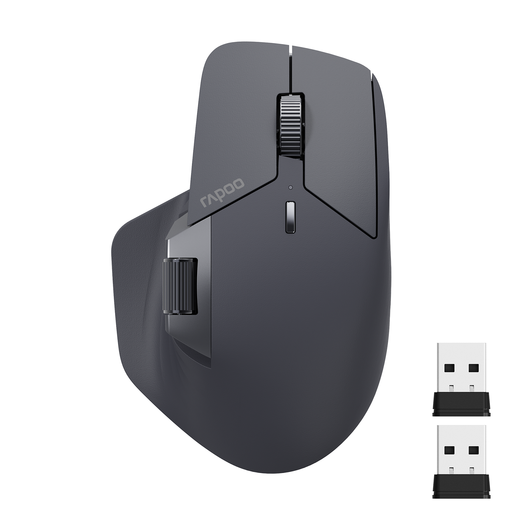
Why This Fits Their Persona: Perfect for power users who seamlessly switch between multiple computers, laptops, and tablets. The high number of programmable buttons and the cross-computer technology enable a highly efficient workflow across different systems.
This model focuses on tangible productivity features rather than marketing gimmicks. The M+ Cross-Computer technology and 11 programmable buttons offer genuine added value that goes far beyond a simple DPI figure.
Supports connection with up to 4 devices simultaneously. The extensive button programming and side scroll wheel optimize complex workflows.
We've compiled a complete, up-to-date list of products that fully meet these strict selection criteria.
Not necessarily. A vertical mouse requires an adjustment period, as its handling differs from that of a conventional mouse. People with very small hands might find some models too large. However, it is an option worth considering for users who regularly experience tension in their wrist or forearm when using standard mice.
Battery life varies significantly by model and usage. Some mice powered by AA or AAA batteries can last from 12 to 24 months. Models with a built-in rechargeable battery, like the Logitech MX Vertical, often provide several months of use per charge. The exact duration depends on daily usage time and activated features.
For basic functions like pointing, clicking, and scrolling, no additional software is usually required, as most mice work via plug-and-play. However, to use advanced features such as programming buttons, adjusting DPI levels, or managing connections on a multi-device mouse, installing the manufacturer's provided software (e.g., Logi Options+) is typically necessary.