For finished projects you rarely open, where capacity matters more than speed, consider a compact, USB-powered 2.5-inch HDD. If you access files often or edit directly from the drive, an external SSD is likely to suit you better. The space available, including room for the cable, the storage capacity you need and the USB capabilities of your computer and cable all matter too, as manufacturers' maximum speeds are only achievable under certain conditions. For irreplaceable projects, you'll also need a separate backup that you can restore from: a single drive is not a complete archive.
Who are HDDs and SSDs suited to?
Video archivists with lots of finished projects
If you rarely reopen files, a compact, USB-powered HDD could be worth considering. Toshiba and Seagate offer portable product ranges of this kind; whatever you choose, plan to back up your files separately.
Video editors who access projects frequently
If you regularly move large projects or edit directly from the drive, compare compact SSDs and check which USB speeds your computer and cable support. Samsung and Kingston state that their quoted maximum speeds depend on certain connection requirements.
Archivists with irreplaceable footage
If you can't afford to lose a project, plan to keep separate backup copies and check that you can restore files from them. Germany's Federal Office for Information Security (BSI) highlights the importance of being able to restore data, as well as backing it up.
What should you look for when buying?
Compact external HDD
A good fit if: You mainly store finished projects, rarely access them and value capacity over fast transfers.
The trade-off: CHIP describes external HDDs as slower and more vulnerable to knocks than SSDs. Toshiba says the Canvio Basics USB-C needs to be reformatted for macOS.
Compact external SSD
A good fit if: You regularly transfer large files, often reopen projects or work directly from an external drive.
The trade-off: CHIP describes SSDs as faster but more expensive than HDDs. You won't automatically get the advertised maximum speeds: Samsung says the T9's performance depends, among other things, on the host, cable and UASP.
When building a video archive on a small desk, your choice mainly depends on which of your needs matters most.
| Priority |
What to check before buying |
Who it's particularly important for |
| Recoverability |
Allow room for separate copies and check that you can restore files from them. |
If I'm archiving irreplaceable projects, I want to be able to recover them even if a drive fails. Around 33% of consumers put recoverability first. |
| Archive capacity |
Work out how much space your project folders take up and how much they're likely to grow; allow for separate backup copies too. |
If I'm keeping lots of finished projects, having enough space matters more to me than particularly fast access. Around 27% of consumers prioritise archive capacity. |
| Desk space and cables |
Measure the space available for the drive and cable, and check the plugs and ports on your computer. |
On a small desk, I want the drive and cable to fit neatly and connect without any guesswork. Around 20% of consumers prioritise desk space and cabling. |
| Access speed |
Check the USB standard and cable for both your computer and drive; treat maximum speeds as conditional figures quoted by the manufacturer. |
If I'm often moving large video files or editing them from the drive, I need a suitable connection for repeated transfers. Around 20% of consumers put access speed first. |
Common buying pitfalls
-
Assuming a single external drive is a complete archive
A drive can fail, and a copy kept in the same place won't protect you against every kind of damage to the building. The BSI recommends considering how you will restore your data, too.
Keep separate backup copies and occasionally check that you can restore important project files from them.
An additional copy needs more storage space and regular upkeep.
-
Assuming the USB specification guarantees your project transfer speed
Samsung says the T9's maximum speed depends on certain conditions, including a compatible host, a suitable cable and UASP being enabled. For Toshiba's Canvio Basics, the interface speed refers to the USB connection, not the HDD's write speed.
First check your computer's port, and only compare speed figures for the specific model and under the conditions stated for it.
-
Choosing a pre-formatted Windows HDD for a Mac without checking first
Toshiba says the Canvio Basics USB-C comes formatted as NTFS; the manufacturer says it needs to be reformatted for macOS.
Before copying anything, check which computers will need to access the archive, and back up any existing files before formatting a drive.
Brands and product ranges to consider
Samsung
The T9 is aimed at users who frequently transfer large files; the T7 Shield is a separate range with a greater focus on enclosure protection.
- Samsung quotes speeds of up to 2.000 MB/s for the T9 and a five-year limited manufacturer's warranty.
- According to Samsung, the quoted maximum speed requires, among other things, Gen-2x2 support from the host and cable, as well as UASP. These specifications apply to the T9, not to all Samsung drives.
Kingston
The XS1000 is a Gen-2 SSD, while the XS2000 is a Gen-2x2 option with higher quoted transfer speeds.
- Kingston quotes enclosure dimensions of 69,54 × 32,58 × 13,5 mm for both models. The XS1000 is rated for read speeds of up to 1.050 MB/s, while the XS2000 is rated for read and write speeds of up to 2.000 MB/s.
- The interfaces and included cables differ. The XS2000's higher quoted speed is only relevant if the host supports the necessary interface.
Crucial
The X10 Pro is an external SSD range, and its 2-TB version may be worth considering for frequent transfers of large video files.
- Crucial quotes speeds of up to 2.100 MB/s for reading and 2.000 MB/s for writing, as well as an IP55 rating, for the X10 Pro.
- These are manufacturer specifications for the X10 Pro, not independently verified real-world transfer speeds or features of the entire Crucial range.
Toshiba
The Canvio Basics USB-C is a USB-powered 2.5-inch HDD for projects that are mainly stored rather than accessed regularly.
- Toshiba offers versions of the range with capacities of up to 4 TB. The 4-TB version is listed as measuring 78 × 109 × 19,5 mm.
- The drive comes formatted as NTFS for Windows; Toshiba says it needs to be reformatted for macOS. The USB interface speed is not a guaranteed HDD write speed.
Seagate
The Expansion Portable is a compact HDD option for an archive where capacity is the priority.
- Seagate quotes a capacity of 5 TB and dimensions of 20,9 × 80,0 × 115,3 mm for model STKM5000400.
- The capacity and dimensions apply to this specific model. They don't establish a particular transfer speed or the suitability of every version in the Expansion range.
Joybuy products for your video archive
This selection includes compact external HDDs for storage and external SSDs for more frequent transfers. Compare capacity, desk space and connections with your project collection and computer.
 No image available
WD Elements Portable 5 TB USB-C
For an archive that needs plenty of space: the product description lists an external hard drive for storing videos.
Capacity: 5 TB. Format: 2.5 inches. Weight: 240 g. Connection: USB-C; USB 3.2 Gen 1 is specified.
View at Joybuy
No image available
WD Elements Portable 4 TB USB-C
For storing video projects: the product description lists 4 TB of capacity and video storage.
Capacity: 4 TB. Format: 2.5 inches. Weight: 240 g. USB-C and USB bus power are specified; the interface is described as USB 3.2 Gen 1.
View at Joybuy
 No image available
Samsung Portable SSD T7 2 TB, Indigo Blue
For moving large projects or reopening them frequently: the product description lists an external SSD with quoted sequential speeds of up to 1.050 MB/s for reading and 1.000 MB/s for writing.
Capacity: 2 TB. Dimensions: 85 × 57 × 8 mm. USB 3.2 Gen 2; two cables are listed: USB-C to USB-C and USB-C to USB-A.
View at Joybuy
 No image available
KIOXIA Exceria Plus G2 Portable SSD 2 TB
For repeated video file transfers: the product description lists an external SSD with quoted sequential speeds of up to 1.050 MB/s for reading and 1.000 MB/s for writing.
Capacity: 2 TB. Dimensions: 72 × 40 × 11,8 mm. USB 3.2 Gen 2; USB-C to USB-A and USB-C to USB-C cables are listed.
View at Joybuy
 No image available
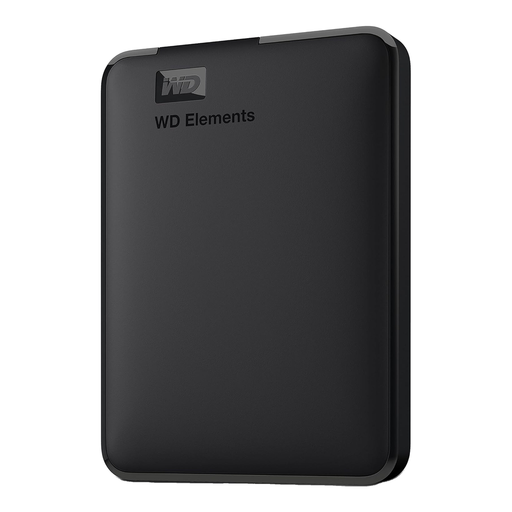
WD Elements Portable external hard drive 5 TB, USB 3.0
For an archive that needs more space: the product description lists an external hard drive for storing videos and other files.
Capacity: 5 TB. Format: 2.5 inches. USB 3.0 with backwards compatibility with USB 2.0. Reformatting may be required for macOS.
View at Joybuy
Frequently asked questions
How do I start archiving without moving my only copy?
First, copy all your project files to the external drive and check that you can reopen the files you need. Keep a separate backup copy; the BSI points out that you also need to be able to restore your data later.
Will a Canvio Basics USB-C work with a Mac straight out of the box?
Not without some preparation: Toshiba says it comes formatted as NTFS and needs to be reformatted for macOS. Before formatting, check which computers will need to access the archive, and back up any files already on the drive.
Is a five-year manufacturer's warranty the same as your statutory rights when you buy?
No. A voluntary manufacturer's warranty is separate from your statutory rights against the seller. According to consumer information from the European Union, consumer purchases in the EU come with at least two years of legal guarantee from the date you receive the goods; check the terms of any additional manufacturer's warranty separately.


