Who this camera guide is for

Photography tutors who explain things on camera by themselves

If you film yourself and occasionally hold a camera up to the lens, test the lighting and focus changes with your actual setup. Nikon recommends adjusting the white balance to suit the lighting conditions; Sony notes that harsh light from a window can be softened with a sheer curtain, for example.

Tutors who demonstrate controls close up

For small buttons and settings, what matters is how large and sharp they look in the frame from your intended filming distance. DJI gives the Osmo Pocket 3 a minimum focusing distance of 20 cm; whether a particular control appears large enough still depends on the framing.

Tutors giving longer explanations

If you record longer takes, plan your audio, power supply and storage alongside the recording mode you want to use. Nikon gives the Z 30 a maximum continuous recording time of 125 minutes; Panasonic notes that there are conditions under which recording on the GH7 may stop.

What to consider when buying

Mirrorless camera with interchangeable lens

A good fit if: you switch between on-camera explanations and close-ups, and want to choose a lens to suit your working distance. Canon lists compatibility with RF and RF-S lenses for the EOS R50 V; Nikon lists 4K UHD at 30p and an external microphone input for the Z 30.

Bear in mind: You’ll need to factor in a lens and, if required, a microphone. A high video resolution alone won’t guarantee close-ups that are large enough or consistent lighting from a window.

Camcorder with built-in zoom

A good fit if: the camera will stay in one place and you want to zoom between yourself and a demonstration table further away. Panasonic lists 24x optical zoom and an audio LINE IN or microphone input for the HC-VX3.

Bear in mind: The built-in lens saves you from changing lenses, but gives you less freedom to choose the focal length and close-up perspective.

Compact gimbal camera

A good fit if: you have little room at your table or often want to change the angle by hand during a lesson. DJI lists a gimbal, a fixed lens with a 20 mm full-frame equivalent and a focus range starting at 0.2 m for the Osmo Pocket 3.

Bear in mind: The fixed lens doesn’t give you a choice of lenses, and stabilisation is no substitute for a secure mount when filming overhead views.

What matters What to look for when buying Who it matters most to
Exposure and colour Make sure you can easily adjust exposure and white balance; record a test clip at the time of day you plan to film and check your face and bright areas. If I’m explaining things in front of a window, I want my face and the camera I’m showing to remain clear even as the light changes. Around 33% of consumers would prioritise consistent exposure and colour as their main requirement when making this buying decision.
Focus and framing Measure your working distance and test the smallest relevant control within your intended frame; check how well the camera handles changes in focus, too. If I’m showing small buttons, they need to be clear from my actual filming distance. Around 27% of consumers would put detail and framing first when making this buying decision.
Clear speech Check the microphone input and microphone position for the exact camera and bundle you’re considering; listen to a test recording from your intended filming position. If my explanation is central to the lesson, I want to record clear speech from where I plan to position the camera. Around 20% of consumers would choose clear speech as their main requirement when making this buying decision.
Longer recordings Compare the length of your lesson with the recording times given for the relevant recording mode, then test the camera, power supply and memory card together. If I want to record a longer explanation without interruption, my setup needs to last for the whole session. Around 20% of consumers would put recording time first when making this buying decision.

How to avoid camera-buying pitfalls

  • Assuming 4K means you’ll get a detailed close-up

    Video resolution alone doesn’t tell you whether a small button will look large and sharp enough from your filming distance.

    Before deciding, film the smallest control you want to explain from the camera position you plan to use. If the framing or focus isn’t right, try a different distance, position or lens.

  • Assuming stabilisation is enough for an overhead mount

    A gimbal stabilises the camera, but it won’t securely attach it above your demonstration table.

    Plan the mounting and cable routing separately from stabilisation when filming overhead views; you may also need a suitable, secure mount.

  • Assuming the maximum recording time applies to every mode

    Recording time can depend on the mode and operating conditions. Panasonic specifically lists conditions under which recording on the GH7 may stop.

    Test a complete lesson using the settings, power supply and storage media you actually plan to use.

    Long takes may require an additional power supply or suitable storage media.

Brands to consider

Canon

The EOS R50 V is a video-focused mirrorless camera with a choice of RF lenses; the EOS R50 is a separate model.

  • Canon lists Dual Pixel CMOS AF and compatibility with RF and RF-S lenses for the EOS R50 V.
  • Don’t assume that the product demonstration mode Canon describes for the EOS R50 is also available on the EOS R50 V without checking. The lens needs to suit your filming distance.

Nikon

The Z 30 combines interchangeable lenses with a camera body designed for video and solo recording.

  • Nikon lists 4K UHD at 30p, an external microphone input and up to 125 minutes of continuous recording for the Z 30.
  • These manufacturer specifications apply to the model and don’t guarantee the same results with every teaching setup or recording situation.

DJI

The Osmo Pocket 3 combines a compact body and gimbal with a built-in lens.

  • DJI lists a focus range starting at 0.2 m and a lens with a 20 mm full-frame equivalent.
  • Whether small controls look large enough from your filming distance depends on the framing; the lens isn’t interchangeable.

Panasonic

The HC-VX3 is a camcorder with built-in optical zoom; the GH7 is a separate mirrorless camera option.

  • Panasonic lists 24x optical zoom and an audio LINE IN or microphone input for the HC-VX3.
  • According to Panasonic, the GH7 offers options for longer recordings in certain modes, but recording may stop under specific recording or temperature conditions. These features don’t apply to the HC-VX3.

Sony

The ZV-E10 II is a mirrorless camera with interchangeable lenses; the FDR-AX43A belongs to a separate camcorder range.

  • Sony lists video recording up to 4K/60p for the ZV-E10 II and 20x optical zoom for the FDR-AX43A.
  • These specifications for different product ranges don’t establish that one range is always better for teaching videos.

Joybuy products for teaching videos

The Joybuy products below include a mirrorless camera with an interchangeable lens, as well as compact video, action and 360° cameras. For each model, check that the framing, audio and mounting options suit your window light and table setup.
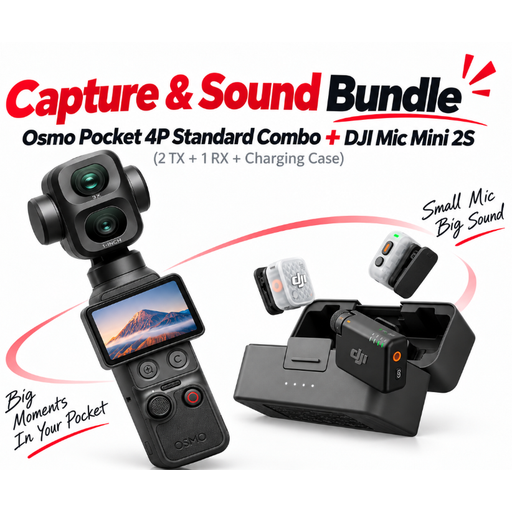
DJI Osmo Pocket 4P Pro Audio Bundle, Pocket 4P Standard Combo + Mic Mini 2S

DJI Osmo Pocket 4P Pro Audio Bundle – Pocket 4P Standard Combo + Mic Mini 2S (2 TX + 1 RX + Charging Case)

For a compact video and audio setup; check in advance how the camera, microphone and cables will fit into your teaching space.

Bundle details: Mic Mini 2S with 2 TX, 1 RX and Charging Case.

View at Joybuy
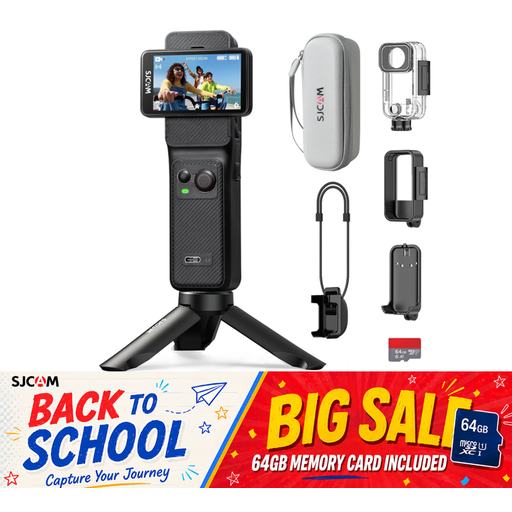
SJCAM C400 4K Action Camera with dual touchscreen

SJCAM C400 4K Action Camera with dual touchscreen

If you want to check settings directly on the camera, see whether both touchscreens are easy to reach from your intended filming angle.

Listed in the product name: 4K, dual touchscreen and 7-hour battery life.

View at Joybuy

Sony Alpha 6100 APS-C with 16–50 mm power zoom lens

Sony Alpha 6100 APS-C with 16–50 mm power zoom lens

For switching between views of yourself and the camera controls, you can adjust the framing with the supplied zoom lens; test the focus from your actual working distance.

Listed in the product name: APS-C mirrorless camera and 16–50 mm power zoom lens.

View at Joybuy

DJI Osmo Pocket 3 with rotating 2-inch touchscreen

DJI Osmo Pocket 3

For a compact setup with changing angles; check whether the fixed lens shows the controls you need clearly enough from your intended filming distance.

Listed in the product name: 4K/120fps, 3-axis stabilisation and rotating 2-inch touchscreen.

View at Joybuy
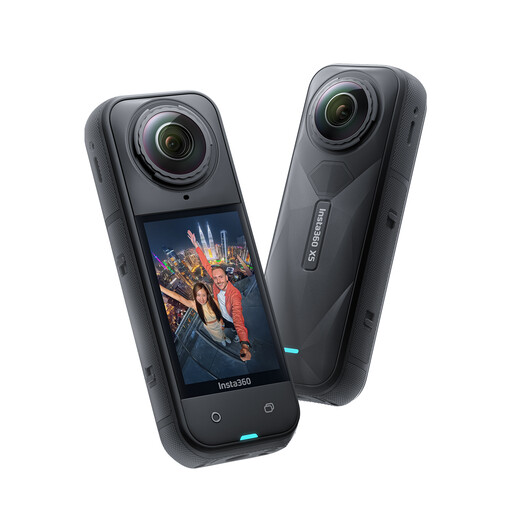
Insta360 X5 Waterproof 8K 360° Action Camera

Insta360 X5 Waterproof 8K 360° Action Camera

If you’re considering 360° footage for a lesson, plan how you’ll frame it as part of your recording and editing workflow.

Listed in the product name: 8K 360° video and replaceable lens.

View at Joybuy

Frequently asked questions

How do I get started with a camera setup by a window?

Set up the tutor and demonstration table, then record a test clip at the time of day you plan to film. A sheer curtain or reflector can help manage harsh window light; if you’re using additional artificial light, Nikon recommends adjusting the white balance to suit the lighting conditions.

Is 4K enough to show small buttons on a camera?

No, resolution alone isn’t enough to judge. Check the framing and focus from your actual working distance; DJI, for example, gives the Osmo Pocket 3 a minimum focusing distance of 20 cm, but doesn’t guarantee that every button will look large enough.

What should I test before recording for a longer period?

Test your chosen video mode with the power supply, memory card and audio for the full recording time you need. A manufacturer’s stated maximum recording time doesn’t automatically apply in all operating conditions; Panasonic specifically lists conditions under which recording on the GH7 may stop.

Can I show identifiable course participants in a teaching video that I publish?

Not simply because they’re attending the course. Under § 22 KunstUrhG, distributing or publicly displaying someone’s image generally requires the consent of the person shown; § 23 sets out limited exceptions. Processing personal data also requires a legal basis under Article 6 of the GDPR. Be clear about your plans to record and publish before filming.

Can I return a camera bought online if it doesn’t suit my setup?

According to the Verbraucherzentrale, consumers who buy online generally have a 14-day right to cancel. You must notify the other party to the contract that you’re cancelling; check the terms of your specific contract.