
Lieferung heute & morgen

Qualitätsgarantie

Willkommens-Angebote freischalten: KOSTENLOSE Lieferung | Bis zu 80 % RABATT | Kostenlose 30-Tage-JoyPlus-Testphase
App herunterladen
Equipping a large conference room presents unique challenges for IT and facility managers. An inadequate technical solution quickly leads to frustration: participants at the far end of the table can't be heard, the camera only captures part of the room, or software compatibility causes constant disruptions. Before you invest, it's crucial to understand the most common pitfalls, which are often obscured by marketing promises.
This guide focuses on the objective criteria that a video conferencing system for large rooms must meet, helping you make an informed decision.
Choosing an unsuitable system not only results in poor meeting quality but also leads to unnecessary downstream costs. Here are two common misconceptions to avoid:
To equip a conference room professionally, you should base your selection on three fundamental technical specifications. These define the system's performance and flexibility in demanding environments.
A modular conference system is the structurally superior solution for large rooms. Unlike a rigid video bar, these systems consist of separate components:
This setup allows for precise customisation to the room's acoustics and seating layout.
For large rooms, a 4K PTZ conference camera is essential. PTZ stands for Pan, Tilt, and Zoom. These motorised functions allow the camera frame to be adjusted dynamically:
Modern systems also use AI-powered features like "RightSight" (according to manufacturer Logitech) to automatically adjust the frame so that all participants are optimally visible.
A system may have impressive specs on paper, but its smooth day-to-day operation depends on software integration. Always look for official certifications for the platforms you use. Zoom Rooms certified hardware or certification as a video conferencing solution for Microsoft Teams guarantees:
Instead of making a one-size-fits-all recommendation, we have identified solutions tailored to specific requirement profiles and room sizes.
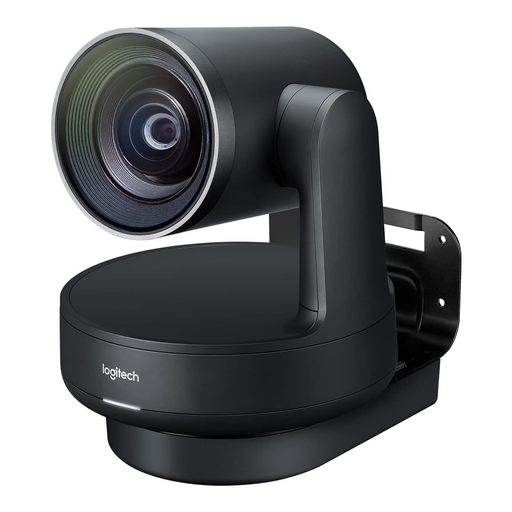
Why This Fits Their Persona: This system was explicitly designed for medium to large conference rooms. It meets all requirements for modularity, scalability, and professional video and audio quality for mission-critical meetings. Anyone planning to buy the Logitech Rally Plus is investing in a future-proof, comprehensive solution.
By definition, it is a modular system, sidestepping the "all-in-one" pitfall. The audio components are designed for scalability from the outset, and official certification for Teams and Zoom prevents compatibility issues.
A complete ecosystem with a 4K PTZ camera, two speakers, and two mic pods in the base package. Smart cable management via table and display hubs ensures a clean installation.
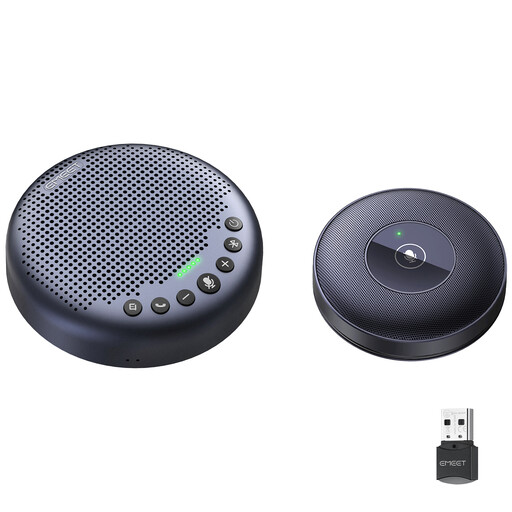
Why This Fits Their Persona: Ideal for businesses that already own a camera but need a flexible and cost-effective solution to improve audio coverage in large or growing rooms. The daisy-chaining capability is the key feature here.
This set specifically solves the pitfall of inadequate audio scalability. Instead of relying on a single device, two units can be connected to double the microphone range for up to 16 participants.
Each unit features an 8-microphone array for 360° voice pickup. The connection is made easily via a daisy-chain cable. The VoiceIA technology (according to the manufacturer) filters out background noise.
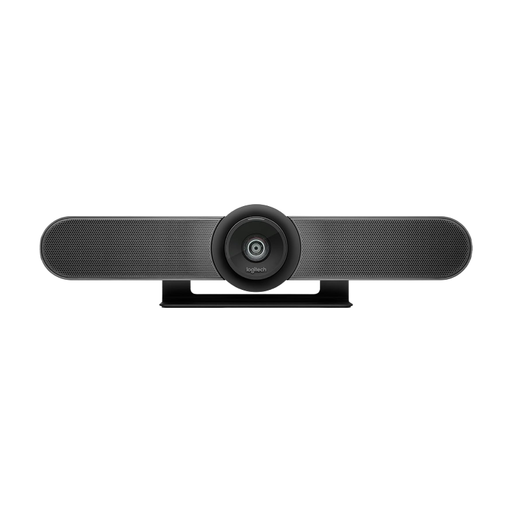
Why This Fits Their Persona: This all-in-one video bar is an excellent choice for small meeting rooms or huddle spaces (up to 6 people) where a quick and straightforward installation is the priority.
By being selected for the correct use case—small rooms—it avoids the mistake of deploying an underpowered system in a large environment. It highlights the difference compared to modular systems.
Extremely compact design with an integrated 4K camera, microphone array, and speaker. Simple USB plug-and-play connectivity for rapid deployment.
For a more comprehensive selection of audio solutions, we have compiled a list of products that meet strict selection criteria and are suitable for professional environments.
Optical zoom physically adjusts the lenses in the camera to magnify the image without any loss of quality. The image quality remains high even at maximum zoom. Digital zoom simply enlarges a portion of the existing image using software, which inevitably leads to a visible loss of quality (pixelation). For large rooms, optical zoom is therefore indispensable.
As a rule of thumb, a single mic pod effectively covers a radius of about 2 to 3 meters (6.5 to 10 feet). For a 50 m? room with a long conference table, you will typically need at least two, and often three or four, mic pods to ensure even audio pickup for all participants. Modular systems like the Logitech Rally Plus allow for the connection of up to seven mic pods.
A non-certified USB system might be recognised as a generic camera and microphone and function on a basic level. However, there is no guarantee of stability or access to advanced features like PTZ control from within the app, automatic firmware updates, or dedicated manufacturer support for issues. For reliable operation in a corporate environment, non-certified hardware is strongly discouraged.