What to consider when buying
First compare storage for media and cache, then check your software requirements, and finally consider the hardware for the effects you actually use.
| Buying consideration |
What to check |
Who it matters most to |
| Storage for long recordings |
SSD capacity, fast external connections or internal drive bays, and space for cache and media. |
If I record long cooking sessions, I want room for original footage and working files, without leaving storage planning to chance. Around 29% of consumers prioritise space and speed for raw footage. |
| Smooth playback preview |
Editing software, operating system, resolution and recording format; then check the specific CPU and RAM configuration. |
If I want the preview to run smoothly with my actual footage, I’ll match the configuration to my software and file format. Around 23% of consumers prioritise how easily their footage can be edited. |
| Backing up original footage |
Plan for a separate working drive and backup; check that raw footage and project files can be backed up regularly. |
If footage can’t easily be recorded again, I want to be able to recover it if the working drive fails. Around 18% of consumers put protecting their original footage first. |
| Graphics for effects |
Match the effects you use and your software requirements to the GPU actually installed and its memory. |
If I use more demanding effects, I want to choose graphics hardware that suits my editing software. Around 12% of consumers prioritise this. |
| Overall configuration and upgrades |
Compare the full RAM and SSD specifications, ports and upgrade options for the specific model. |
If I want to expand my projects later, I’ll check exactly what the model I’m choosing includes and what else I may need. Around 18% of consumers prioritise overall costs and future upgrades. |
According to Adobe, its recommendation of 32 GB of RAM and 8 GB of GPU memory applies to Premiere on Windows at 4K and above. Check the requirements for other editing programmes, operating systems and recording formats. Proxies can help when editing large or processor-intensive files in Premiere, but they don’t replace the original footage or its backup.
Joybuy product selection
This selection of desktops and mini PCs includes configurations that may suit storage planning and editing projects. For each model, check that its operating system and actual specifications are compatible with your editing software and footage.
 No image available
Acer Nitro 20 N20-100 desktop PC, i5, 32 GB, 1 TB, RTX 5060, Windows 11 Home
The SSD and additional HDD may suit projects with large files; remember to plan for a separate backup as well.
Specifications include 32 GB of RAM, a 1-TB SSD and a 1-TB HDD. The description also lists dedicated NVIDIA graphics with 8 GB of GDDR7 memory.
View at Joybuy
 No image available
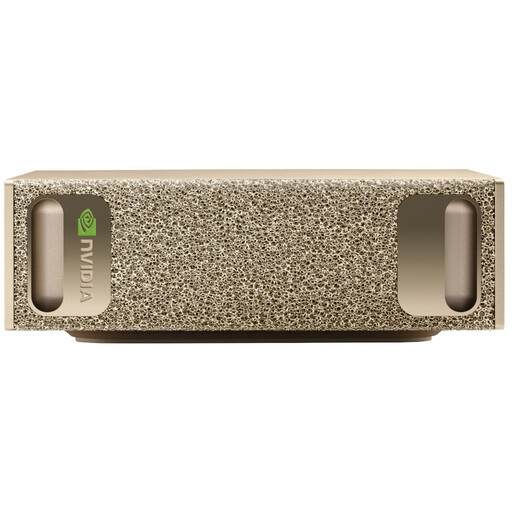
NVIDIA DGX Spark Founders Edition, GB10, 128 GB RAM, 4 TB SSD, NVIDIA DGX OS
The listed storage may suit large files; before using this system for video editing, check software compatibility carefully.
The description lists 128 GB of LPDDR5X memory, an integrated NVIDIA GPU, a 4-TB SSD and a 20-core processor. It’s designed primarily for AI work and comes with NVIDIA DGX OS, so make sure this operating environment is compatible with your editing software.
View at Joybuy
 No image available
HP Z2 Tower G1i A40MMET, Core Ultra 7 265, 32 GB DDR5, Windows 11 Pro
This tower is an option for a Windows editing setup, provided the specific configuration suits your project.
Specifications include a Core Ultra 7 265 and 32 GB of DDR5 RAM. Before ordering, check the exact SSD specifications of the version on offer and plan for a separate backup.
View at Joybuy
 No image available
Dell Alienware Aurora ACT1250 1J3N5, Core Ultra 9 285K, 32 GB, 2 TB SSD, RTX 5080
This tower configuration may suit editing projects that use memory-intensive applications; check that its GPU specifications match the effects you actually use.
The description lists 32 GB of DDR5, a 2-TB SSD, an RTX 5080 with 16 GB of GDDR7 memory and Windows 11 Home. Keep the ventilation openings clear, as instructed in the product description, and plan for a separate backup.
View at Joybuy
 No image available
Captiva Highend Gaming PC R89-503, Ryzen 7 7800X3D, RTX 5070 Ti, 32 GB DDR5, 2 TB SSD
The listed SSD capacity may suit large project files; also keep your original recordings on a separate backup drive.
The description lists a Ryzen 7 7800X3D, 32 GB of DDR5, an RTX 5070 Ti with 16 GB of GPU memory, a 2-TB NVMe SSD and Windows 11 Home. Before setting it up, follow the product description’s guidance on transport protection and ventilation clearance.
View at Joybuy
Frequently asked questions about video-editing PCs
How should I set up drives for long projects?
For Premiere, Adobe recommends a fast SSD for the system and application, fast media storage and, if possible, a dedicated SSD for the cache. If you only have two drives, Adobe says you can use the same second drive for media and cache. Plan storage for original footage and working files separately from your backup.
Can I use a less powerful computer by working with proxies?
In Premiere, lower-resolution working copies can make large or processor-intensive video files easier to edit. Whether this works for your footage depends on the proxy requirements; proxies don’t replace the original files or their backup.
How can I prevent my original recordings from being lost?
The Verbraucherzentrale recommends a data backup strategy based on the 3-2-1 rule. Back up raw footage and project files regularly to separate storage media, and keep a copy elsewhere. This is a data backup recommendation, not a required PC specification.
What rights do I have when buying a PC online in Germany?
When a consumer buys goods from a business, they generally have a statutory right to a remedy for faulty goods for at least two years. Online purchases generally come with a 14-day right to cancel, although exceptions apply and the buyer’s status matters. This is separate from a voluntary manufacturer’s guarantee. Your Europe and the Council of the European Union explain these consumer rights.
Does the 14-day right to cancel also apply to business purchases?
The EU consumer rights described here apply to consumer purchases. You can’t tell from the intended use alone whether a purchase for a commercially operated video channel is covered; check the capacity in which the contract is made.


