If you want to keep several video and audio tracks, as well as a longer timeline, in view at once, start by looking at a widescreen monitor and the usable space it offers for your editing software. A 4K model is a more obvious choice for assessing 4K footage in detail. You should also consider suitable colour modes, connections and how much space the preview and timeline will actually take up.
Which monitor is right for you?
Editing with multiple tracks
If you want to keep video tracks, audio and a longer timeline in view at the same time, usable screen width is a key factor in your choice. Adobe explains that video and audio tracks can be arranged separately, and that video tracks play back as layers.
4K and colour checking
If you’re assessing image detail or matching colours between shots, check that the resolution and colour modes suit your output format. BenQ, ASUS and EIZO each list specific colour or calibration features for selected models.
Laptop editing set-up
If you regularly connect your editing laptop, make sure the monitor’s video connection and power delivery meet your laptop’s requirements. ASUS lists 96 W USB-C Power Delivery for the PA279CRV, while LG specifies 60 W power delivery for the 34WN80C-B.
What should you look for when buying?
First decide whether timeline width or a native 4K preview matters more to you. Then check the colour mode and laptop connection on the specific model you’re considering.
| Buying criterion |
What to look for |
Who is this particularly important to? |
| Timeline and tracks |
Compare aspect ratio, pixel count, desk space and your planned editing software layout. |
If I want to keep several video and audio tracks, as well as a longer timeline, in view at once, usable width matters most to me. Around 36% of consumers put timeline visibility first. |
| Colour matching |
Check the output colour space, available colour modes and, if needed, calibration options. |
If I want to assess colours across different shots, I need settings that suit my output format. Around 29% of consumers prioritise colour matching. |
| 4K detail |
Consider the footage resolution, preview window size and operating system scaling together. |
If I want to check fine detail in 4K footage, I need a preview with a suitable pixel count. Around 21% of consumers prioritise checking 4K detail. |
| Laptop connection |
Check the laptop’s video output, cable and charging requirements against the monitor’s specifications. |
If I connect my laptop to my editing set-up, the picture connection and power delivery need to suit my device. Around 14% of consumers focus on the laptop connection. |
Common misconceptions
-
Assuming a widescreen display gives you a native 4K preview
A widescreen 21:9 model with 3,440 × 1,440 pixels doesn’t offer the same pixel count as a 4K model with 3,840 × 2,160 pixels. The number of tracks you can see at once also depends on how your editing software is arranged.
Choose between timeline width and detail checking based on your priorities, and compare the full pixel specifications.
-
Assuming a colour-space percentage guarantees a complete colour workflow
Manufacturers list different colour modes and calibration features for specific models. A colour-space specification on its own doesn’t prove that your software and output are correctly set up for your workflow.
Decide on your output format, then check the colour modes and, if needed, the calibration options for the specific model.
A calibration workflow may require additional equipment.
-
Assuming USB-C guarantees enough power to charge your laptop
A USB-C port alone doesn’t tell you whether its power delivery will suit the connected laptop. The models reviewed here specify different power outputs.
Compare your laptop’s video output, cable and charging requirements with the Power Delivery specification for the specific monitor.
If the connection or power delivery isn’t suitable, you may need a separate power supply or a different connection.
Monitor brands to consider
LG
The 34WN80C-B is a 34-inch 21:9 model, designed to provide a wide workspace for timeline-focused editing.
- For this model, LG lists a 3,440 × 1,440 resolution, IPS and 60 W USB-C power delivery.
- Its resolution isn’t 4K UHD, and the tracks you can see also depend on how your editing software is arranged.
BenQ
The PD2705U is a 27-inch 4K model with published colour mode specifications.
- BenQ specifies 99% sRGB and 99% Rec. 709, as well as factory calibration, for the PD2705U.
- These are the manufacturer’s specifications for the model, not an independent measurement of the individual unit supplied.
ASUS
The ProArt PA279CRV combines a 27-inch 4K UHD display with colour presets and USB-C.
- ASUS lists a Rec. 709 preset, 99% DCI-P3 and 96 W USB-C Power Delivery, among other features.
- Whether the charging output suits your laptop depends on the laptop itself; ASUS notes that specifications may vary by region.
EIZO
The ColorEdge CS2740 is an example of a model designed for a hardware calibration workflow.
- EIZO describes the CS2740 as having factory calibration and hardware calibration with ColorNavigator.
- Calibration doesn’t guarantee that finished videos will look the same on other devices.
Dell
The UltraSharp U2723QE is a 27-inch 4K model with a USB-C hub.
- Dell describes the model as a monitor with a USB-C hub.
- Dell Germany currently marks the model as unavailable on its own product page. This doesn’t indicate whether it’s available from other retailers.
Joybuy monitors for your editing set-up
This selection includes widescreen monitors for extra timeline space and 4K models for a detail-focused preview.
 No image available
CRUA 49-inch DQHD curved monitor
The 32:9 format is worth considering if you’re planning a wide workspace for your timeline.
49 inches, 5,120 × 1,440 pixels, 165 Hz, 1,500R, HDMI 2.1 and DisplayPort 1.4, according to the product name. If you’re wall-mounting it, make sure the bracket is suitable for its size and weight.
View at Joybuy
 No image available
INNOCN E34A1R 34-inch curved ultrawide monitor
The 21:9 format gives you a wide workspace if you’re prioritising timeline space over a native 4K preview.
3,440 × 1,440 pixels, VA, 200 Hz and 1,500R, according to the product name. The title also lists PIP and PBP modes, as well as HDMI and DisplayPort connections.
View at Joybuy
 No image available
INNOCN CB27U1 27-inch 4K UHD monitor
4K UHD is an option if you want to assess image detail in the preview.
3,840 × 2,160 pixels and IPS, according to the product name. The product specifications also list 100% sRGB, 99% Adobe RGB and 90 W USB-C Power Delivery; the charging output needs to suit your laptop.
View at Joybuy
 No image available
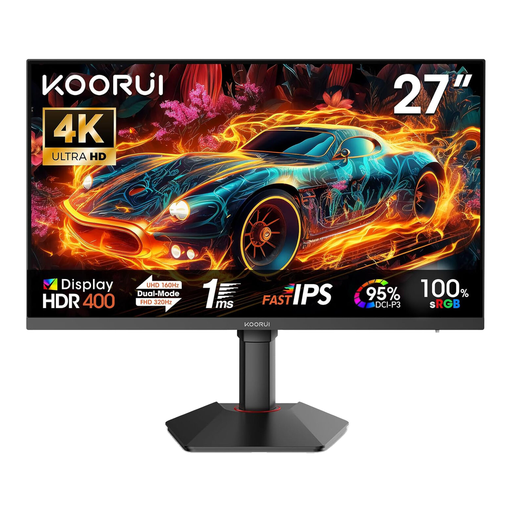
KOORUI G2741L 27-inch 4K UHD monitor
4K resolution is an option if you want to check detail in your footage.
3,840 × 2,160 pixels; according to the product specifications, dual mode offers 160 Hz at 4K and 320 Hz at FHD. The description lists 100% sRGB and 95% DCI-P3.
View at Joybuy
 No image available
MSI MAG 321UPDE QD-OLED 31.5-inch 4K monitor
The 4K resolution and larger screen size are worth considering if you want to view your preview and workspace on a bigger display.
The product name lists a 31.5-inch QD-OLED display with 3,840 × 2,160 pixels.
View at Joybuy
Frequently asked questions
Do I need an ultrawide monitor for multiple video tracks?
No. A widescreen display can help if you want to spread out your timeline, but you decide the number and layout of tracks in your editing software. Before buying, think about how you’ll actually use the timeline and preview side by side.
What should I check when connecting a laptop?
Compare your laptop’s video output and charging requirements with the connections and stated USB-C power delivery of the specific monitor. ASUS lists 96 W Power Delivery for the PA279CRV, while LG lists 60 W for the 34WN80C-B; whether that’s suitable depends on your laptop.
Does a monitor need regular calibration?
It depends on how important consistent colour settings are to you. EIZO describes hardware calibration with ColorNavigator for the CS2740; this feature isn’t a must-have for every straightforward editing workflow.


