If you’re buying a new screen and computer and want to use as few power sockets as possible, a suitably configured All-in-One is a natural place to start: this design has an integrated screen, as MEDION describes it. If you already have a suitable monitor, a mini PC could be a good fit; the monitor may still need its own power socket. A tower is worth considering when specific upgrade options matter for your editing workflow. Before you buy, check the requirements of your editing software and video files, as well as the connections you need.
Who are the different types of desktop PC suited to?
An editing setup with just one spare socket
If you also need a screen, an All-in-One combines the computer and display in a single device. You’ll still need to check that the specific model has the right specs for your videos; MEDION describes this design as having integrated hardware components.
Editing 4K holiday videos
If you’re working with high-resolution footage or demanding effects, compare your editing software’s requirements with the formats of your videos. Adobe’s guidance on RAM and supported hardware applies to Premiere, not every editing app.
Using a monitor you already own
If you want to keep using a suitable screen, consider a mini PC or tower. Apple lists ports for external displays on the Mac mini M6; remember to factor in the monitor’s own power socket when planning your setup.
What should you look for when buying?
All-in-One PC
A good fit if: you need a new computer and screen and want to set them up together as a compact, single device.
Consider: display, RAM and upgrade options vary by model. An integrated screen doesn’t remove the need to check whether the PC is suitable for your footage.
Mini PC
A good fit if: you already have a suitable monitor and want to keep the computer’s footprint small.
Consider: you’ll need to provide the screen and possibly other accessories separately, so check their power requirements as well as the computer’s video and media ports.
Tower PC
A good fit if: your editing workflow calls for specific internal drives, a suitable graphics card or the option to upgrade later.
Consider: the computer and separately powered screen take up space and may need several power sockets. Check the upgrade options for the specific case and motherboard.
For consumers in Germany choosing a desktop PC for editing holiday videos, the following buying priorities reflect different needs; each percentage shows the most important priority for that group.
| Buying priority |
What to check |
Who is it important to? |
| Power sockets |
Count the sockets needed for the computer, screen and other devices. Also check what’s included with the specific model. |
If you have only a few spare sockets at your editing setup, you’ll want to avoid having to power a separate monitor if possible. Around 36% of consumers put the number of power sockets needed first. |
| Editing performance |
Compare the resolution and codec of your clips with the requirements of the editing software you actually use. For Adobe Premiere versions 26.0 to 26.5.2 on Windows, Adobe recommends 32 GB RAM or more for 4K and higher resolutions. |
If you’re working with 4K footage or demanding effects, you’ll want to know first whether your software, video format and hardware are compatible. Around 29% of consumers prioritise performance that suits their editing needs. |
| Existing monitor |
Check your screen’s resolution and connection type, along with the computer’s compatible video outputs. Remember that the monitor may need its own power socket. |
If you want to keep using a suitable screen or choose one separately from the computer, its connections and power supply are key considerations. Around 21% of consumers prioritise using their existing monitor. |
| Storage and upgrades |
Compare SSD capacity, ports for camera media and external drives, and the documented upgrade options for the specific configuration. |
If you want to plan storage and future upgrades carefully, consider how much space you’ll need for media and cache. Around 14% of consumers prioritise upgradeability and potential future costs. |
Avoiding pitfalls when buying a video editing PC
-
Assuming a mini PC means you’ll only need one plug for your setup
A mini PC needs a separate screen, which may need its own power socket. This means your complete editing setup could need more sockets than the computer alone.
Count the plugs for all the devices you plan to use, including the screen and accessories, before choosing a PC type.
-
Assuming a review result applies directly to your editing needs
COMPUTER BILD’s review results relate to the specific devices tested. They don’t automatically tell you whether another model can handle your codec, editing software or 4K footage.
Compare your video files and software version with the specifications of the exact configuration on sale. Also check whether the RAM can be upgraded and what hardware your software supports.
-
Solving a shortage of sockets by daisy-chaining extension leads
The German Social Accident Insurance recommends against connecting portable multiple-socket extension leads in a chain. This is safety advice, not a statement about a legal limit on sockets in private homes.
Plan the power supply for the devices you actually need and check the load rating of the extension lead you use, rather than daisy-chaining leads.
Which brands and ranges are worth considering?
Apple
The iMac is an All-in-One with an integrated screen, while the Mac mini is a computer for use with a separate display.
- Apple Germany lists an integrated 24-inch 4.5K display for the iMac M6. The Mac mini M6 has ports for external displays.
- Check whether you have a suitable monitor and what storage and accessories you need. The display specifications don’t indicate a particular video editing speed.
HP
OmniStudio-X All-in-One models with an integrated 27-inch screen.
- HP Germany lists 32 GB RAM, a 512 GB SSD and a QHD display for the 27-cx0775ng configuration.
- If you work with 4K footage, consider the display and internal storage in light of your workflow. The manufacturer’s claims about creative use aren’t independent evidence of this model’s editing speed.
Lenovo
The IdeaCentre AIO Gen 10 is a configurable Windows All-in-One with a 27-inch screen.
- A configuration shown on Lenovo’s German website lists 16 GB RAM and a 512 GB SSD.
- This configuration has an FHD display, so it won’t automatically suit every 4K editing workflow. The specifications of the configuration actually on sale are what matter.
ASUS
The ExpertCenter E5402 and P600 PM640KA are All-in-One models with specifications that vary by model.
- According to COMPUTER BILD, the RAM was upgradeable in the E5402 they tested.
- For the PM640KA they tested, COMPUTER BILD described the RAM as soldered and the SSD storage as limited. These findings apply to the devices tested, not every configuration on sale or its suitability for 4K editing.
MEDION
The Signium 27 S1 is an All-in-One range with an integrated screen.
- The German manufacturer’s overview lists configurations with either 16 or 32 GB RAM and a 1 TB SSD.
- Check the exact configuration and the requirements of your editing software. General claims from the manufacturer about media editing are no substitute for checking your files and workflow.
Joybuy products for use with an existing monitor
The following Joybuy products are mini PCs for a setup with a separately connected monitor; remember to factor in its power supply.
 No image available
Firebat F1 P mini PC
A compact computer option if you already have a suitable monitor; it may still need its own power socket.
Listed specifications include an AMD Ryzen 7 H 255, 16 GB DDR5 RAM, a 512 GB SSD and Windows 11 Pro. For Adobe Premiere versions 26.0 to 26.5.2 on Windows, Adobe recommends 16 GB RAM for HD media. This makes the RAM specification relevant for that use case, but on its own it doesn’t tell you how the computer will perform with your footage.
The product title also lists USB4.0 and Wi-Fi 6. Check that the ports are suitable for your camera media and external drives.
View at Joybuy
 No image available
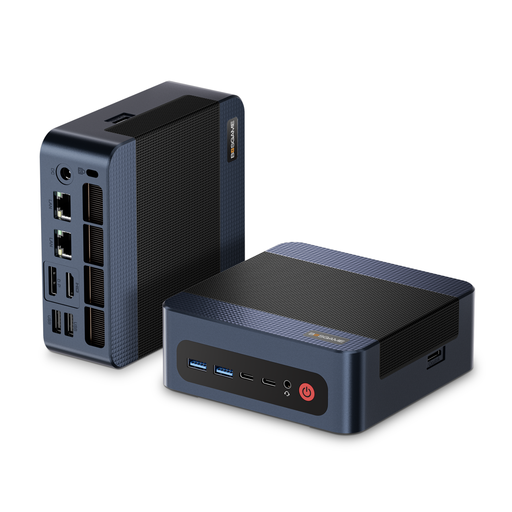
BOSGAME M4 Plus mini PC
A mini PC option for an editing setup with an existing monitor; remember that it may need an additional power socket.
The product title lists an AMD Ryzen 9 7940HS, 32 GB DDR5 RAM, a 1 TB PCIe 4.0 SSD and Windows 11 Pro. For Adobe Premiere versions 26.0 to 26.5.2 on Windows, Adobe recommends 32 GB RAM or more for 4K and higher resolutions. This is a software-specific guideline, not proof of the computer’s overall performance with your footage.
The title also lists USB4.0. Compare the ports with those required by your camera media and external drives.
View at Joybuy
Frequently asked questions
Will an All-in-One with one power plug be enough for my entire editing setup?
An All-in-One can reduce the number of sockets needed for the computer and integrated screen compared with a computer and separately powered monitor. Remember to count any additional mains-powered devices, and check the specifications of the exact configuration before buying.
What specifications do I need for 4K holiday videos?
It depends on your editing software and footage. For Adobe Premiere versions 26.0 to 26.5.2 on Windows, Adobe recommends 32 GB RAM or more for 4K and higher resolutions; supported GPUs can speed up playback and exporting H.264 and H.265 footage. This guidance applies to the software and formats specified, not as a general minimum for every editing programme.
Where should I store video files and cache if the internal SSD is short on space?
For Adobe Premiere, Adobe recommends fast SSD or NVMe drives for media and cache. If internal storage is limited, fast external drives are an option. Check the available ports and remember to allow for the extra device and any additional power socket it may need.
What should I know about buying a PC and dealing with a fault in Germany?
The German Federal Network Agency includes CE marking, manufacturer details and required German-language information among the points checked during market surveillance. Your statutory rights against the seller are separate from any voluntary manufacturer’s warranty. According to the Verbraucherzentrale, if a product is repaired or replaced to remedy a fault, the seller covers the transport, labour and materials costs; check the terms of your specific purchase.


