What should you look for when buying?
First, check the light’s angle and how much room you have for mounting it. Then consider colour control and power in relation to how you actually film your reviews.
| What matters |
What to check before buying |
Who should pay particular attention? |
| Lighting across the pages |
Diffuser and adjustable positioning; test both pages of the book, including your hand, in the camera frame. |
When I’m turning pages or showing drawing details, I don’t want harsh shadows from my hands or distracting reflections to obscure the page. For around 31% of consumers, reducing shadows and reflections is likely to be the top priority. |
| Consistent colours |
Check whether the white light is adjustable or fixed; keep the camera’s white balance consistent when comparing shots. |
When I compare paper, ink or pigments between shots, I don’t want changes in the light or camera settings to distort the colours. For around 25% of consumers, consistent, recognisable colours in their artwork are likely to come first. |
| Free space for your setup |
Allow room for a table stand or tripod; if you already have a mount, check the thread and any accessories you’ll need. |
When there’s very little room left on my small table, I don’t want the light to get in the way of the book or my hands. For around 25% of consumers, keeping their workspace clear is likely to be the main buying consideration. |
| Power and longer recording sessions |
Assess battery life only for the stated mode; if you see visible bands, record a test clip with an adjusted shutter speed. |
When I’m filming longer takes, I don’t want to have to stop because of power issues or visible bands. That’s why around 19% of consumers are likely to prioritise uninterrupted, flicker-free recording. |
Joybuy products for video recording
The Joybuy products below include portable video and RGB lights, as well as a ring light with tripod options for different filming spaces.
 No image available
MOMAN PC8 RGB Camera Light
Its portable design and mounting options may suit a flexible setup; check whether a mount can keep the light out of your workspace.
The description lists an adjustable colour temperature of 2,500–9,000 K, an integrated 3,100-mAh battery, CRI 95+ and TLCI 96+.
Mounting options listed include a 1/4-inch screw and a cold shoe.
View at Joybuy
 No image available
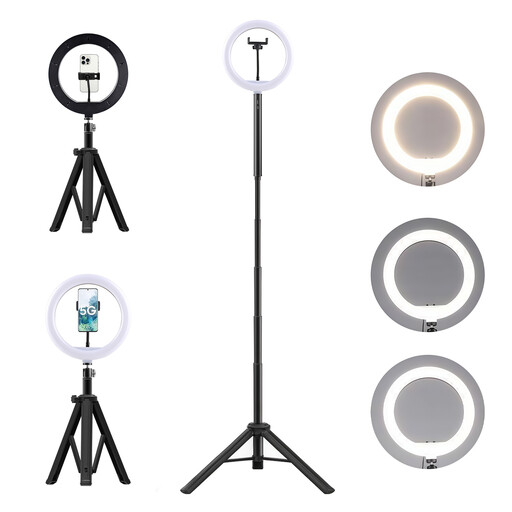
3-in-1 tripod with 10000-mAh power bank and ring light
This ring light kit could work if you plan to film front-facing shots as well as overhead views. Check for reflections on the paper and make sure the tripod and mount will fit in your filming space.
The description lists ten brightness levels, three colour temperatures, a 360° head, and both table and floor stands.
According to the description, the lithium-ion battery must not be opened, crushed or pierced, or exposed to heat, fire or water. Use a compatible charger and keep it away from children.
View at Joybuy
 No image available
COLBOR W60R Video Light, 60W RGB
Adjustable colour and white-light settings may be useful when switching between filming situations; test how they affect paper and colours in the camera frame.
The title lists 60 W and a weight of 345 g. The description lists RGB, adjustable white light from 2,700–6,500 K and brightness control from 0–100%.
Colour rendering is specified as CRI 97+.
View at Joybuy
 No image available
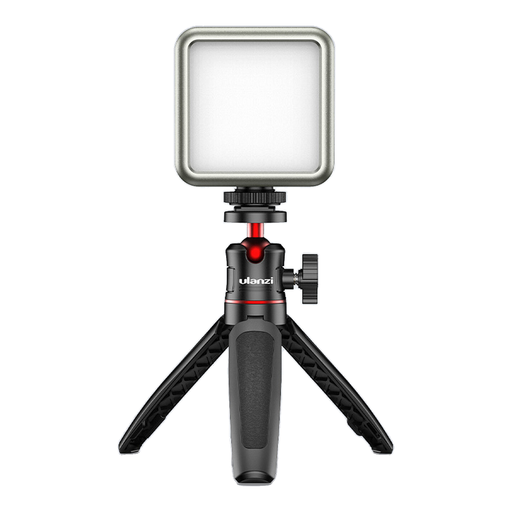
Ulanzi VL49 RGB with 2000-mAh battery
This compact battery-powered light may suit a portable setup. Check that you’re looking at the exact RGB version: it’s not the same as the white VL49 1672.
The description lists dimmable brightness, RGB and an adjustable colour temperature of 2,500–9,500 K.
The title specifies a 2,000-mAh battery; the description also lists magnets on the back.
View at Joybuy
 No image available
Ulanzi VL119 Handheld Video Light, 10 W
Its handheld design is suited to filming on the move, but overhead filming means you’ll need a free hand or a suitable way to position it.
The title lists 10 W, a 3,300-mAh battery and 360 lux at 0.5 m.
The description lists RGB, adjustable brightness and a colour temperature of 2,500–9,000 K.
View at Joybuy
Frequently asked questions
Does the light need to be positioned directly above the sketchbook?
No. Start by positioning it to the side and take a short test clip to see whether your hand, the spine or the paper surface causes any issues. Diffusion can soften harsh shadows, but it doesn’t replace testing from your camera’s position.
Will the Elgato Key Light Mini fit my table straight out of the box?
Not necessarily. Elgato specifies a 1/4-inch-20 mount, but doesn’t list mounting accessories as included. Check whether your existing arm or tripod is compatible, or whether you’ll need a mount.
How can I prevent bands in video when using LED lighting?
Record a test clip and adjust your camera’s shutter speed if possible. For regions with a 50-Hz power supply, Sony suggests 1/50 or 1/100 of a second as possible starting points when lights flicker. This doesn’t guarantee band-free footage with every light and camera.
Which mounts and power sources should I check before buying?
Check the specific offer to see whether it includes a compatible mount, power adapter or battery. Elgato doesn’t list mounting accessories with the Key Light Mini; according to the manufacturer, the documented NEEWER NL660 kit doesn’t include NP-F batteries.
Is a ring light automatically suitable for an overhead view of a sketchbook?
No. The front-facing ring light illumination described is mainly intended for filming faces. For an overhead view, take a test shot to check for reflections and make sure both pages remain clearly visible.


