Artists filming with a desk camera
If you film your paper and hands from above or at an angle, it’s important that your lines remain visible as your hand moves. Check the lighting in the footage rather than relying on a single brightness figure.


First, choose a position where both the paper and your drawing hand are clearly visible in the camera frame. Then decide whether a desk clamp, a freestanding panel or a compact rechargeable light is right for your table. Dimming and adjustable white light make it easier to fine-tune the lighting, but they’re no substitute for setting the camera’s white balance or taking a test shot to check for shadows, reflections and flicker. The product features mentioned are manufacturers’ claims, not comparative measurements taken at a drawing desk.
If you film your paper and hands from above or at an angle, it’s important that your lines remain visible as your hand moves. Check the lighting in the footage rather than relying on a single brightness figure.
If there’s little room for paper, a camera and arm movements, the edge of your desk and the available surface area will determine which type of mounting works best.
If you want the paper and pen colours to look consistent across several recordings, match the light colour to the camera’s white balance. Canon Europe explains that the colour temperature of the light falling on a subject affects how colours are reproduced.
First check where the light can be mounted securely, then see whether the recorded image renders shadows, colours and flicker as you’d like.
| What matters | What to look for when buying | Who should pay particular attention? |
|---|---|---|
| Visible lines, even with hand shadows | Record a short clip using your usual hand position and check the centre of the page, the edges and any shadows. NEEWER and Godox list diffusers for the panel models mentioned; test the effect at your own drawing desk. | When I move my hand over the page as I draw, I want to be able to see the lines even in shadowed areas. Around 26% of consumers prioritise keeping lines visible despite hand shadows. |
| Clear workspace and secure mounting | Measure the thickness of your tabletop and the available edge, and plan for your camera, light, cables and room to move at the same time. Elgato says the Key Light Air MK.2 has a clamp for tabletops up to 6 cm thick; whether a stand is included with the NEEWER NL660 depends on the package option. | When I film at a small desk, I want to keep my paper and room to move clear without the clamp or stand getting in the way of my camera or arms. Around 26% of consumers prioritise space-saving mounting. |
| Colours and paper whiteness | Check the Kelvin range and colour rendering specifications for the exact model, then adjust your camera’s white balance. Elgato lists 2.900–7.000 K for the Key Light Air MK.2; Godox lists average CRI and TLCI values of at least 98 for the P260C Pro. Canon Europe explains how light colour affects the image. | When I work with specific pens and white paper, I want their colours to look consistent in my recordings. Around 21% of consumers pay particular attention to colour reproduction and paper whiteness. |
| Set-up and pack-away without a mains socket | Compare the stated run time at full power with the length of your demo, and check which batteries or mounts are actually included. Ulanzi lists a 70-minute run time at full power for the VL119; NEEWER states that NP-F batteries are not included with the NL660. | When I often move the light or pack it away after filming, I want to be able to set it up flexibly without needing a mains socket. Around 11% of consumers prioritise a portable setup. |
| Flicker in video footage | Test a clip using your planned frame rate, shutter speed and brightness setting. Sony Support describes possible flicker or banding while recording video; a test with your own camera will show what to expect with your particular setup. | When I record a longer demo, I want to avoid visible banding in the video. Around 16% of consumers prioritise flicker-free footage. |
Watts measure power consumption and, on their own, don’t tell you how the page will be lit in your video. The Verbraucherzentrale recommends checking lumens and Kelvin figures as well as watts when buying; lighting measurements can also vary depending on the test setup and reflector used.
Only compare figures taken under similar test conditions, and check the whole drawing area in a test recording.
Whether the light can be mounted securely on your desk and how it’s powered depends on the model and package option you choose. You may need to allow for a stand, a suitable adapter or a battery separately.
Check the contents of the specific package and measure your desk edge and available space before buying.
A diffuser and a manufacturer’s colour rendering figure don’t prove how your own paper and pens will look on camera. Photoflex notes that light modifiers and other bright surfaces can still appear in reflective surfaces.
Test your usual paper and pens with your own camera, then adjust the light angle and white balance based on the footage.
Ulanzi lists a 70-minute run time at full power for the VL119. Compare this with the length of your demonstration.
Before a longer demo, check which power options are available for the specific model.
A clamp-on desk light for a fixed workspace with a suitable edge.
An adjustable panel that can be positioned at your desk with a suitable mount.
A larger panel light for a separately planned setup, with a diffuser and a choice of power options.
A COB continuous light for a setup where the light modifier and mount need to be planned separately.
A portable supplementary light for a setup that’s often moved or packed away after filming.
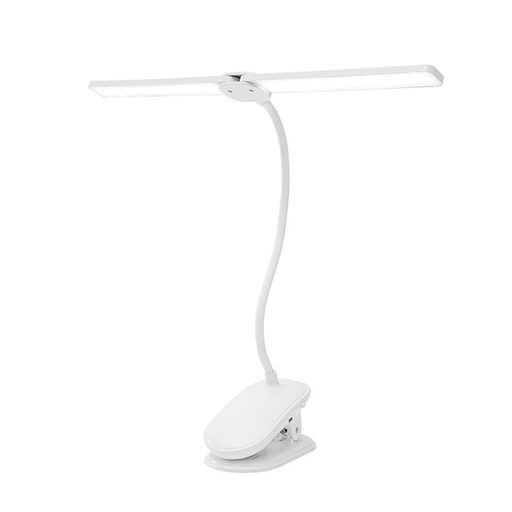
This Joybuy selection includes a dimmable clamp-on desk light. It may suit you if the clamp fits your desk edge and you can position the light heads so that your camera and hands have room to move.
 No image available
This clamp-on light can save desk space if the clamp fits and you can position the flexible light heads away from the areas where your camera and hands need to move.
The product name lists two light heads, flexible gooseneck arms, dimming, three colour modes, 360° rotation and battery power. Check that the clamp fits your desk edge.
Start by framing the shot you want, then test a dimmable light positioned to the side or at an angle while you draw. Check both shadows and possible reflections in the footage; a diffuser alone won’t guarantee a reflection-free recording.
The light falling on your subject and the camera’s white balance affect how colours look in the recording. Set the white balance for your actual setup and check a video with white paper and the pens you use; a manufacturer’s CRI figure doesn’t prove how the colours will look under mixed room lighting.
Check the contents of the exact package option: with the NEEWER NL660, whether a stand is included depends on the package, and an NP-F battery isn’t included; the Elgato Key Light Air MK.2 doesn’t come with a suitable PD adapter or power bank. Also read the returns terms that apply to your specific purchase.
The Bundesnetzagentur lists CE marking, product traceability and accurate manufacturer details among the aspects covered by market surveillance. The European Commission explains that there is no central EU body that issues CE marking as a certificate. The Umweltbundesamt recommends not disposing of old electrical appliances in household waste and, where possible, handing in removable batteries separately.