What to look for when buying
For long takes, check the fit, record a voice sample and confirm the connection all together. A compatible plug alone won’t tell you whether a headset will be comfortable or how it will perform at your intended recording location.
| What to consider |
What to look for when buying |
Who it matters most to |
| Fit for long takes |
Try wearing the headset for as long as possible, and check whether the ear pads, headband and microphone boom stay comfortably in place, including when you’re wearing glasses. Audio-Technica says the ATH-M50xSTS comes with two sets of ear pads. |
If I’m speaking for a long time, I want the headset to stay in place without the headband or ear pads pressing on me. Around 29% of consumers prioritise comfort and a secure fit for long takes. |
| Clear voice recordings |
Record quiet and emphatic passages without editing, then listen back and adjust the microphone position and input level before recording the full take. In its test of the ATH-M50xSTS-USB, c’t noted that breathing sounds could be picked up if the microphone was too close. |
If I want my narration to remain clear throughout the take, I want to check the position and level with my own voice first. Around 29% of consumers put consistent voice recording first. |
| Recording and playback connections |
Check the exact model name against your device’s inputs and outputs, and see what’s included in the box. According to Audacity, an XLR microphone needs an audio interface to record on a computer. |
If I want to use my existing recording equipment without buying the wrong thing, the microphone and headphone connections need to be compatible. Around 24% of consumers prioritise device compatibility. |
| Noise at your recording location |
Record at your intended location under typical conditions, then listen back to the saved file. A Bonedo review described the earcup isolation on the RØDE NTH-100M as relatively modest; this doesn’t directly tell you how the microphone track will sound. |
If I want to avoid echo or background noise, I want to assess the recording at the actual location rather than relying on what I hear through the headphones. Around 18% of consumers focus on noise at the recording location. |
Related products at Joybuy
This selection includes headsets with 3.5 mm, USB and wireless connections. Before buying, check that each model’s signal path is compatible with your recording equipment. For long takes, you should also check the fit and voice recording for yourself.
 No image available
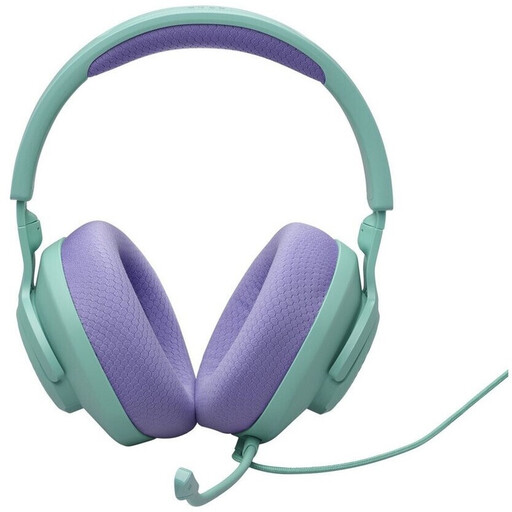
JBL Quantum 100 M2 wired over-ear headset, cyan
May suit recording equipment with a compatible 3.5 mm connection; check the fit for longer takes.
According to the product description, it has a detachable, adjustable microphone boom, memory foam ear cushions, microphone mute and windscreen foam.
View at Joybuy
 No image available
JBL Quantum 400 over-ear gaming headset
Worth considering if the USB or 3.5 mm connection suits your recording equipment; test the microphone position before recording a full take.
The product description lists USB Type-C and 3.5 mm connections, a flip-up boom microphone with noise cancellation, and memory foam ear pads.
View at Joybuy
 No image available
Logitech 960 stereo headset, USB
Designed for computer recording, provided the USB connection is compatible with your device; check the fit and listen back to a saved voice sample before longer takes.
Specifications include a 2.4 m cable, an adjustable microphone boom and soft ear pads.
View at Joybuy
 No image available
Logitech G PRO X gaming headset, black, USB
May suit voice recording on a computer if the USB connection is compatible with your device.
The product description lists an external USB sound card, a detachable microphone, and leatherette and fabric ear pads.
View at Joybuy
 No image available
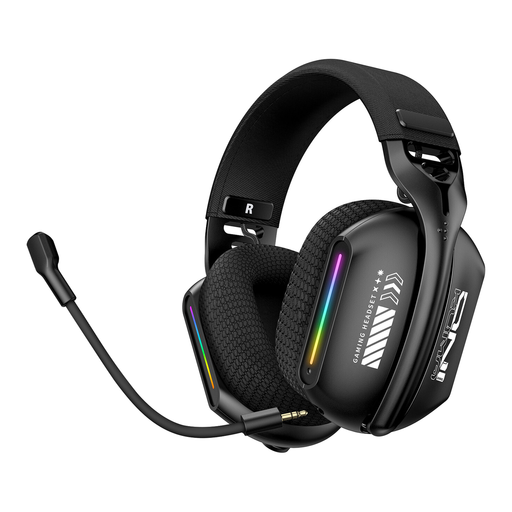
ONIKUMA GT808 RGB-lit triple-mode headset
The different connection options may be useful if you need to move around while recording; check that the receiver you plan to use is compatible with your device.
Bluetooth, wired and 2.4 GHz connections are listed. The product description also mentions an adjustable microphone and memory cotton ear cushions.
View at Joybuy
Frequently asked questions
How should I set up my headset before a long take?
In your recording software, select the microphone and headphones you want to use as the input and output devices. Record a sample using your usual speaking voice and a more emphatic delivery, check the levels and listen back to the saved recording. Audacity notes that clipped audio can’t be repaired afterwards.
Can I record with an XLR broadcast headset directly on a laptop?
An XLR microphone can’t be used on its own by connecting it directly to a computer; Audacity describes using an audio interface for this signal path. The headphone connection must also be compatible. For connecting the NTH-100M to an XLR microphone input, RØDE describes a suitable adapter that supplies plug-in power.
How should I care for a headset used regularly for long recording sessions?
Check the instructions for your exact model to see which ear pads and cables can be removed or replaced, and how they should be cleaned. Shure lists replaceable cables, ear pads and a windscreen for the BRH440M; RØDE describes the NTH-100M’s ear pads as removable.
What should I consider when it comes to accessories and aftercare?
The specified box contents for the Shure BRH440M-LC and beyerdynamic DT 297 PV MK II don’t include the required connection cable. For defective consumer purchases in Germany, Verbraucherzentrale distinguishes between the seller’s statutory liability for defects and a voluntary guarantee; if you have an additional guarantee, check its terms.
Am I allowed to record other people’s conversations for the audio guide?
Not in every case: under § 201 of the German Criminal Code (StGB), secretly recording another person’s private speech without authorisation is a criminal offence. If identifiable voices are being processed, you should also check the data protection basis for the specific activity; consent is one possible basis, but not the only one. This does not mean there is a general ban on recording your own narration alone.


