What should you look for when buying?
Make a test recording with the fan switched on to see how well the microphone performs in your recording space. Then choose the connection and features to suit your speaking distance and setup.
| Buying consideration |
What to look for |
Who should prioritise this? |
| Clear speech despite fan noise |
Check the polar pattern and position yourself close to the capsule, keeping the microphone steady. Audio-Technica describes dynamic models as relatively tolerant of constant background noise when you speak close to the mic; this is not a measurement of how they perform with your particular fan. |
If I’m recording the guide on my own, I want my voice to remain clear with the fan running. That’s why around 50% of consumers put speech clarity despite fan noise first. |
| The right connection |
Check USB compatibility and the inputs available on your device. To record on a computer via XLR, you’ll need a suitable interface or mixer; Elgato explains the additional signal path. |
If I want to record on my computer without a separate interface, the right USB connection matters to me. Around 30% of consumers prioritise a simple setup without extra equipment. |
| Monitoring and positioning |
Check for a headphone socket, controls and what’s included in the box. A desk stand or mount needs to suit your recording position. |
If I’m recording several sections of a guide, I want to hear my signal directly and position the microphone consistently each time. Around 20% of consumers prioritise this level of recording control. |
Microphones for voice recording
This selection includes USB and USB/XLR microphones, USB condenser models and a set with two microphones. For each one, check speech clarity with a test recording in your intended position and with the fan running.
 No image available
FIFINE K688CTW dynamic USB/XLR microphone, white
For recording a single voice at close range if you want to use USB and a positionable boom arm.
Unidirectional dynamic microphone; the product description recommends a speaking distance of 2 to 6 inches. The headphone socket, gain control and mute function are available in USB mode. To connect via XLR to a computer, you’ll need a suitable interface or mixer; an XLR cable isn’t included.
View at Joybuy
 No image available
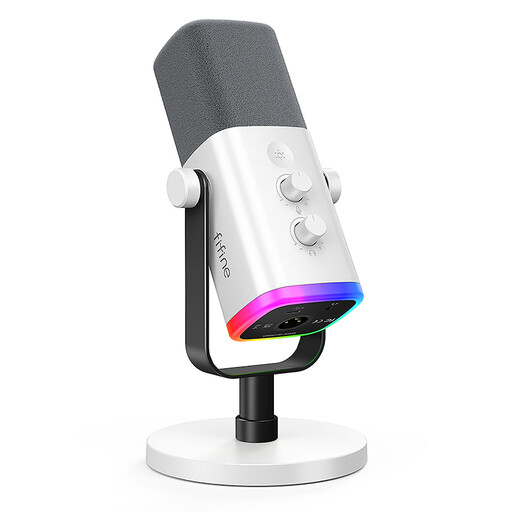
FIFINE AM8 White, dynamic XLR/USB microphone
For close-up voice recording if you want to use USB and monitor your audio directly through headphones.
The product description lists a speaking distance of 2 to 6 inches, a headphone socket with volume control and a desk stand. According to the description, the gain control, mute function and RGB lighting are available in USB mode. For XLR recording on a computer, you’ll need a suitable interface or mixer; an XLR cable isn’t included.
View at Joybuy
 No image available
USB condenser microphone with RGB lighting, 7-piece set
For voice recording on a PC if you’re looking for a USB condenser microphone with a headphone socket.
The product details list a mute button, a Type-C adapter and real-time monitoring through the headphone socket. Before a longer recording session, check that the microphone works with your recording device and listen to how the fan sounds in the recording.
View at Joybuy
 No image available
Yinkaer G10-P17-P17 podcast set with two microphones
For a setup where you’d prefer a set with two microphones and an audio mixer rather than a single microphone for speaking.
According to the product details, the set includes two 3.5 mm condenser microphones and an audio mixer; the description also lists support for PCs and phones. Check that the connections and shared setup suit your recording space.
View at Joybuy
 No image available
JBL Quantum Stream Studio, USB-C condenser microphone
For recording a single voice on a computer if you want direct monitoring and a selectable cardioid mode.
The product description lists USB-C, a mute function, monitoring and a flexible microphone mount. Software options for EQ and noise reduction are also listed; check that the software is compatible with your setup, then assess the results with a test recording.
View at Joybuy
Frequently asked questions
How should I position the microphone with the fan running?
With a directional dynamic microphone, speak into the front of the capsule and try to keep the same distance as you read. Listen to a test recording made in your actual recording space with the fan running: manufacturer claims about reducing noise from the sides and rear don’t guarantee complete suppression.
Do I need an audio interface for XLR?
To record an analogue XLR microphone directly on a computer, you’ll need a suitable audio interface or a mixer that connects to a computer. With a compatible USB microphone, you don’t need a separate interface for this connection.
What should I check about accessories and consumer guarantees?
Check that what’s included suits your recording space and whether you’ll need a stand, compatible cables or headphones. For consumer purchases in the EU, you have a minimum legal guarantee of two years from the date you receive the goods. The European Union’s Your Europe website explains this period.
Can I record other people’s conversations for the audio guide?
Section 201 of the German Criminal Code (StGB) covers, among other things, the unauthorised recording of another person’s non-public spoken words. If other people’s conversations could be captured in your recording, discuss this with them beforehand; this provision alone doesn’t answer every question about publishing the recording later.


