For a village audio guide with a seated narrator, a lavalier microphone is a good option if you want the mic to stay close to the speaker during longer passages. A handheld recorder is suitable if you also want to capture ambient sounds. A simple voice recorder can make short recordings and file transfers easier, but no device will automatically compensate for a reverberant room. Before buying, check the microphone position, make a test recording, and consider the file format, power supply and any accessories you may need.
Which option is right for you?
Creators focused on the speaker’s voice
If you’re recording a seated person for the finished audio guide, test the microphone distance and room reverberation at the recording location. Shure explains that a microphone can’t simply separate direct sound from unwanted reverberation.
First-time audio guide creators
If you want to keep recording, checking and transferring files straightforward, compare voice recorders and compact handhelds by their connections and recording formats. Sony lists Linear PCM and MP3 recording, as well as a direct USB connection, for the ICD-UX570 series.
Creators who want to capture the atmosphere of the village
If you want to record local sounds as well as the narration, consider built-in microphones and suitable recording formats. OM SYSTEM lists a three-microphone system and WAV and FLAC recording for the LS-P5.
What should you look for when buying?
Voice recorder with built-in microphone
Suitable if: You mainly record short spoken passages and want to transfer files easily.
Consider: Make a test recording to check whether the recorder’s position in your room gives you clear audio.
Handheld recorder
Suitable if: You want to record village sounds as well as the speaker’s voice, or use an input for an external microphone.
Consider: Built-in microphones are no substitute for positioning the mic close to the speaker if the room has noticeable reverberation.
Recorder with a lavalier microphone
Suitable if: You want the microphone to stay close to one seated person during longer passages.
Consider: The microphone and how it’s attached need to suit your recording setup; you may need to record ambient sounds separately.
| Buying priority |
What to check |
Who it matters most to |
| Clear speaker’s voice |
Check whether you can position the recorder close enough, or whether a suitable lavalier microphone is available. Listen to a test recording made in the actual room. |
If I’m recording a seated person for the finished guide, I want their voice to remain clear despite possible room reverberation. Around 36% of consumers prioritise the speaker’s voice. |
| Simple, easy-to-monitor recording |
Look for a clearly visible recording indicator, a way to monitor the audio and a suitable power supply. |
If I can’t easily repeat a take, I want to check that recording has started and monitor the sound as I go. Around 29% of consumers prioritise simple, reliable operation. |
| Files for editing and sharing |
Check that the recording format works with your editing software and find out how to transfer the files. Also check whether you’ll need a memory card. |
If I want to edit out mistakes and share the file, I look for a suitable format. Around 21% of consumers put editing and file sharing first. |
| Speaker’s voice and village sounds |
Check whether the built-in microphones are suitable for recording ambient sounds separately and whether you can connect an external microphone. |
If I want to capture local sounds as well as the narration, I need a suitable way to record them. Around 14% of consumers prioritise the atmosphere of the village. |
Common misconceptions
-
More features don’t automatically mean a clearer voice
If a microphone is poorly positioned, it can’t reliably separate unwanted room reverberation from the voice. That’s why Shure emphasises the importance of microphone distance and placement.
Plan where to position the microphone before comparing devices, and listen to a test recording at the recording location.
Poor positioning may mean spending extra time on another take or finding a different microphone solution.
-
A microphone input doesn’t mean a lavalier microphone is included
An input means you can connect an external microphone. By contrast, Tascam specifically describes the DR-10L Pro as combining a recorder with a lavalier microphone.
Check the model, connections and exactly what’s included together.
Depending on your setup, you may also need to buy a microphone, headphones or a memory card.
-
The maximum recording time doesn’t necessarily apply to every format
Available recording time can vary depending on the recording format.
Check the recording time using the exact format you plan to use for editing.
Remember to allow time for transferring files and organising your takes, too.
A guide to relevant brands
Zoom
The H1essential is a compact handheld recorder for voice and separately recorded ambient sounds.
- For the H1essential, Zoom lists XY microphones, a mono mode, a 3.5 mm input for a lavalier microphone and a headphone output.
- A microphone input doesn’t confirm that an external microphone is included. Room acoustics still matter when recording.
Tascam
The DR-10L Pro is described as a recorder setup with a lavalier microphone, while the DR-05XP is a handheld option with built-in microphones.
- Tascam describes the DR-10L Pro as combining a recorder with a lavalier microphone. For the DR-05XP, it lists built-in microphones and an external mini-jack input.
- These models are designed for different recording setups; features of one don’t automatically apply to the other.
Sony
The ICD-UX570 is a voice recorder option for individual recordings and file transfers.
- For the UX570 series, Sony lists Linear PCM and MP3 recording, a recording monitor and a direct USB connection.
- Noise-reduction claims are no substitute for listening to a test recording in the room where you plan to record your audio guide.
OM SYSTEM
The LS-P5 is a compact option for voice and additional ambient sounds.
- For this model, OM SYSTEM lists a three-microphone system, internal storage, and WAV and FLAC recording.
- Manufacturer claims about battery life and sound aren’t independent comparative test results.
Philips VoiceTracer
The DVT4115 combines a voice recorder with built-in microphones and app control.
- The manufacturer’s data sheet lists PCM and MP3 recording, internal storage and app control.
- Recording-time claims won’t necessarily apply to every file format. If you’re considering optional cloud transcription, check how your data will be processed.
Joybuy products for voice recording
The Joybuy products below are voice recorders with built-in microphones for voice recording. Check that the format, controls and positioning suit your audio guide.
 No image available
PLAUD Note Pro, 64 GB
For voice recordings you plan to edit later: WAV recording, 64 GB of storage and USB-C are listed.
The device is described as having four MEMS microphones. Check that the microphone position is right for recording the seated speaker.
View at Joybuy
 No image available
Mobvoi TicNote Standard, 64 GB, dark grey
For voice recording with built-in microphones: a three-microphone array and a Speaker Mode are listed.
Other listed features include Ogg recording, 20 hours of recording time, Wi-Fi and Bluetooth synchronisation, and an OLED display. Check that the format suits your editing workflow.
View at Joybuy
 No image available
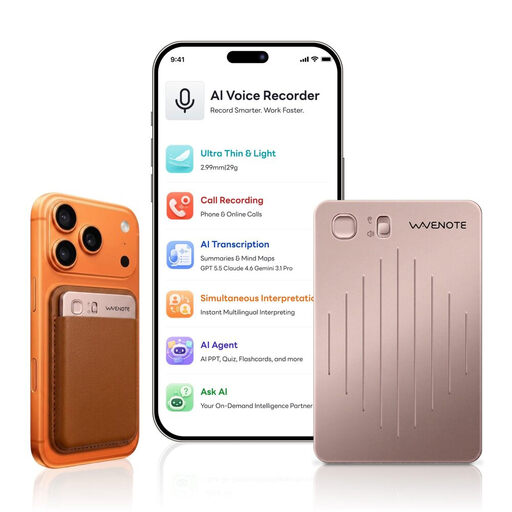
WaveNote AI Voice Recorder, 64 GB, rose gold
For voice recordings you plan to edit later: WAV recording and 64 GB of storage are listed.
Other listed features include a dual sensor microphone system, USB-C, a slider switch to start recording and up to 36 hours of continuous recording, according to the product listing.
View at Joybuy
 No image available
Rexsun L15 voice recorder, 64 GB
For voice recordings you can start easily: features listed include one-click recording and two built-in omnidirectional microphones.
A 64 GB TF card is listed as included. Other features include USB-C, an LCD screen and playback through earphones.
View at Joybuy
 No image available
Rexsun L810 Digital Voice Recorder, 64 GB
For voice recordings you plan to edit later: WAV and MP3 recording and USB-C are listed.
Other features described include a dynamic microphone, one-button operation, file timestamps and playback. Headphones are listed as included.
View at Joybuy
Frequently asked questions
How should I prepare to record a seated speaker?
If possible, choose a quiet spot with little reverberation, position the microphone close to the speaker and listen to a test recording before recording the full script. The right distance depends on the room and the microphone; a recorder placed further away can’t remove room reverberation afterwards.
Does an audio guide recorder need to offer 32-bit float?
No, 32-bit float isn’t essential for a clear audio guide. Microphone positioning, a monitored test recording and a suitable file format are still important things to consider; the recording format can’t make up for poor positioning in the room.
What ongoing costs and service details should I check?
Before buying, check whether your setup also needs a microphone, headphones, a memory card or a suitable power supply. If a product is faulty in Germany, statutory warranty rights against the seller are distinct from a voluntary guarantee, as explained by the Verbraucherzentrale.
Can I record and publish someone’s voice for a village audio guide?
Check in advance whether recording is permitted: § 201 StGB covers the unauthorised recording of another person’s non-publicly spoken words. Discuss the purpose of the recording and the planned publication with the speaker. If personal data is processed, there must be an appropriate legal basis under the GDPR; check the circumstances of your specific case, particularly if other people can be heard.


