You don’t need a dedicated gaming keyboard to keep an aquarium display running. First, work out how the image will reach the big screen. If you want to control it from your seat, choose a keyboard with a connection supported by your playback device. Which shortcuts work depends on the aquarium app you’re using.
Who might need a keyboard?
Aquarium on your TV
If you mainly want to start the display from a distance, first check how the aquarium will get onto the screen. IdleTab describes using a playback device connected via HDMI, for example. Only then should you check whether a keyboard will work with that device.
Using a PC and keyboard shortcuts
If you switch between the aquarium and other apps, the commands actually supported and the connection to your playback device are what matter. For example, SereneScreen says you can press F to switch its aquarium app to full-screen mode.
Gaming and typing on the same PC
If you regularly use the same keyboard for gaming or typing, its layout, form factor and switch choice may matter more than features for the aquarium display. Keychron offers the K8 Pro in a choice of layout variants, so check which one the specific listing includes.
What should you look for?
First, check how the image reaches the screen and how the app can be controlled. Then you can decide whether an extra keyboard will serve a practical purpose for your setup.
No extra gaming keyboard
A good fit if: You start the aquarium on your playback device and mainly leave it running in full-screen mode.
Bear in mind: You won’t be able to use an extra keyboard to control it from your seat, and the screen will still need a suitable playback connection.
Wireless keyboard
A good fit if: You want to control a connected PC from a distance or switch between apps.
Bear in mind: Bluetooth or a 2.4 GHz receiver must be compatible with your playback device. The layout of the specific variant also matters.
Wired gaming keyboard
A good fit if: Your PC is on your desk and you also use the keyboard for gaming or frequent keyboard shortcuts.
Bear in mind: Macro and media keys are only useful if the app supports the commands you want, and the cable limits where you can place the keyboard.
| Priority |
What to check when buying |
Who it matters most to |
| Control from a distance |
Check whether your playback device supports Bluetooth or 2.4 GHz, and whether a receiver is needed. |
If I want to control the aquarium from my seat, I need a suitable wireless connection. Around 40% of consumers put remote control first. |
| Keyboard shortcuts and controls |
Check which commands the aquarium app you use supports; only consider macro keys if the app supports the key assignment you want. |
If I want to switch to full-screen mode or use other features from the keyboard, I need to know which commands my app actually accepts. Around 30% of consumers prioritise aquarium controls. |
| Other PC use |
Check that the specific variant has a German layout and includes the keys you need, such as a number pad. |
If I regularly game or type on the same PC, I need a layout and form factor that work for those activities too. Around 20% of consumers focus on gaming and typing. |
| Typing feel and noise |
Check the switch variant and, if relevant, whether the switches can be replaced. Manufacturer claims about noise levels are not independent measurements. |
If I type a lot, I want to choose a typing feel that suits how I use the keyboard, rather than paying for extra features just for the aquarium display. Around 10% of consumers prioritise typing comfort. |
Common buying mistakes
-
Buying a gaming keyboard before deciding how to get the image to the screen
A keyboard won’t create or transmit the aquarium image. For a large display, you’ll first need a suitable combination of screen, app and playback device.
Start by checking which device the aquarium runs on and how it connects to the screen. Then decide whether you need a keyboard for a specific control task.
-
Assuming ‘wireless’ means universally compatible
Bluetooth, a 2.4 GHz receiver and a wired connection are different ways to connect. Whether they’ll work depends on the connections and features available on your playback device.
Compare the connections supported by both devices, and check the exact keyboard variant in the listing, including the layout you want.
-
Assuming macro keys will automatically control the aquarium
Extra keys can only trigger the right aquarium commands if the app and key assignments support those inputs.
Before choosing a model for its macro keys, check the keyboard commands supported by the app you’ll actually be using.
Key brands at a glance
CHERRY
The MX 3.0S Wireless is an option if you want to choose between Bluetooth, 2.4 GHz wireless and a USB cable.
- CHERRY lists several connection options and says the keyboard can be used while charging.
- Its advertised gaming latency isn’t a proven benefit for occasional aquarium controls. Also check whether your TV or playback device supports the connection.
Keychron
The K8 Pro is an option for buyers looking for a suitable layout variant and customisable switches.
- Keychron lists QMK/VIA and hot-swap support for compatible variants.
- The availability of a German layout doesn’t confirm the layout of a specific listing. Check your chosen variant before buying.
Razer
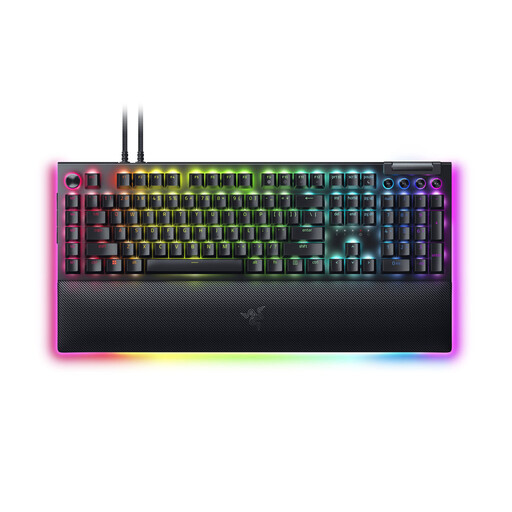
The BlackWidow V4 X could suit PC users who want to use macro and media keys alongside their aquarium display.
- Razer lists six macro keys and two switch options.
- Whether the macro keys can trigger aquarium commands depends on the app you use. The manufacturer’s claims about noise levels aren’t independent measurements.
Logitech G
The Logitech G Pro X TKL Rapid appears in a German gaming keyboard ranking by heise online.
- Its ranking position relates to gaming keyboards.
- It doesn’t confirm whether the keyboard is suitable as an aquarium remote, or whether its connection, layout or exact variant will work for your setup.
Joybuy products
The models below include wired gaming keyboards with extra features and wireless options with a German layout. For aquarium commands, both your playback device and app must support the relevant input.
 No image available
Razer BlackWidow V4 Pro, Green Switch, US QWERTY
For desk use, with a wired USB connection and extra macro and media keys.
This wired model isn’t designed for wireless control from a distance. The US QWERTY layout differs from the German layout, and macros only work if the app supports the commands.
View at Joybuy
 No image available
CHERRY MX-LP 2.1 Wireless, German QWERTZ, 65%
For controlling a compatible playback device without a keyboard cable, as well as other PC use with a German layout.
Connection options listed are 2.4 GHz wireless, Bluetooth and USB-C. The 65% form factor is compact, so check that the available key layout meets your needs.
View at Joybuy
 No image available
AJAZZ AK35I V4, German QWERTZ, full-size
For wireless control via a compatible playback device and regular PC use with a German layout.
Bluetooth, 2.4 GHz and USB-C are listed as connection options. The full-size layout and rotary dial may appeal to buyers who want a complete set of keys and extra controls.
View at Joybuy
 No image available
Akko 3084B Plus Tri-Mode, 75% ISO-DE, black and gold
For buyers looking for a compact German layout and several connection options for compatible devices.
Bluetooth, 2.4 GHz and USB-C are listed. The 75% form factor takes up less space than a full-size keyboard; check that its reduced key layout suits your PC use.
View at Joybuy
 No image available
ARZOPA gaming keyboard, German layout, 80%
For wireless control via a compatible device and other PC use with a German layout.
Bluetooth and wired operation are listed in the product name. The 80% form factor has 87 keys, so check that it includes the keys you use regularly.
View at Joybuy
Frequently asked questions
Can I show the aquarium on a TV without a gaming keyboard?
Yes. For the browser-based app described by IdleTab, you can use a laptop or mobile phone as the playback device, connected via HDMI. A suitable browser on your TV or streaming box may also work; it depends on your devices.
How do I exit full-screen mode in the browser app reviewed?
IdleTab says to press Esc. Other aquarium apps may use different controls.
What should I bear in mind when displaying an aquarium for a long time?
IdleTab points out that the app reviewed prevents the display from going to sleep, and that keeping a bright image on screen for a long time can age the panel. For longer sessions using a mobile playback device, the provider recommends a charger; it doesn’t describe image movement as protection against burn-in.
Can I return a keyboard bought online in Germany?
According to the consumer advice centres, online consumer contracts generally come with a 14-day right of withdrawal. You must notify the other party to the contract, and the terms of your specific purchase apply.
Are a warranty and statutory consumer rights the same thing?
No. The consumer advice centres distinguish statutory rights against the seller from a voluntary guarantee offered by the manufacturer or retailer. If a product is faulty, repair or replacement is generally the first remedy to consider.


