What should you look for when buying?
First, measure the space you have, including the stand. Then decide whether your priority is saving space, seeing more detail or accounting for long-term use. The percentages show consumers’ most important selection priorities.
| Buying criterion |
What to look for |
Who is this most important to? |
| Desk space and viewing distance |
Measure the available width and depth, then compare them with the monitor’s dimensions, including the stand. Remember to allow space for cables, too. |
When desk space is limited, I want to know whether the monitor and stand will really fit, rather than relying on screen size alone. Around 36% of consumers put desk space first. |
| Image detail and viewing angles |
Compare the native resolution, panel type and your seating position. Don’t judge an HDR claim by the logo alone. |
For my aquarium scene, fine detail and a good side-on view matter more than the smallest possible casing. Around 29% of consumers prioritise image detail and viewing angles. |
| Motion and connections |
Check the video output, connection, resolution and supported refresh rate of both your source device and application. |
If I want fish and other elements to move smoothly, I first check what my source device can actually output. Around 21% of consumers prioritise motion handling and connection compatibility. |
| Long-term use and care |
Compare the EU energy label and the SDR figure in kWh per 1,000 hours. If you’re considering OLED, read the model-specific guidance on static images. |
If a scene is going to run for long periods, I want to compare energy consumption and take static images into account with OLED. Around 14% of consumers prioritise long-term use and care. |
Compact monitors at Joybuy
The models below are compact Full HD monitors ranging from 23.8 to 24 inches. They’re worth comparing if you’re looking to save desk space for your virtual aquarium; measure the dimensions, including the stand, before choosing.
 No image available
KOORUI MB24V29FS4, 24 inches
Its 24-inch Full HD screen makes a compact starting point for a small desk; check the stand dimensions to make sure it fits your space.
Full HD; IPS; 120 Hz; 99% sRGB; HDMI and VGA; VESA 100 × 100 mm; tilt-adjustable stand.
View at Joybuy
 No image available
KTC H24B9S, 24 inches
If you’re looking for a compact gaming model, this 24-inch monitor offers Full HD as a starting point; check that its connections work with your source device.
Full HD (1080p); IPS; 144 Hz; HDMI and DisplayPort; Adaptive Sync; tilt-adjustable stand.
View at Joybuy
 No image available
Acer Vero B247YGbmiqprx, 24 inches
This 24-inch Full HD IPS monitor is another compact option to compare; check that its adjustment options suit your workspace.
Full HD; IPS; 120 Hz; HDMI and DisplayPort; height-adjustable; pivot function; VESA 100 × 100 mm.
View at Joybuy
 No image available
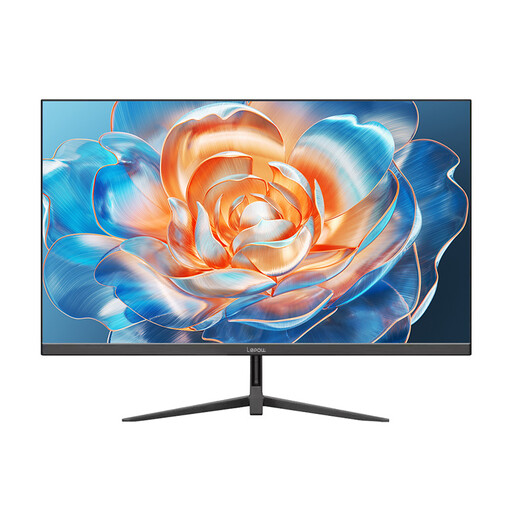
Lepow HC-24Z2, 23.8 inches
The 23.8-inch screen and Full HD resolution make this a compact option to compare for a small desk; remember to measure the depth of the stand before buying.
Full HD; 100 Hz; HDMI; metal stand.
View at Joybuy
 No image available
MSI MAG 244F, 23.8 inches
If you’re comparing compact Full HD gaming monitors, check that the stated refresh rate matches the capabilities of your source device.
Full HD; Rapid IPS; 200 Hz; 16:9; DisplayPort and HDMI; Adaptive Sync; VESA 100 × 100 mm.
View at Joybuy
Frequently asked questions
How can you check whether a monitor will fit on your desk?
Measure the available width and depth, then compare them with the manufacturer’s dimensions, including the stand – not just the screen size. Dell lists the G2422HS as measuring 53.78 × 18.944 cm and the G2724D as measuring 61.19 × 20.02 cm (width × depth, including the stand).
Does a virtual aquarium need to run at 180 Hz?
No. A 180 Hz figure describes a possible monitor mode, not the application’s frame rate. Check which resolution and refresh rate your source device can output, then set the monitor accordingly.
What should you consider when using OLED for an aquarium scene that runs for a long time?
Take static image elements into account and follow the care instructions for the specific model. Samsung explains that static images displayed for long periods can leave visible marks on OLED screens; the protective features of one Samsung model won’t necessarily be available on other OLED monitors.
How do you compare energy consumption, and what happens if a monitor develops a fault?
The EU energy label lets you compare the stated energy consumption. To estimate your own costs, multiply the consumption in kWh per 1,000 hours by your hours of use divided by 1,000, then multiply that by your electricity price per kWh. The Verbraucherzentrale distinguishes between your statutory rights against the seller and a voluntary guarantee.
Can you put an old monitor in your household rubbish in Germany?
No. Disused screens must be collected separately as waste electrical equipment. The Umweltbundesamt lists local collection points and suitable retailer take-back options.


