What should you look for when buying?
Wired gaming mouse
A good fit if: you use a PC and don’t want to manage a wireless receiver or battery.
Consider: the cable needs space. HP also describes the wired HyperX Pulsefire Haste 2 as providing acoustic feedback.
Gaming mouse with USB wireless receiver
A good fit if: you’d rather not have a cable and have a suitable USB port free on your computer.
Consider: check which receiver comes with the model and whether it also supports Bluetooth. The Logitech G502 X LIGHTSPEED is listed with a USB-A receiver.
Gaming mouse with Bluetooth and USB wireless
A good fit if: you want to switch between several devices that support the relevant connection.
Consider: check the connection options on the exact model. According to the manufacturer, the Razer Basilisk V3 Pro supports Bluetooth, USB wireless and a USB cable, and is designed for right-handed users.
Quiet work mouse instead of a gaming mouse
A good fit if: a quiet workspace is your priority and your aquarium application’s basic controls are all you need.
Consider: the CHERRY GENTIX SILENT is a work mouse with three buttons, not a like-for-like replacement for a gaming mouse with extra controls.
Start by noting the controls you actually use. Then compare the scroll wheel, shape, connection and noise information rather than focusing solely on gaming specifications.
| Buying consideration |
What to check |
Who it matters most to |
| Positioning and zooming |
How easy it is to reach the scroll wheel and main buttons; the type of scrolling you need |
If I often drag and resize objects, I want to be able to use the wheel and buttons with confidence. Around 29% of consumers put precise design work first. |
| Comfort while working |
Shape and button placement; consider weight alongside fit |
If I use the mouse for work and my aquarium for long periods, I want its shape and buttons to suit my hand. Around 22% of consumers say comfort at work is their main concern. |
| Connection and switching between devices |
Bluetooth, receiver or cable on the exact model; suitable ports |
If I want to use the same mouse with several devices, its connection needs to work with each computer. Around 21% of consumers put switching between devices first. |
| Click noise |
Specific noise information for the exact model |
If I work in a quiet environment, I want to avoid disruptive clicks, so I check the noise information for the model. Around 14% of consumers prioritise quiet clicks. |
| Simple set-up |
The features you need, receiver and power supply |
If I only use the aquarium occasionally, I don’t want to choose features I won’t need. Around 14% of consumers mainly value a simple set-up with the right features. |
Mice for your aquarium and home office
This Joybuy selection includes gaming and office mice for designing your virtual aquarium, occasional use and sharing between your aquarium and home office PC.
 No image available
Logitech G502 X LIGHTSPEED, white, right-handed
A possible choice if you want configurable controls and different scrolling options.
The listing mentions 13 programmable controls and a scroll wheel with ratchet and free-spin modes. The wireless receiver requires a USB-A port.
View at Joybuy
 No image available
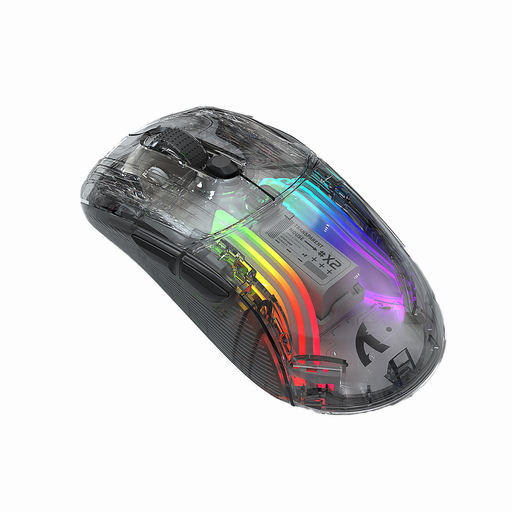
KINSI X2 Wireless Bluetooth Mouse, 3 Modes, Transparent, 2400 DPI, Rechargeable, Silent
This model could be worth considering if you’re looking for a mouse for office work and gaming with several connection modes.
The product title lists Bluetooth, three modes, a 2400-DPI sensor and a rechargeable battery. Both the title and description describe the clicks as quiet.
View at Joybuy
 No image available
ATTACK SHARK X11, 2.4 GHz wireless, Bluetooth, USB-C
An option if you want to choose between wireless, Bluetooth and a wired connection.
The listing mentions five programmable buttons, along with 2.4 GHz wireless, Bluetooth and USB-C.
View at Joybuy
 No image available
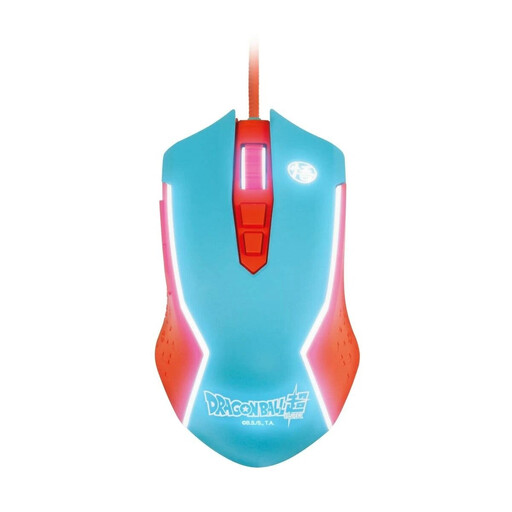
Blade Dragon Ball Goku gaming mouse, wired
A wired option for use with a PC, if you’re happy to use a cable.
The listing mentions a USB connection and adjustable DPI settings of up to 8000 DPI.
View at Joybuy
 No image available
Razer Naga V2 HyperSpeed, 19 programmable buttons
This model may suit you if you want extra controls and the option to switch between connection types.
The listing mentions 2.4 GHz wireless, Bluetooth and a scroll wheel with both tactile and free-spin modes.
View at Joybuy
Frequently asked questions
Do I need a particularly high DPI rating for a virtual aquarium?
Not just because it’s an aquarium. AquaSim describes moving and resizing objects using the Shift key and scroll wheel, so first check that you can use these controls comfortably in your application. A high maximum sensor rating doesn’t prove that a mouse will suit your hand or the controls you need.
What should I check when connecting a wireless mouse?
Check the connections available on your computer for the exact model, as well as its receiver and power supply. The product description checked for the Logitech G502 X LIGHTSPEED lists a LIGHTSPEED USB-A receiver; this doesn’t mean it has Bluetooth.
Are gaming mice automatically quiet?
No. The term ‘gaming mouse’ doesn’t tell you how loud its clicks are. HP describes the wired HyperX Pulsefire Haste 2 as providing acoustic feedback. If a quiet workspace matters, check the noise information for the exact model version.
What should I check to make sure a wireless mouse complies with German regulations?
Check the markings and product documents for the specific listing. The Bundesnetzagentur lists CE marking, manufacturer details, German-language instructions and a declaration of conformity among the points it checks during market surveillance.
Can I return an item bought online, and what happens if it’s faulty?
In Germany, goods ordered online can generally be returned within 14 days of receipt under the right of withdrawal; check the terms of your particular purchase. If an item is faulty, statutory consumer rights against the seller are separate from any voluntary guarantee; repair or replacement may be the first step. Verbraucherzentrale explains these two rights separately.


