First, check that your visual novels are available on the console and offer your preferred text language. Then consider whether you want to read on a handheld or set up and angle the screen in a bright room. Anti-glare surfaces may help with reflections, while tabletop and TV modes give you more flexibility over where you read. OLED and high resolution alone don’t guarantee that text will be easy to read in a brightly lit room.
Which console is right for you?
For readers bothered by reflections
If you read long stretches of dialogue in daylight, check the surface and viewing angle of the exact model you’re considering – not just its display technology. Valve specifies anti-glare etched glass for the 1 TB version of the Steam Deck OLED; ASUS describes the display on the ROG Xbox Ally RC73YA-NH002W as having low reflectivity.
For players with a specific list of titles
If you want to play particular visual novels in a particular text language, check the platform, language and, where relevant, compatibility first. Nintendo recommends checking individual Switch games before playing them on Switch 2; Valve provides compatibility details for individual Steam games.
For reading at a table or on a TV
If you don’t want to hold the device for long or would like to angle the screen away from a window, a stand and TV output are important things to consider. Nintendo lists a stand and TV mode for Switch OLED and Switch 2; Switch Lite does not support TV output.
What should you look for when buying?
Nintendo Switch family
Worth considering if: Your chosen visual novels are Switch titles and you want to switch between handheld, tabletop and TV modes.
Bear in mind: Check each title’s compatibility with Switch 2; Switch Lite does not support TV output.
Steam Deck OLED
Worth considering if: Your chosen games are available on Steam and their Deck compatibility rating suits your needs.
Bear in mind: Valve specifically lists anti-glare etched glass for the 1 TB version; a ‘Playable’ rating may mean you need to make adjustments.
Windows handheld
Worth considering if: Your chosen visual novels are PC games and you want to check their requirements and how they work on Windows.
Bear in mind: ASUS describes the display on one ROG Xbox Ally model as having low reflectivity; Lenovo lists the 8.8-inch OLED on the documented Legion Go Gen 2 configuration as glossy.
| What matters when buying |
What to look for |
Who this matters most to |
| Readability in bright conditions |
Check the surface and viewing angle of the exact model, and try the text of a specific game in your intended reading spot. |
If I read long stretches of dialogue in daylight, I want to keep reflections on the text to a minimum. Around 36% of consumers put readability first. |
| Games and text language |
Check availability, your preferred language and compatibility for each title individually. |
My wish list and preferred text language determine whether a platform is right for me. Around 29% of consumers prioritise access to specific titles. |
| Flexible reading position |
Consider the stand, TV output and the screen you already have. |
At a table, I want to be able to stand the device up and angle the screen to suit the window. Around 21% of consumers prioritise a flexible reading position. |
| Compactness and accessories |
Check the play modes you need and the required storage type before buying anything extra. |
If I mainly want a compact handheld, I don’t want to pay for features or accessories I don’t need. Around 14% of consumers put compactness first. |
Check these things before you buy
-
Assuming OLED or high resolution means glare-free reading
Resolution, contrast and reflections are separate characteristics. Lenovo lists the 8.8-inch OLED on the documented Legion Go Gen 2 configuration as glossy.
Compare the surface and stand angle of the exact model, and check the text in a specific game under similar room lighting.
-
Assuming similarly named models are the same
Valve’s anti-glare glass specification applies specifically to the 1 TB Steam Deck OLED, not automatically to every storage option.
Before buying, check the full model number, storage option and screen surface.
-
Leaving compatibility and text language checks until after you buy
Nintendo recommends checking each existing Switch title’s compatibility with Switch 2 individually. A Steam game’s Deck rating also doesn’t always tell you whether it will work as expected without adjustments.
Make a shortlist of the titles you want and check the platform, text language, play mode and controls for each game.
An unsuitable title could mean you need to buy another game, or that it won’t work as you’d hoped on your chosen device.
-
Buying a memory card without checking the standard
Nintendo specifies microSD Express for expanding the Switch 2’s storage; standard microSD cards have limited functionality on the console.
First check how much storage you actually need, then find out which card type is designed for your chosen device.
An unsuitable memory card could mean you have to buy another one.
Key brands at a glance
Nintendo
Switch Lite is designed for handheld play; Switch OLED and Switch 2 offer additional play modes.
- Nintendo lists a 7-inch OLED screen and an adjustable stand for Switch OLED. Switch 2 is specified with a 7.9-inch LCD and 1920 × 1080 pixels.
- These specifications don’t prove that the display is reflection-free. You should check the compatibility of each existing Switch game with Switch 2 individually.
Valve
Steam Deck OLED is an option for buyers whose chosen games are available on Steam and have a suitable Deck rating.
- Valve specifically lists anti-glare etched glass for the 1 TB Steam Deck OLED.
- Compatibility ratings apply to individual games; ‘Playable’ may mean you need to make adjustments. Manufacturer specifications don’t test readability in every lighting condition.
ASUS
The ROG Xbox Ally is a Windows handheld option for compatible PC titles.
- ASUS describes the 7-inch display on model RC73YA-NH002W as anti-glare and low-reflection.
- This specification applies to this model number and doesn’t guarantee that every game will be easy to read in a brightly lit room.
Lenovo
Legion Go Gen 2 is aimed at buyers looking for a large built-in display and detachable controllers for compatible PC games.
- Lenovo lists an 8.8-inch OLED display for configuration 83N0CTO1WWDE2.
- Lenovo describes the documented display surface as glossy. The larger screen doesn’t remove the risk of reflections.
MSI
Claw handhelds are another option for compatible PC games.
- Checking the full model number helps you tell different Claw models apart.
- Don’t assume display specifications or features from one model apply to other Claw handhelds.
Related products from Joybuy
The products below are portable retro handheld consoles. Their product specifications don’t confirm compatibility with visual novels, so check the titles, text languages and controls you need before buying.
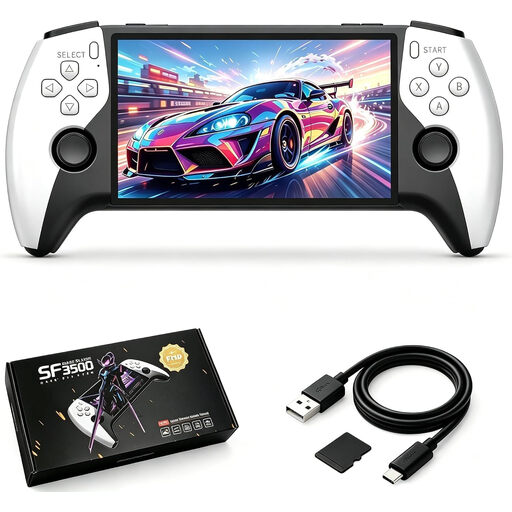 Image unavailable
SF3500 retro handheld games console, 5.5-inch IPS, 32 GB
Described as a portable handheld games console; before buying, check that your visual novel is available and playable on the device.
The product name specifies a 5.5-inch IPS screen and 32 GB.
View at Joybuy
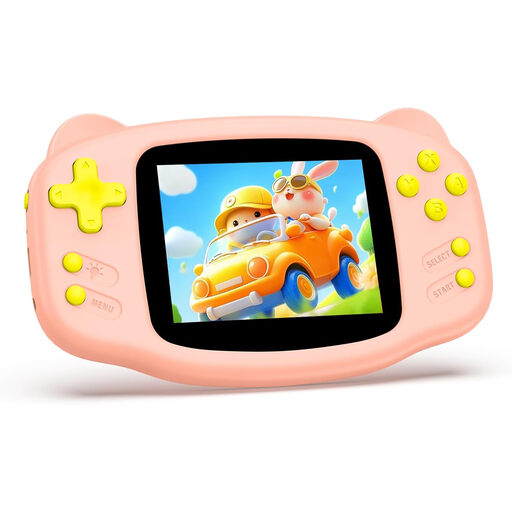 Image unavailable
16-bit retro handheld games console, 3.2-inch HD screen, pink
Described as a compact handheld for gaming on the go; before buying, check that your chosen visual novel is available and playable.
The product name specifies 300 pre-installed retro games, a 3.2-inch HD screen and a rechargeable battery.
View at Joybuy
Frequently asked questions
How can I tell whether my visual novel will work well on Steam Deck?
Check the game’s store listing and compatibility details. Valve includes legible text among the criteria for ‘Verified’; ‘Playable’ may mean you need to adjust the controls or launcher. Check that your preferred text language is available separately.
Can I simply carry on playing an existing Switch visual novel on Switch 2?
Not necessarily: Nintendo recommends checking each Switch title’s compatibility with Switch 2 individually before choosing the console.
How can I change my reading position when there’s light from a window?
Switch OLED and Switch 2 have stands for tabletop mode and support TV output. Position the device or TV so that distracting reflections don’t fall across the text; Switch Lite can’t output a picture to a TV.
What costs and rights should I consider when buying in Germany?
Budget separately for games, any extra storage you need and accessories. For consumers buying new goods, Verbraucherzentrale explains that you have statutory warranty rights against the seller for two years from delivery or receipt. Online purchases generally come with a 14-day right to cancel; conditions and exceptions depend on the circumstances.


