What should you look for when buying?
First, check that your particular game and device are supported. Then compare wired and wireless connection options, along with the buttons you need.
| What matters when buying |
What to check before buying |
Who should pay particular attention? |
| Game and device compatibility |
Check that your particular game is supported and that the exact controller model is compatible with your PC or console. |
If I want to play a visual novel on my TV, I need to know whether I’ll have to keep a mouse or keyboard handy. Around 36% of consumers put game and device compatibility first. |
| Connection from your seat |
Measure the cable run or check whether the exact model uses Bluetooth, a USB receiver or a USB cable with your device. |
When playing from the sofa, I don’t want to find out that the cable is too short or the wireless connection isn’t suitable. Around 29% of consumers prioritise the connection between their seat and device. |
| Using dialogue and menus |
Think about the inputs you need and check whether the game or compatible controller software lets you set up a suitable button layout. |
If I mainly want to advance dialogue and choose options, buttons that are easy to reach and suit my needs matter more than extras I won’t use. Around 21% of consumers prioritise ease of use. |
| Power and accessories |
Check the exact model’s power requirements, the connections you’ll need and what’s included, such as a USB receiver or cable. |
If you want to keep the extra effort involved in power and accessories to a minimum, check these details in advance. Around 14% of consumers put this first. |
Controllers at Joybuy
The models below cover wired PC and Switch use, as well as controllers for PlayStation and Nintendo Switch. What matters is still whether your visual novel is supported and whether the connection suits your setup. For devices sold in Germany, the Federal Network Agency lists requirements including correct CE marking, manufacturer details and, where applicable, EU importer details, as well as any required instructions and safety warnings in German. Check these details on the specific product listing.
 No image available
BIGBIG WON Rainbow 2 Pro Wired
For PC or Nintendo Switch, if a cable connection works for your seating position.
Wired; the product name lists gyro, macro and turbo functions, as well as customisable buttons.
View at Joybuy
 No image available
Nintendo Switch Pro Controller – Black
For an existing Nintendo Switch. Nintendo also confirms that this controller can be used wirelessly with a Switch 2.
According to Nintendo, on Switch 2 you can’t wake the console from sleep using the HOME button on a Switch controller.
View at Joybuy
 No image available
PlayStation DualSense Wireless Gaming Controller, White
For a PS5 or compatible PC, provided your particular visual novel supports controller input.
The product title lists PC, Mac and Android. According to Sony, haptic feedback on PC requires a supported game and a USB connection.
View at Joybuy
 No image available
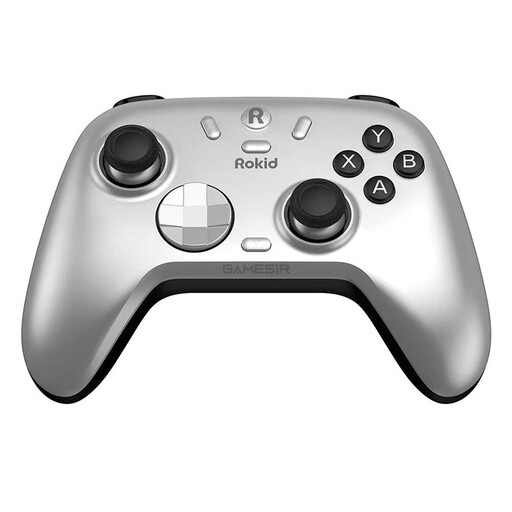
Rokid × GameSir Co-Branded Controller
For PC or Switch, once you’ve checked that your particular game is supported and the connection is right for your setup.
The product description lists a wireless dongle or wired connection for PC.
View at Joybuy
 No image available
Nintendo Switch 2 Pro Controller
For a Nintendo Switch 2, provided your visual novel can be played with a controller.
Nintendo lists customisable GL and GR buttons; how useful they are depends on the inputs your game needs.
View at Joybuy
Frequently asked questions
Is Steam Big Picture enough to let me play any visual novel using only a controller?
No. Valve’s Steam Support points out that not every Steam game supports controllers. With full controller support, you should be able to download, launch and play without a mouse or keyboard. With partial support, you may need them at certain points.
How do I connect a DualSense to a compatible PC?
Sony describes USB-C and Bluetooth as connection options. To pair over Bluetooth, hold down the PS and Create buttons until the light bar flashes, then select the controller on your device. Also check whether your visual novel supports controller input.
Can I keep using my Switch Pro Controller with a Switch 2?
Yes. Nintendo confirms that the Switch Pro Controller can be used wirelessly with a Switch 2. However, according to Nintendo, you can’t wake the console from sleep using the HOME button on a Switch controller.
What are my rights when buying a controller online in Germany?
According to the Verbraucherzentrale, consumers generally have the right to cancel an online contract, usually within 14 days of receiving the goods ordered. Statutory consumer rights are separate from a voluntary manufacturer’s guarantee; if a product is faulty, the seller is responsible for providing a remedy.
What labels and information should a controller listing for Germany include?
For electrical and electronic devices sold in Germany, the Federal Network Agency lists requirements including correct CE marking, the manufacturer’s details and, where applicable, those of the EU importer, clear product identification, and any required instructions and safety warnings in German. Check these details on the specific listing; on their own, they don’t prove that a controller is compatible with your game.


