
Lieferung heute & morgen

Qualitätsgarantie

Willkommens-Angebote freischalten: KOSTENLOSE Lieferung | Bis zu 80 % RABATT | Kostenlose 30-Tage-JoyPlus-Testphase
App herunterladen
Whether you’re making short Reels, family videos, travel footage or a school project, a vlogging camera and a smartphone gimbal serve different purposes. A camera captures footage independently, while a gimbal stabilises your smartphone as you move. It’s often an unclear choice, rather than the price, that leads to a purchase you regret.
Terms such as 4K, 5K and high megapixel counts describe only part of a device’s technical specification. Sensor size, lens, lighting conditions, autofocus and image stabilisation also matter. For example, a camera with “64 MP” can still produce noticeable noise in low light.
With some compact digital cameras, it’s also worth checking the detailed specifications. The Songdian Pocket Camera is described as a 4K model in its product name, but its description lists a video resolution of 1920 × 1080P. If you regularly want to export in 4K, check the stated video resolution before buying.
Optical zoom changes the lens’s focal length while preserving more image detail. Digital zoom, by contrast, enlarges part of the image. So the term “16X Zoom” alone doesn’t tell you whether the zoom is optical or digital.
For selfies, school videos and spontaneous travel footage, digital zoom is often enough. If you want to photograph distant subjects, look specifically for a stated optical zoom.
A smartphone gimbal with tracking often requires a specific app, a Bluetooth connection or a compatible smartphone mount. Before buying, check the operating system, device dimensions and app availability. The product information for the DJI Osmo Mobile 7P notes that, due to platform compatibility, the DJI Mimo app is not available in the Google Play Store and must be downloaded from the official DJI website.
Your smartphone’s weight distribution also matters. Very large models, protective cases or add-on lenses can affect the balance.
A 3-axis gimbal mechanically compensates for movement. This is particularly useful for walking shots, panning and handheld vlogs. However, a smartphone gimbal can’t replace steady camera work: smooth steps and a secure grip are still important.
Some compact cameras use electronic image stabilisation, or EIS. This can reduce camera shake through software, but often crops the image. For sports and outdoor footage, an action camera with suitable stabilisation may be a better choice than a basic camera for beginners.
Before buying, check:
A high frame rate can be useful for fast-moving footage, but it creates larger files. For longer travel videos, extra storage or a way to back up your files quickly is important.
A travel tripod for your smartphone should be compact enough to fit in a rucksack or hand luggage, while remaining stable when set up. The Rollei Smartphone Traveler Tripod is listed as weighing 595 g, measuring 39 cm when folded, reaching a maximum working height of 100 cm and supporting a maximum load of 2 kg. According to the product description, these specifications apply to smartphones, not heavy cameras.
With a selfie stick with tripod, the footprint, Bluetooth range and secure locking of the smartphone mount are also important. A longer extension gives you more reach, but can make the setup more susceptible to wind and uneven ground.
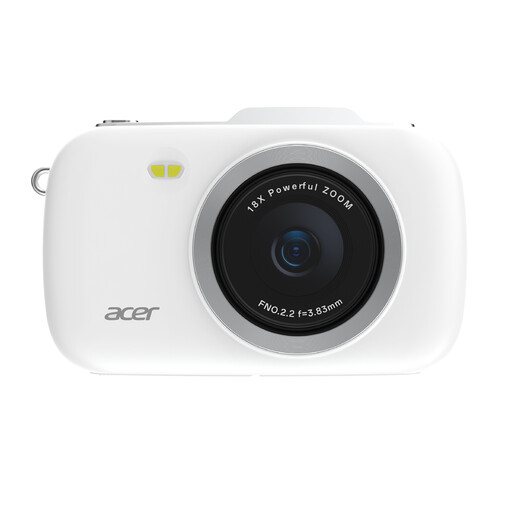
Why this product suits this profile: This portable digital camera is aimed at beginners, teenagers and anyone looking for a standalone zoom camera for school, leisure and travel.
Choosing a separate camera means your smartphone won’t be tied up during longer recording sessions. Before buying, check the actual resolution and the details of the 18x zoom.
According to the product information, features include autofocus, 18x zoom and UHD video. The body is designed for simple point-and-shoot operation.
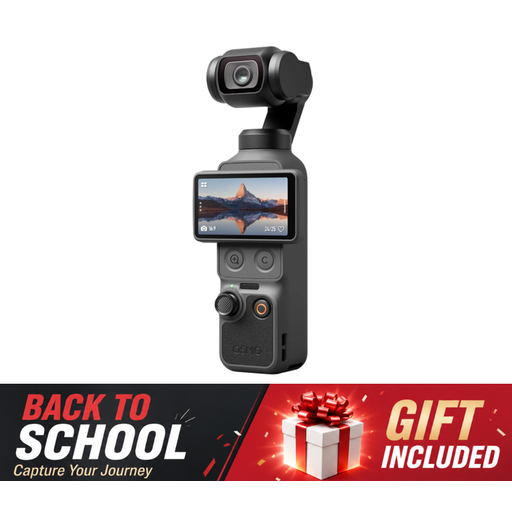
Why this product suits this profile: This compact vlogging camera is designed to record video independently, combining a 1-inch CMOS sensor with a 3-axis gimbal.
The stated mechanical stabilisation is clearly distinct from digital zoom or EIS alone. Before use, make sure you’ve planned for storage, battery life and any required app.
According to the product information, it offers 4K/240 fps, 2x lossless zoom, 107 GB of built-in storage and a rotatable 2-inch screen.
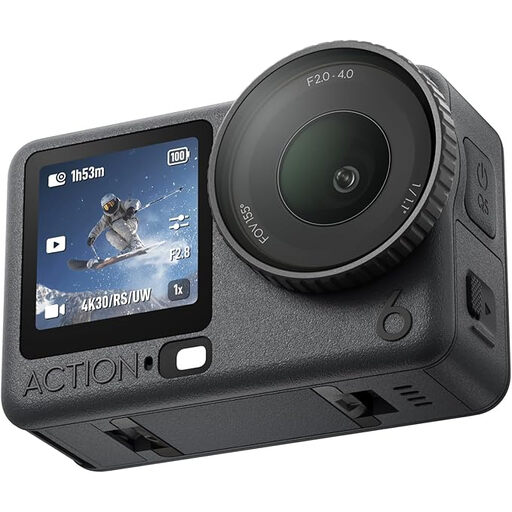
Why this product suits this profile: This action camera is well suited to outdoor activities, sports, dynamic vlogs and filming in changeable weather.
Its stated waterproof rating is more specific than a general claim about outdoor use. Before using it, check the covers, temperature limits and that it’s mounted correctly.
According to the product information, this model offers 4K recording, a variable aperture, up to 4 hours of battery life under normal conditions and waterproofing to 20 m without a case.
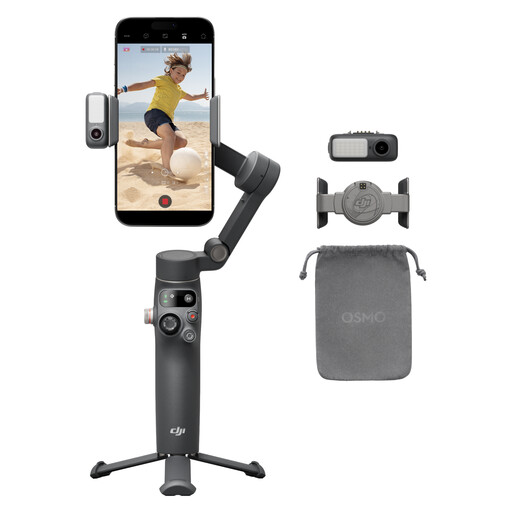
Why this product suits this profile: This smartphone gimbal is a good choice if you want to use your existing iPhone or Android device for vlogs, tracking shots and selfies.
The built-in extension rod and tripod mean you’ll need fewer extra accessories. Check the app requirements and smartphone compatibility before ordering.
According to the product information, features include 3-axis stabilisation, native tracking, a built-in extension rod, tripod functionality and up to 10 hours of operating time.
We’ve put together a complete, regularly updated list of products that meet these strict selection criteria and the safety regulations in force in the EU.
A selfie stick with tripod is useful for taking group photos, making video calls or capturing static shots without needing someone else to help. The Verbex S05S is listed as extending to 100 cm, with Bluetooth shutter control, iOS and Android compatibility and a range of under 10 m. Before filming, make sure the tripod is on level ground.
For a separate camera with a 1/4-inch thread, a small travel tripod such as the Ulanzi MT-08 is a good option, provided the load capacity and thread are compatible. Magnetic quick-release mounts, such as the one on the Ulanzi MT-50, must be fully locked into place. Keep magnets away from medical implants, magnetic cards and magnetic storage media.
A beginner-friendly camera should have straightforward controls, autofocus and an easy-to-understand storage setup. For moving smartphone footage, a 3-axis gimbal is a useful addition. If you already have a good smartphone, you may not need a separate digital camera.
Battery life depends on the battery, tracking, lighting and charging habits. The DJI Osmo Mobile 7P is rated for up to 10 hours, according to the product information. After intensive use, let the device cool down before charging it. Storage conditions, moisture and drops can shorten its lifespan.
Potential extra costs include microSD cards, replacement batteries, USB cables and tripod adapters. For app-based features, also check whether the required software is readily available and what smartphone permissions it needs. Advertised extra features won’t necessarily work with every device or operating system.