Choose a microphone based on how quiet your room is and whether you can keep a consistent speaking distance. In a quiet room with little echo, a USB condenser microphone with an easy-to-reach level control and headphone monitoring is a straightforward choice to get started. If you can maintain a close, consistent distance, a dynamic model could be a suitable alternative. USB means you can get started without a separate audio interface, while XLR or a USB/XLR hybrid makes most sense if you actually plan to use the additional signal path. A short test recording in your own room will help you assess the distance and room acoustics.
Which microphone is right for you?
Recording in a noisy room
If you record on your own but can hear a fan, household noise or room echo, keeping a consistent close distance and positioning the microphone appropriately can make a difference. Audacity recommends moving closer to the microphone, but a microphone is no substitute for a quiet recording environment.
Getting started on a computer
If you want to record your voice-over script without a separate audio interface, look for a connection that works with your computer and a practical way to position the microphone. USB microphones offer a straightforward way to get started; Audacity Support explains that XLR microphones need an additional signal path via an audio interface.
Experienced voice-over artists
When recording longer sections, level controls and monitoring can help you spot problems before you record the whole take. If you plan to use an interface later, also check which features are available via USB and which via XLR.
What should you look for when buying?
USB condenser microphone
A good fit if: You’re recording at your computer in a quiet spot with as little echo as possible, and want to adjust the controls or plug in headphones directly to the microphone.
The trade-off: A simple connection won’t make the room quieter; make a test recording to check how much room sound it picks up.
Dynamic USB or USB/XLR microphone
A good fit if: You can speak close to the microphone and from a consistent direction for longer stretches, or have a specific plan to use XLR in future.
The trade-off: Speaking close to the microphone limits your freedom to move; digital features may only be available via USB.
XLR-only microphone
A good fit if: You already have a suitable audio interface or have firm plans to use one.
The trade-off: To record on a computer, you’ll need a suitable XLR signal path in addition to the microphone; that doesn’t automatically mean better sound.
| What matters when buying |
What to check |
Who is this important to? |
| Voice clarity despite room noise |
Microphone direction and mount; listen to a test recording made in the room you plan to use. |
If I want to speak consistently close to the microphone and assess fan noise or echo, what matters most to me is how well it captures speech in my own room. Around 36% of consumers put the room and noise first. |
| Easy connection to a computer |
Check the model variant, computer connection, cable and included mount. |
If I want to get started without an additional interface, I need a suitable connection and a setup that works with my desk. Around 29% of consumers prioritise a straightforward connection and suitable items in the box. |
| Control during longer takes |
Check for a headphone socket and gain control; make a test recording before recording the whole script. |
When I record longer sections, I want to be able to monitor the level and my voice as I record. Around 21% of consumers prioritise monitoring and level control. |
| Adding an interface later |
Check the USB and XLR connections, and which features are available via each signal path. |
If an interface is definitely part of my future setup, I want to be able to use the second connection. Around 14% of consumers prioritise plans to add an interface. |
Common buying mistakes
-
Expecting a more expensive microphone to fix a reverberant room on its own
It’s easier to deal with room reflections and distracting noise before recording than to remove them afterwards. Digital noise-reduction features also can’t guarantee that echo or voices from other rooms will disappear.
First, try speaking at a consistent close distance in the room you plan to use. If possible, switch off noisy equipment and listen to a short test recording before recording the whole script.
Depending on the room, you may need to put in extra effort to find a quieter recording spot with fewer reflections, or record some sections again.
-
Assuming an XLR microphone works like a USB model you can plug straight in
You can’t plan to use an XLR-only microphone for computer recording without the right additional signal path.
Before you buy, decide whether you want to record directly via USB or use an existing interface, or one you’ve already planned to buy.
If you don’t already have an interface, you may also need an audio interface and a suitable XLR cable.
-
Assuming similarly named models or set variants are identical
Connections, controls and what’s included can vary between models and sets. A shock mount or boom arm isn’t automatically included just because another version comes with accessories.
Before buying, check the full model and set name, as well as what’s included with the specific version.
Key microphone brands at a glance
Sennheiser
The Profile USB Microphone is a USB condenser option for voice-over and podcast recording at your desk.
- Sennheiser lists gain, mix and headphone controls, along with a desktop stand for the standard version.
- The documented model uses USB rather than XLR; positioning and the room still make a difference to your recording.
Shure
The dynamic MV7+ is designed for close-mic speech and offers USB-C and XLR on the same microphone.
- Shure lists a headphone socket and digital features.
- The manufacturer’s claims about noise processing don’t prove that unwanted sounds in your room will disappear. The setup and what’s included depend on the stand version you choose.
RØDE
The PodMic USB combines a USB-C connection with an analogue XLR signal path; the standard PodMic is a separate XLR-only option.
- RØDE lists direct headphone monitoring and an external pop filter as included with the PodMic USB.
- According to RØDE, digital processing on the PodMic USB is available via USB. To record with the standard PodMic on a computer, you’ll need an XLR cable and an audio interface.
Audio-Technica
The AT2020USB-X is a USB condenser microphone with a cardioid pickup pattern, designed for a quiet home-studio workspace.
- Audio-Technica lists headphone monitoring, a mix control, mute and an included desktop stand.
- The specification of up to 24 Bit/96 kHz is a device specification, not evidence of clearer speech in your room; a shock mount is optional.
HyperX
The SoloCast 2 is a compact USB-C option if you’re looking for a simple setup.
- HP lists an integrated pop filter, shock mount, mute and software filters.
- In its test dated 14 August 2026, F.A.Z. Kaufkompass describes the SoloCast 2 as an option without live monitoring. It is not the same as the older SoloCast.
Joybuy microphones and sets
The Joybuy selection below includes microphones and sets for recording voice-overs on a computer. Depending on the model, check the connection, what’s included and how it’s designed to be positioned.
 No image available
FIFINE K688CTW with boom arm
For recording voice-overs on a computer, if you want to use a boom arm and controls in USB mode.
The product description lists USB-C and XLR, a gain control and headphone monitoring; according to the description, the controls on the microphone work via USB. An XLR cable is not included.
View on Joybuy
 No image available
FIFINE AM8 USB/XLR
For voice-over recording on a computer, if you want to use USB and have the gain control and headphone socket close at hand while recording.
The product description lists USB-C and XLR, as well as a desktop stand. According to the description, the controls on the microphone are inactive in XLR mode; an XLR cable and boom arm are not included.
View on Joybuy
 No image available
Dynamic USB/XLR microphone set with desktop stand
For recording voice-overs on a computer, if you’re looking for a USB-C microphone with a desktop stand and headphone socket.
The product description lists a cardioid pickup pattern and USB-C and XLR outputs. Gain, echo and mute controls are also listed.
View on Joybuy
 No image available
Yinkaer G10-P17-P17 podcast kit
For recording with multiple components, if you want to use two microphones and an audio mixer.
The product description lists two 3.5 mm condenser microphones and support for PC and Mac.
View on Joybuy
 No image available
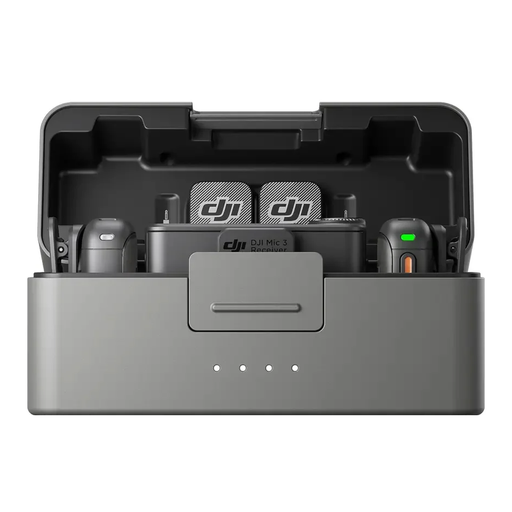
DJI Mic 3 – 2 TX + 1 RX + Charging Case
For recording voice-overs with a wireless microphone system, if you want to use the internal recording feature listed in the product description.
The product details list two transmitters, one receiver and internal storage in the transmitters. Connection options include USB-C and 3.5 mm TRS.
View on Joybuy
Frequently asked questions
Do I need stereo for a single voice-over track?
For a single voice recorded with one microphone, a mono track is usually enough. Audacity recommends checking your device selection before a longer recording and listening to a short test.
How should I position the microphone for longer script sections?
Keep the distance as consistent as possible and speak slightly past the microphone if plosive P and B sounds are a problem. Check the levels and room noise with a short test; Audacity gives peaks between −18 and −6 dB on its meter as a guide for normal speech, not as a microphone specification.
Do I need extra equipment for an XLR microphone?
To record on a computer, an XLR-only microphone needs a suitable XLR-to-USB audio interface signal path. Audacity Support explains this connection; also check whether a cable and mount are included with the specific version.
Is headphone monitoring a given with a USB microphone?
No, check the exact model for this feature. Sennheiser lists it for the Profile USB Microphone and Audio-Technica for the AT2020USB-X; it isn’t a standard feature of every USB microphone.
Are the digital features of a USB/XLR microphone available via both connections?
Not necessarily: RØDE specifies that digital processing on the PodMic USB is available via the USB output. If you plan to record via XLR in future, check which features the specific model offers over that signal path.


