Which recorder is right for you?

Speakers with wide changes in volume

If your narration includes quiet and strongly emphasised passages, record and listen back to both ends of the volume range. Zoom and Tascam specify 32-bit float recording on selected handheld models; even with this feature, microphone position and room acoustics still matter.

Speakers without a dedicated recording space

In a typical living room, the distance from the microphone and a position that keeps room noise in the background are key. Try a few positions with a short test recording and compare the results.

Speakers who want a simple file workflow

If you’re recording alone and want to work with the file afterwards without setting up multiple tracks, check the controls, playback, recording format and file transfer options. Sony lists Linear PCM and MP3 for the ICD-UX570; Speech Processing Solutions lists PCM and MP3 for the Philips VoiceTracer DVT4115.

What should you look for when buying?

Compact voice recorder

A good fit if: You speak alone in a quiet, fixed spot and prioritise ease of use, internal storage or a simple way to manage your files.

The trade-off: These features don’t guarantee better sound when volumes vary widely. Test quiet and loud passages in the spot you plan to use.

Handheld recorder with built-in microphones

A good fit if: You want to set the recorder down and connect an external microphone when needed, or use 32-bit float recording when your speaking volume varies.

The trade-off: Check the storage medium, power supply and file format. 32-bit float recording won’t fix room echo or plosives.

Buying priority What to check Who is this important to?
Quiet and loud passages Record and listen back to a test with a whisper and the loudest emphasis you plan to use. If you choose 32-bit float, plan how you’ll export the file in the format you need. If my narration shifts between very quiet and strongly emphasised passages, I want to check both in a test recording. Around 36% of consumers put changes in volume top of their list.
Room and microphone position Check whether you can position the recorder or a compatible external microphone securely; compare distances and angles in a test recording. If I’m recording in a typical living room, I want to find a position where my voice stays clear and room noise doesn’t overpower it. Around 29% of consumers prioritise the room and microphone position.
Monitoring your recording Check the controls, recording indicator, playback option, power supply and storage medium for the specific model. If I’m recording alone, I want to be able to start and check the recording myself. Around 21% of consumers put a straightforward recording process first.
File format and sharing Check that the recording format and transfer method are supported by your editing software. If I want to edit or share the finished narration, I want to sort out the file workflow in advance. Around 14% of consumers consider this their top priority.

Voice recorder buying pitfalls

  • Assuming 32-bit float will fix every bad recording

    More scope to adjust file levels during editing doesn’t replace getting the microphone distance right or prevent plosives.

    Choose your recording spot in advance and test both a quiet and a loud passage before recording the full narration.

    Poor microphone placement or plosives may mean recording again and spending extra time editing.

  • Assuming more tracks mean a better solo narration

    Extra inputs and tracks are most useful when you plan to record separate audio sources; for a single voice, they can mean more setup.

    For a solo recording, start by comparing positioning, controls and the file workflow. Only prioritise multitrack features if you’ll actually use them.

    Extra features can mean unnecessary setup and accessories.

  • Taking an older comparison list as proof a product is still available

    WELT.de Tests & Vergleiche included the Portacapture X8 in its comparison dated 30 October 2026; Tascam lists the model as discontinued.

    Check the model name, condition and specific offer details for yourself, regardless of its previous position in a comparison list.

Key brands at a glance

Zoom

A relevant option for compact handheld recorders and models with separate inputs.

  • Zoom lists built-in X/Y microphones, 32-bit float recording and a 3.5 mm microphone input for the H1essential.
  • The H5 is a different model, with XLR/TRS inputs and interchangeable microphone capsules. These features don’t apply to the H1essential.

Tascam

The range includes everything from handheld recorders to multitrack models.

  • Tascam lists built-in microphones, a stereo mini-jack input and a 32-bit float mode for the DR-05XP.
  • Tascam lists the Portacapture X8 as discontinued. This applies to that model, not the brand as a whole.

Sony

The ICD-UX570 is a compact voice recorder with internal storage.

  • Sony Germany lists 4 GB of internal storage, Linear PCM and MP3 recording, as well as USB charging, for the ICD-UX570.
  • These specifications aren’t an independent sound comparison and don’t apply to every Sony recorder.

Philips VoiceTracer

The DVT4115 is described as a voice recorder with internal storage and app-based remote control.

  • Speech Processing Solutions lists PCM and MP3 recording, as well as app-based remote control, for the DVT4115.
  • The stated recording time depends on the recording format and isn’t a general guarantee for uncompressed recordings.

OM SYSTEM

The LS-P5 is a compact Linear PCM recorder with internal storage and several built-in microphones.

  • OM SYSTEM lists three microphones, 16 GB of internal storage and 96 kHz/24 Bit for the LS-P5.
  • These specifications describe the features but don’t prove you’ll hear an improvement in your particular recording space.

Joybuy products for voice recording

The Joybuy products below are compact voice recorders. Before buying, pay particular attention to how their recording format and playback and file transfer options fit with your planned editing workflow.

PLAUD Note Pro Voice Recorder, 64GB, Black

PLAUD Note Pro Voice Recorder, 64GB

As a compact voice recorder with built-in microphones, this model could suit a single narrated voice.

The product description lists 64 GB of storage, USB-C, a display, four MEMS microphones and up to 30 hours of continuous recording. Check that the recording format and file transfer options work with your editing software.

View at Joybuy

Mobvoi TicNote Lite AI Voice Recorder, 4GB, Black

Mobvoi TicNote Lite AI Voice Recorder, 4GB

This model is described as a compact voice recorder with a triple-microphone system. Check in advance whether you need to listen back to recordings directly on the device.

The product description lists 4 GB of storage and Bluetooth. It doesn’t have a headphone socket.

View at Joybuy
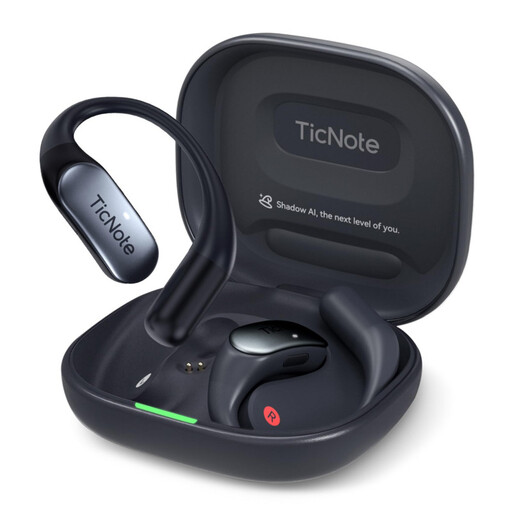
Mobvoi TicNote Pods 4G AI Voice Recorder, 32GB, Navy Blue

Mobvoi TicNote Pods 4G AI Voice Recorder, 32GB

If you want to record without your smartphone nearby after setting up the app, this operating method is worth considering when planning your recording.

The product description lists 32 GB of storage, a dual microphone array, 4G and five hours of battery life. Check that this battery life is enough for your planned recording.

View at Joybuy

Mobvoi TicNote Standard AI Voice Recorder, 64GB, Dark Grey

Mobvoi TicNote Standard AI Voice Recorder, 64GB

This model is described as a compact voice recorder with three microphones and voice recording modes.

The product description lists 64 GB of storage, OGG recording and 20–25 hours of continuous recording. Check that your editing software supports the OGG format.

View at Joybuy
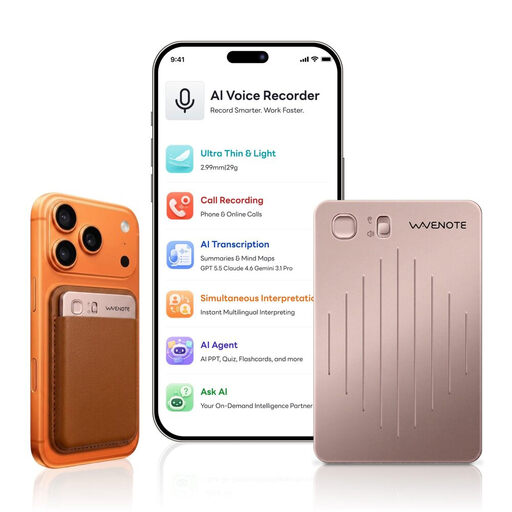
WaveNote AI Voice Recorder, 64GB, Rose Gold

WaveNote AI Voice Recorder, 64GB, Rose Gold

With its physical slide switch, this voice recorder could suit a workflow where you want to start recording directly on the device.

The product description lists WAV recording, 64 GB of storage and Bluetooth for managing files on a smartphone or desktop computer. Check that WAV and the transfer method fit your editing workflow.

View at Joybuy

Frequently asked questions

How do I test a recorder before recording the full film recap?

At your planned recording spot, record a quiet passage and the loudest passage you intend to use, then listen back to both. Adjust the microphone distance or angle if needed. If you hear plosives, try positioning the microphone off to one side or using a suitable pop filter. A microphone manufacturer’s recommended distance won’t necessarily apply to every recorder.

Is 32-bit float recording enough on its own for an expressive recording?

No. 32-bit float recording can make it easier to adjust levels later, but it doesn’t remove the need to check the room acoustics, plosives and microphone position. Also check that your editing software can handle the recording format.

What should I prepare for storage and power?

It depends on the model. Sony lists internal storage and USB charging for the ICD-UX570; the Philips DVT4115 is described as having internal storage and a built-in battery. If you’re using a handheld recorder that takes memory cards, check which card it needs and that the power supply will last for your planned recording.

Can I simply record other people’s conversations for my recap?

Not necessarily. Section 201 of the German Criminal Code (StGB) concerns the unauthorised recording of another person’s privately spoken words. If you want to record anyone else as well as your own narration, check that you have permission before recording. This rule doesn’t apply simply because you record a narration on your own.

Can I include film scenes, original audio or other people’s dialogue in a recap I publish?

There’s no blanket permission. Section 23 of the German Copyright Act (UrhG) covers the publication of adaptations requiring consent and the necessary degree of independence from the original work. Section 51 of the UrhG permits quotations only to the extent justified by the specific purpose of the quotation. Whether a particular extract is permitted depends on its content and how you use it.