Speakers with a dedicated recording spot
If you’re recording your script on your own, clear speech and a suitable setup in your chosen spot are key. A test recording can help you assess room echo and background noise.


For recording a script on your own, a compact voice recorder is enough if you prioritise easy operation, monitoring and file transfer. A handheld recorder with built-in microphones gives you more recording options, while a recorder with XLR inputs is mainly useful if you want to connect a compatible external microphone. No recording feature can replace positioning the microphone correctly and listening to a test recording from the spot where you’ll be speaking.
If you’re recording your script on your own, clear speech and a suitable setup in your chosen spot are key. A test recording can help you assess room echo and background noise.
If you want to start and play back takes quickly, then edit or share them on your computer, built-in storage and suitable recording formats can make the process easier.
If you own an external microphone or are planning a permanent microphone setup, make sure the recorder’s connection and, where applicable, power supply are compatible.
A good choice if: you’re recording on your own and prefer built-in storage and a straightforward file workflow.
Things to consider: Check the sound at your own recording spot; manufacturers’ claims about voice enhancement are no substitute for an independent comparison.
A good choice if: you want to position the recorder and edit recordings in different formats when needed.
Things to consider: Built-in microphones also pick up room noise. In an independent review of the Zoom H1essential, Bonedo noted noticeable handling noise and a lack of included accessories.
A good choice if: your planned setup requires an external XLR microphone or separate inputs.
Things to consider: For one voice and a well-positioned built-in microphone, extra connections can mean unnecessary setup.
For a guided city tour script, the priorities are clear recordings at your chosen speaking spot and a straightforward way to get from a take to an editable file. RØDE’s microphone guidance points out that greater distance can make room echo and background noise more noticeable.
| Priority | What to check before buying | Who is it important to? |
|---|---|---|
| Clear speech | A stable setup close to your speaking spot and a way to play back your take. | If you want to avoid room echo and noise in both quiet and emphatic passages, listening to a test recording is especially important; around 40% of consumers are likely to prioritise clarity above all else. |
| Takes and file workflow | On-device playback, plus a recording format and transfer method that suit your editing process. | If you want to record several sections and then continue working on them on your computer, a simple way to transfer files is important; around 30% of consumers are likely to prioritise this workflow first. |
| External microphone setup | Check the connection type and required power against the specifications for your particular microphone. | If your planned setup requires a specific external microphone, the input and power supply must be compatible; around 20% of consumers are likely to put this need first. |
| Ready for your first take | Check what’s included with the specific offer, as well as the storage medium and power supply. | If you want to start recording without extra preparation, you should already have the necessary parts; around 10% of consumers are likely to prioritise being ready to use above all else. |
The recording format won’t change the acoustics of the room or the microphone’s position. If the microphone is further away, echo and background noise can become more noticeable.
Before choosing a format, listen to a test recording from your intended speaking spot, with both quiet and emphatic passages.
A poor setup can mean recording another take or spending extra time getting everything in place.
A 3.5 mm input doesn’t mean that a recorder has an XLR connection or provides power for a different type of microphone.
Check that your microphone’s connection and power requirements match the specifications for the exact recorder model.
Depending on the microphone, you may need a suitable cable or a recorder with the right power supply.
According to independent tests by Bonedo, the Zoom H1essential does not include a storage medium or connection cable as an accessory.
Check the specific offer to see which parts are included for your first take.
Without the required storage medium, batteries or cables, you may not be able to start recording as planned.
For recording a single script, you could consider the H1essential, with built-in X/Y microphones and a 3.5 mm input, or the H4essential for a setup with XLR/TRS inputs.
The DR-05XP is a handheld recorder with built-in stereo microphones, WAV and MP3 recording, and USB-C interface functionality.
The ICD-UX570 is a compact voice recorder with Linear PCM and MP3 recording, recording monitoring and a USB connection.
The DVT4115 is another option for voice recording, with built-in storage, MP3 and PCM files, and USB-C charging.
The following options from Joybuy are compact voice recorders for recording a single script. When choosing, consider which storage, microphone and transfer features best suit your workflow.
 No image available
For longer script recordings, the product description lists 64 GB of built-in storage and up to 30 hours of recording time.
Four MEMS microphones are listed. Keep the supplied magnetic ring away from pacemakers, credit cards and magnetic storage media.
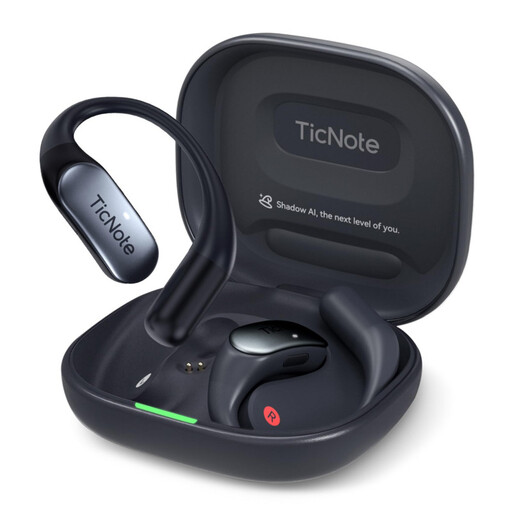 No image available
If you’re looking for a compact device with a built-in microphone, the product title lists a dual microphone and 32 GB of storage.
The title also lists 4G cloud upload and a charging case.
 No image available
For recordings without a separate memory card, the product description lists 64 GB of built-in storage.
The title lists a three-microphone array, 20 hours of recording time, Wi-Fi and Bluetooth.
 No image available
For a quick start, the product description lists one-button recording and two omnidirectional microphones.
A 16 GB TF card and USB transfer are listed; recording time is stated as up to 22 hours.
 No image available
If you want to listen back to recordings on the device, the product description lists 64 GB of storage and supplied headphones.
One-button recording, WAV recording and USB-C are listed; the product description also states compatibility with Windows and Mac.
Position the recorder or microphone securely at your chosen speaking spot and listen to a short test with normal, quiet and emphatic sentences. If you can hear room echo, check the position and recording environment first. RØDE points out that greater distance from the microphone can make echo and background noise more noticeable.
Not necessarily. 32-bit float is a recording option on the handheld recorders mentioned above, while XLR inputs are mainly relevant if you’re using a compatible external microphone setup. A test recording from your actual speaking spot is still important for clear speech.
Before you buy, check that storage, power and cables for your first take are included. The Verbraucherzentrale distinguishes between your statutory rights against the seller and a voluntary guarantee. When buying as a consumer online, you generally have a 14-day right to cancel; exceptions and when the cancellation period begins should also be taken into account.
The German Patent and Trade Mark Office explains that your own text may be protected by copyright if it is an original intellectual creation; authors can grant rights of use. If a published recording includes someone else’s protected text or music, you’ll need to check the relevant rights of use and any applicable exceptions separately.
No. The German Data Protection Conference states that, under data protection law, recording a phone conversation is generally only permitted with the consent of the other person on the call as well. This applies to phone conversations and cannot be applied in the same way to every other recording situation.