Who are these recorders suitable for?

Students recording on their own

If you want to record summaries without a complicated setup and then find and replay them easily, look for simple controls, search features and clear speech when recording at your own desk. Sony lists A/B repeat and speed control among the features of the ICD-UX570.

Students with an editing workflow

If you transfer recordings to a computer or occasionally want to record directly onto one, compare the recording format, USB functionality and file management. Zoom describes the H1essential as a USB microphone that can record to a memory card at the same time; Tascam lists a USB-C audio interface function for the DR-05XP.

Students who record in different locations

If you don’t always speak in the same place, check how the recorder and microphone can be positioned, and which connections the specific model has. OM SYSTEM lists adjustable microphone direction for the LS-P5; Zoom notes that placing the H1essential directly on a table can cause reflections.

What should you look for when buying?

Compact voice recorder

A good fit if: you record short pieces on your own and want to find them easily and transfer them without additional setup.

Consider: connection and recording options may be more limited than on handheld models.

Handheld recorder with built-in microphones

A good fit if: you want to connect an external microphone, choose recording formats or record on a computer.

Consider: you’ll need a suitable memory card and a good position for the recorder. More recording formats are no substitute for listening to a test recording made in your usual spot.

Handheld recorder with internal storage and directional control

A good fit if: you want to get started without a separate memory card and adjust the direction of the built-in microphones.

Consider: extra features aren’t necessarily useful for short study notes recorded on your own.

Priority What to check before buying Who is this important to?
Clear speech where you record Record a typical paragraph in the place you plan to use the recorder, then listen back; check the distance and that the device is stable. If your main priority is clear recordings of your own voice, test the device in your room. Around 36% of consumers prioritise clear speech where they record.
Quick recording and playback Try starting a recording, searching for it and replaying a particular section. If you record lots of short pieces and want to listen to them again without searching for ages, pay attention to the playback process. Around 29% of consumers prioritise quick recording and playback.
Transferring and editing files Check whether recordings can be transferred via USB and opened in the software you want to use; find out if recording directly to a computer is possible. If you want to organise or edit study notes on your computer, the format and transfer method matter. Around 21% of consumers prioritise transferring and editing files.
Recording flexibly in different locations Compare internal storage and memory card support, as well as the power supply and the microphone inputs actually available. If you record in different places or may want to use an external microphone later, check the positioning options and connections. Around 14% of consumers prioritise this flexibility.

Common misconceptions

  • 32-bit float solves every room-acoustics problem

    A recording format can’t make up for poor microphone positioning or distracting reflections from a table.

    First, record a typical study note where you plan to use the device and listen back. For the H1essential, Zoom recommends avoiding placing it directly on a table if reflections are affecting the recording.

  • Memory card support and internal storage are the same thing

    Storage varies by model. The Zoom H1essential requires a suitable microSD card for the card-based workflow described.

    Check the storage media supported by the complete model variant and prepare it before your first recording.

  • An old product page proves that a product is currently available

    Philips marks the DVT2110 as no longer available on its German product page.

    Compare features using the full model number and check the specific listing before choosing a variant.

Notable brands and model ranges

Sony

The ICD-UX570 is a compact option for students who want to find and replay recordings easily.

  • Sony lists 4 GB of internal storage, Linear PCM and MP3 recording, A/B repeat, speed control and direct USB.
  • These specifications don’t prove that the device will sound better in a particular home studio.

Zoom

The H1essential and H2essential are handheld options if you want to combine standalone recording with USB microphone use.

  • Zoom lists built-in X/Y microphones and a 3.5 mm microphone input for the H1essential; for the H2essential, the manufacturer describes selectable recording directions.
  • The H1essential requires a suitable microSD card for the card-based workflow described. Zoom also warns that placing it directly on a table can cause distracting reflections.

Tascam

The DR-05XP is a handheld option if you’re considering USB-C audio interface functionality as well as standalone voice recording.

  • Tascam lists built-in microphones, a range of recording formats and an external microphone input.
  • Manufacturer claims about recording quality aren’t independent proof that speech will be clear in every home studio.

OM SYSTEM

The LS-P5 is an option for students looking for internal storage, adjustable microphone direction and file search.

  • OM SYSTEM lists 16 GB of internal storage and a calendar search for saved recordings.
  • The German manufacturer’s website marks the LS-P5 variant shown there as out of stock; this doesn’t tell you whether other retailers have it available.

Philips VoiceTracer

The VoiceTracer range is worth considering for voice recordings; when comparing models, the exact model number matters.

  • Philips lists 8 GB of internal storage and MP3 and PCM stereo recording for the DVT2110.
  • Philips explicitly marks the DVT2110 as no longer available, so it isn’t a current buying option.

Recorders for study summaries at Joybuy

This selection includes compact voice recorders for your own study recordings, as well as models with features for transferring, replaying or processing your notes afterwards.
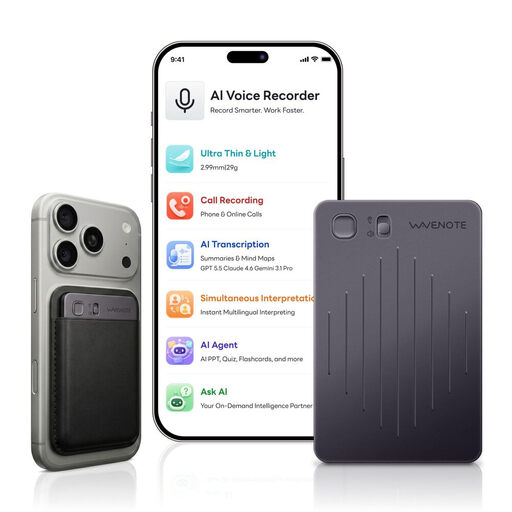
WaveNote AI Voice Recorder, 64 GB, Black Grey

WaveNote AI Voice Recorder, 64 GB, Black Grey

If you’d like to sync recordings in an app later and use summaries there, the product description lists these features for the device.

One-button recording, 64 GB of internal storage, Bluetooth and WAV recording are listed. The stated recording time is up to 42 hours.

View at Joybuy

Digital Voice Recorder, 64 GB, with transcription function

Digital Voice Recorder, 64 GB, with transcription function

If you want to turn your study recordings into text afterwards, the product description lists transcription and summaries as features.

The product title states that it has 64 GB of storage. The description lists studying and interviews as uses, but doesn’t make any claims about transcription accuracy.

View at Joybuy

Rexsun L15 Voice Recorder with 16 GB TF card

Rexsun L15 Voice Recorder with 16 GB TF card

For short study notes that you want to play back straight away and then transfer to your computer, the manufacturer describes these functions for the device.

The description lists one-button recording, headphone playback and USB file transfer, as well as an included 16 GB TF card.

View at Joybuy

Rexsun L810 Digital Voice Recorder, 64 GB

Rexsun L810 Digital Voice Recorder, 64 GB

If you want to replay sections of your study notes and transfer recordings by cable, the product description lists A-B repeat and USB-C file transfer.

MP3 and WAV recording, as well as automatic voice activation, are also listed. The storage capacity differs between the title and description, so check the exact variant before buying.

View at Joybuy

Rexsun L357 Portable Voice Recorder, 128 GB

Rexsun L357 Portable Voice Recorder, 128 GB

For study notes you want to record, replay section by section and edit on your computer, the product description lists relevant features.

Features listed include 128 GB of storage, MP3 and WAV formats, A-B repeat and USB-C file transfer.

View at Joybuy

Frequently asked questions

Is a basic voice recorder enough for my study summaries?

If you record short pieces on your own, a straightforward recording, search and playback process is a sensible place to start. If you need an external microphone input or want to record directly to a computer, check the features of the specific handheld model.

How should I position the recorder at home?

Test it in your usual speaking spot and listen back to a complete sample sentence. For the H1essential, Zoom recommends keeping it away from the table surface, for example by using a stand, as reflections from the table can affect clarity.

Do I need a memory card or additional software?

It depends on the model: Sony lists internal storage for the ICD-UX570, as does OM SYSTEM for the LS-P5. A suitable microSD card should be prepared for the H1essential recording workflow described. Also check that your computer can read the files you want to use.

Can I record other people or a lecture?

Section 201 of the German Criminal Code (StGB) sets limits on recording another person’s private spoken words without permission. Section 53 of the German Copyright Act (UrhG) requires the rights holder’s consent to record public lectures, performances or presentations of a work. Being able to record your own summaries does not give you blanket permission to record other people’s voices or talks.

Who should I contact if my device is faulty?

Statutory consumer rights generally apply against the seller and are separate from a voluntary guarantee. If a product is faulty, the first remedy may be repair or replacement. Which rights apply in a particular case depends on the purchase and the circumstances.