For short study summaries in your own voice, a simple recorder with local file storage is a good choice if you mainly want to record, listen back and transfer files. Extra recording features or AI transcription can be useful if they fit your routine; test how clear the audio is with a sample of your own voice at your actual desk. Under Section 201 of the German Criminal Code (StGB), it is a criminal offence to record another person’s private spoken words without permission (Federal Ministry of Justice, Laws Online).
Which recorder is right for you?
Students at a shared desk
If you record your own summaries, check whether your voice remains clear and whether other people’s conversations are picked up. Section 201 of the German Criminal Code (StGB) protects other people’s private spoken words from being recorded without permission (Federal Ministry of Justice, Laws Online).
Students who prefer local file storage
If you want to listen to, organise and transfer recordings without using an AI service, check the formats and features of the specific model. Sony Germany and OM SYSTEM list local recording and file management features for their respective models.
Students who need transcription
If you also want to turn your own audio summaries into text, check the service’s terms and the allowance included. Plaud lists 300 transcription minutes per month for its Starter plan.
What should you look for when buying?
Basic voice recorder with local files
A good fit if: you mainly want to record short summaries in your own voice, find them later and listen back. Sony lists features including MP3/L-PCM, calendar search and adjustable playback speed for the ICD-PX470; OM SYSTEM lists a simple operating mode and direct USB connection for the WS-882.
Consider: If you need automatic text summaries, check whether the specific model or an additional service offers this feature.
Audio recorder with extra recording features
A good fit if: you plan to use it for more than voice notes, or as a USB microphone. Philips lists recording scenes and MP3/PCM for the DVT4115; Zoom lists X/Y microphones and simultaneous SD card recording when the H1essential is used as a USB microphone.
Consider: Extra microphones and formats alone don’t guarantee clearer audio at a shared desk; also check how easy the device is to use and what accessories you’ll need.
Recorder with AI transcription
A good fit if: you regularly want to turn your own recordings into text or summaries for further use.
Consider: Plaud lists 300 transcription minutes per month for its free Starter plan. Check the service terms and how your data is processed; AI features do not give you permission to record other people’s private conversations without authorisation.
First, decide what matters most to you: clear recordings of your own voice, a local file workflow, text processing or the ongoing terms of a service.
| Buying priority |
What to check |
Who is this important for? |
| Clarity of your own voice |
Test with a sample of your own voice from your usual seat; take your headphones and microphone position into account. |
If I only want to record my own voice at a shared desk, I need to be able to hear it clearly later. Around 36% of consumers would put recording clarity first. |
| Local storage and playback |
Check file formats, search and playback features, and compatibility with your computer. |
If you want to find, listen to and transfer recordings without an AI service, a local workflow is particularly important. Around 29% of consumers would prioritise these features. |
| Transcription and summaries |
Check the monthly allowance, app workflow and how the service processes your data. |
If I regularly want to reuse my own recordings as text, the transcription terms matter. Around 21% of consumers would make text processing a priority. |
| Upfront and ongoing costs |
Compare the features you need, accessories and any plan limits before you buy. |
For consumers focused mainly on the purchase price and possible ongoing costs, what the device can actually do is key. Around 14% would put this cost consideration first. |
Which assumptions should you avoid?
-
A sensitive microphone doesn’t automatically mean a clear recording
Manufacturers’ claims about microphones or recording modes can’t predict how clearly your voice will come through at your particular shared desk. A microphone may also pick up other people’s voices.
Before recording for longer, make a short test recording using only your own voice and listen back to it. Don’t record another person’s private spoken words without permission; this is a criminal offence under Section 201 of the German Criminal Code (StGB) (Federal Ministry of Justice, Laws Online).
-
A monthly free allowance doesn’t mean unlimited AI use
Plaud lists 300 transcription minutes per month for its Starter plan. If you need more, check the plan terms currently in force.
Estimate how much you’ll use each month and compare it with the stated allowance before you buy.
-
Saved recordings aren’t automatically backed up
The Philips DVT4115 manual warns that resetting the device to factory settings deletes data and recordings.
Regularly transfer any files you need to suitable personal storage and back them up before resetting the device.
Which brands are worth considering?
Sony
The ICD-PX470 is an example of a voice recorder with features for local study recordings.
- Sony Germany lists MP3/L-PCM, calendar search, adjustable playback speed and a headphone output for the ICD-PX470.
- These model specifications are not an independent comparison of recording clarity at a shared desk.
OM SYSTEM
The WS-882 is an example of a recorder with a simple operating mode and local file storage.
- OM SYSTEM lists a direct USB connection and 4 GB of internal storage for the WS-882.
- The manufacturer’s specifications are not a comparison test of recording clarity when other people are speaking nearby.
Philips VoiceTracer
The DVT4115 is also described as offering different recording scene settings.
- The product page lists three microphones, MP3/PCM and 8 GB of internal storage.
- Recording modes and manufacturer specifications alone don’t guarantee clearer audio at your desk.
Zoom
The H1essential is a handheld recorder for voice notes, with additional USB microphone features.
- Zoom lists X/Y microphones and simultaneous SD card recording when used as a USB microphone.
- These features don’t demonstrate any particular advantage for short study summaries at a shared desk.
Plaud
Plaud offers recorders with app-based transcription and summaries for students who regularly need text versions.
- Plaud lists 300 transcription minutes per month for its free Starter plan.
- The allowance doesn’t demonstrate independently tested transcription accuracy or guarantee that the service terms suit every workflow.
Recorders for study summaries at Joybuy
This selection includes recorders with AI transcription for recording your own study summaries.
 No image available
PLAUD Note Pro voice recorder, 64 GB
For recording your own study summaries to turn into text or summaries for further use.
64 GB storage; 30-hour battery life; 4 MEMS microphones; compatible with Android and iOS.
View at Joybuy
 No image available
Mobvoi TicNote Lite AI Voice Recorder, 4 GB
For your own study recordings, which you can process further with transcription and summaries.
4 GB storage; supports 120+ languages.
View at Joybuy
 No image available
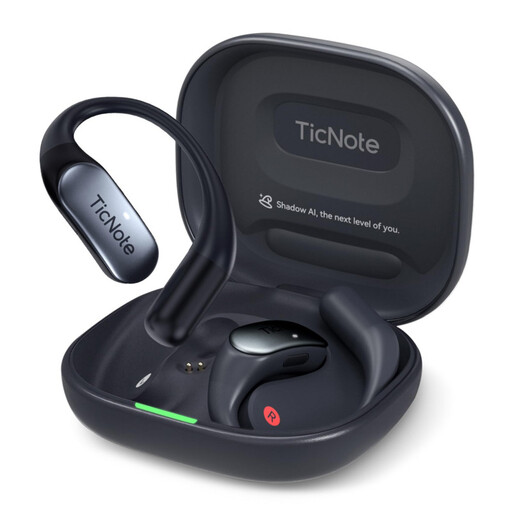
Mobvoi TicNote Pods 4G AI Voice Recorder, 32 GB
For your own recordings, which you can transcribe and summarise; bear in mind the stated cloud upload when using it at a shared desk.
32 GB storage; two microphones; 4G cloud upload; wireless charging case.
View at Joybuy
 No image available
Mobvoi TicNote Standard AI Voice Recorder, 64 GB
For your own study summaries, which you can transcribe, summarise and turn into notes.
64 GB storage; triple-microphone array; 20-hour recording time; Wi-Fi and Bluetooth.
View at Joybuy
 No image available
Digital voice recorder with transcription function, 64 GB
For study recordings that you also want to turn into text and summarise.
64 GB storage; transcription function.
View at Joybuy
Frequently asked questions
Can I simply record other people at a shared desk?
No. You must not record another person’s private spoken words without permission; this is a criminal offence under Section 201 of the German Criminal Code (StGB) (Federal Ministry of Justice, Laws Online). Record your own summary in a way that minimises the chance of picking up other conversations.
Can I use AI summaries for free without limits?
Plaud lists 300 transcription minutes per month for its Starter plan, so the allowance isn’t unlimited. If you need more, check the plan terms currently in force.
How can I check whether the recorder captures clear audio at my study space?
Start by making a short test recording using only your own voice and listen back to it; adjust the distance and direction if needed. Sony lists a recording monitor and headphone socket for the ICD-PX470, but you’ll need to check the audio clarity at your particular desk for yourself.
What should I do with my recordings after studying?
Transfer and back up any files you need using your usual file workflow. The Philips DVT4115 manual warns that resetting the device to factory settings deletes data and recordings.
Can I record a lecture to make a study summary?
Check your university’s rules and get any required consent before recording. The University of Duisburg-Essen prohibits recording its classes without the prior consent of those involved; this specific university rule does not necessarily apply to every institution.


