Which type of recorder is right for you?

Commentators recording with a fan running

If you can’t turn off the fan, making a single voice easy to understand is what matters most. Shure recommends reducing unwanted noise at its source where possible, or moving the microphone closer to the speaker.

Presenters who vary their volume

If your delivery alternates between quiet and emphatic passages, keep an eye on the microphone position and check that the recording format suits your editing plans. Zoom and Tascam specify 32-bit float recording for certain models, but this won’t remove fan noise.

Occasional recordists

A compact voice recorder can be enough for a short commentary if it’s quick to start, easy to check and simple to transfer, provided a test recording sounds clear where you plan to use it. Sony lists built-in storage and a PC connection for the ICD-UX570.

What should you look for when buying?

Clip-on recorder with a lavalier microphone

Best suited to you if: You move around or turn your head while speaking and need to keep the microphone at a consistent distance.

Things to consider: Check the attachment, cable and clothing for possible rustling before you start recording.

Handheld audio recorder set up nearby

Best suited to you if: You speak from a fixed position and can place the device close enough to your voice.

Things to consider: If the recorder is further away, more room sound and background noise may be picked up. Built-in microphones don’t automatically cancel out fan noise directionally.

Compact voice recorder

Best suited to you if: A straightforward recording start, playback and file transfer matter more than setting up a separate microphone.

Things to consider: Voice optimisation or filter specifications don’t prove that fan noise will disappear from the finished recording.

Buying priority What to check Who is this important to?
Clear speech with fan noise Check the microphone position and attachment; make and listen back to a test recording with the fan running. If the fan can’t be turned off, making a single voice easy to understand is my top priority. Around 42% of consumers would also make speech clarity their most important buying priority.
Quiet and emphatic passages Compare recording formats and controls; check both the quietest and loudest passages you plan to record. If my poetry commentary switches between quiet delivery and emphasis, I want to check both passages and edit them if needed. Around 25% of consumers would prioritise changes in vocal dynamics.
Microphone distance when moving Check the clip, cable routing and possible rustling against the clothes you’ll actually be wearing. If I move around or turn my head while speaking, keeping a consistent distance from the microphone is particularly important. For around 17% of consumers, freedom of movement would be their top buying priority.
Checking a recording and transferring the file Check the power supply, storage requirements, playback options and transfer method to the device you’ll use. For a short commentary, I want to be able to start, listen back to and share the recording without fuss. Around 16% of consumers would prioritise an easy recording and file-transfer process.

Common misconceptions when buying a recorder

  • Assuming 32-bit float recording filters out fan noise

    The recording format affects how levels are handled, but it won’t automatically separate your voice acoustically from the fan.

    First, find a suitable microphone position, then decide which format best suits your editing plans.

  • Placing a built-in stereo microphone too far away

    As the distance increases, your voice may become less prominent compared with room sound and background noise.

    Test the device in the place where you can actually set it up. If that’s too far away, a microphone worn close to your body could be a suitable alternative.

  • Assuming what’s included with a clip-on setup

    The recorder, microphone, clip and storage are separate parts of your planned recording setup.

    Check the specific offer to see which items are included and whether you’ll need storage media or attachment accessories.

Key brands at a glance

Zoom

The F2 and H1essential offer different recording setups: a lavalier worn on the body or built-in microphones in a handheld device.

  • Zoom lists an included omnidirectional lavalier microphone and clip for the F2, and built-in X/Y microphones and a USB microphone function for the H1essential.
  • 32-bit float recording and Zoom’s claims about AI noise reduction don’t prove that a particular fan noise will be removed.

Tascam

The DR-10L Pro is designed for use with a clip-on microphone, while the DR-05XP records using its built-in microphones.

  • Tascam specifies 32-bit float recording for both models. According to the manufacturer, the DR-05XP’s built-in microphones are omnidirectional.
  • The DR-10L Pro’s clip-on microphone needs to be attached securely. Manufacturer claims about recording quality aren’t an independent test of fan noise.

Sony

The ICD-UX570 is positioned as a compact voice recorder for short commentaries and file transfers.

  • Sony lists built-in storage, a PC connection, PCM and MP3 recording, and an Auto Voice function designed to optimise capture for voice frequencies.
  • Voice optimisation doesn’t prove that fan noise will be completely suppressed.

OM SYSTEM

The WS-883 is a compact voice recorder with built-in microphones.

  • OM SYSTEM lists two microphones arranged at a 90° angle and a low-cut filter for this model.
  • A test recording will show whether the filter sounds right for your voice and the particular fan noise.

Joybuy products for voice recording

This selection includes compact voice recorders for short commentaries, with straightforward recording, playback and file transfer. Feature or noise-reduction specifications don’t prove that speech will be clear when a fan is running.

Mobvoi TicNote Lite AI Voice Recorder, 4GB Storage, Black

Mobvoi TicNote Lite AI Voice Recorder, 4GB Storage, Black

Could suit a straightforward recording process followed by file transfer.

Listed features include WAV recording, Bluetooth, and app and web management. These don’t demonstrate any specific effect on fan noise.

Joybuy
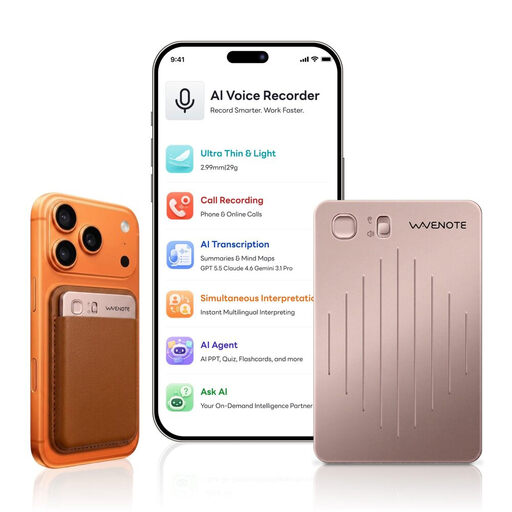
WaveNote AI Voice Recorder 64GB Rose Gold

WaveNote AI Voice Recorder 64GB Rose Gold

Could suit you if you want to start recording quickly and manage your files digitally afterwards.

Specifications list two recording modes with a 4-microphone array, as well as transcription, summaries and app-based file management. They don’t show any specific effect on fan noise.

Joybuy

Rexsun Digital Voice Recorder L15, 16GB, Gray

Rexsun Digital Voice Recorder L15, 16GB, Gray

Could be worth considering for a short commentary that you want to start recording straight away and listen back to afterwards.

Listed features include one-touch recording, two omnidirectional microphones, headphone playback and USB file transfer. The stated noise reduction doesn’t prove that a particular fan noise will be removed.

Joybuy

Rexsun Digital Voice Recorder L810, 64GB, Gray

Rexsun Digital Voice Recorder L810, 64GB, Gray

Could suit you if you want to start recording, listen back and then transfer files via USB-C.

Listed features include one-touch recording, WAV recording, voice activation and headphone playback. No measurement of speech clarity with fan noise is provided.

Joybuy

Rexsun Digital Voice Recorder L357, 128GB, Gray

Rexsun Digital Voice Recorder L357, 128GB, Gray

Could suit a commentary you want to start quickly, check afterwards and then share as a file.

Listed features include one-touch recording, A-B playback, time stamps, and MP3 and WAV support. USB-C is specified for transferring files.

Joybuy

Frequently asked questions

Can a noise filter reliably remove a running fan?

You can’t tell from the name of a filter alone. Place the microphone as close to your voice as possible, then compare a short recording with and without the filter. Zoom advertises AI noise reduction for the H1essential, but this manufacturer claim isn’t independent evidence of how it will perform in your room.

What should I check just before presenting?

With the fan running, make a test recording from the position where you’ll actually be speaking. Then check that recording starts properly, the storage and power supply are ready, quiet and emphatic passages sound clear, and the file plays back correctly.

What should I check about what’s included and the accessories?

Check the specific model to see whether it includes a lavalier microphone, a clip and any storage media you need. For clip-on recorders, make sure the attachment and cable routing work with your clothes, too.

Can I record other people as well as my own commentary?

Section 201 of the German Criminal Code (StGB) covers unauthorised recordings of another person’s non-public spoken words. If other people will be audible, check before recording that it’s permitted and that you have any consent required.