Which setups are right for different needs?

Solo storytellers on the move

If you speak for longer stretches while walking, consider how the microphone’s position and wind protection help keep your voice clear as you move. RØDE, Hollyland and DJI describe solutions for outdoor recording and speaking with a microphone worn close to the body.

Storytellers who want to keep their phone free

If you don’t want to hold your smartphone in front of your mouth as you walk, a transmitter worn on your body can separate the microphone position from the phone. Hollyland and DJI offer wireless options for this; make sure the receiver, adaptors and batteries are right for the specific set.

Capturing the atmosphere along the way

If the surrounding sounds matter as much as your commentary, check whether stereo recording suits your needs. Shure and Zoom describe adjustable stereo and mono options for their respective models.

What should you look for when buying?

Direct USB-C directional microphone

A good fit if: you can position your phone suitably while speaking and want to avoid a wireless connection.

Consider: The microphone sits on your phone, so your posture and any changes in distance may matter as you walk.

Wireless microphone with USB-C receiver

A good fit if: you want to wear the transmitter close to your body and hold your phone separately.

Consider: The transmitter, receiver, any adaptors and batteries all need to suit the set and your recording setup.

Direct USB-C stereo microphone

A good fit if: you want to capture the surrounding atmosphere as well as your spoken voice.

Consider: Stereo recording is no substitute for suitable wind protection or keeping a consistent distance from the microphone.

Priority What to check before buying Who it matters most to
Voice clarity in wind and while moving Check the wind protection and how the microphone attaches; try the setup outdoors in the way you plan to wear it. If you speak continuously while walking, clear audio despite the wind is likely to be your priority. Around 31% of consumers say recording speech in windy conditions is their main concern.
Long, uninterrupted recordings Check battery-life figures and how they were measured, along with your phone’s battery, storage and the recording app’s behaviour, using a test recording. If you need to record without stopping, you’ll want to keep an eye on the power supply for every device you need. Around 25% of consumers prioritise long recordings and avoiding interruptions.
Connectivity and ease of use Check that your phone model, operating system, case and recording app are compatible, and that the USB-C receiver version is right for your wireless set. If you want to keep your phone free while walking, a suitable connection and practical microphone position will matter. Around 25% of consumers put compatibility and ease of use first.
Capturing the atmosphere along the way Compare the stereo and mono options, then listen to a test recording of your commentary alongside the surroundings you want to capture. If the sounds and sense of space along your route matter as much as your voice, you’ll want to plan how to record them. Around 19% of consumers say atmosphere is their main buying priority.

Avoid common misconceptions

  • USB-C doesn’t automatically mean compatible

    A USB-C port alone doesn’t confirm that a particular microphone will work with your phone, operating system, case and recording app. Zoom explicitly warns that the Am7 isn’t compatible with USB-C iPhones and iPads; a thicker case may prevent the Shure MV88 USB-C from fitting directly.

    Check the exact model version against your phone, operating system, case and app requirements.

  • The charging case’s battery life isn’t the same as recording time

    Transmitter and receiver battery-life figures may be based on different conditions. Hollyland quotes up to 10 hours per transmitter charge; DJI publishes battery-life figures for a specified camera test, which don’t confirm how long you can record on a smartphone.

    Check the battery life of each device you need to use at the same time, and test a continuous recording with your phone and recording app.

  • Foam and furry windshields aren’t always included together

    For the RØDE VideoMic GO II, the manufacturer lists a furry windshield for strong winds as a separate purchase. A furry windshield is included with the VideoMic Me-C+.

    Check what’s included with the exact model version and whether it comes with the wind protection you need for your setup.

Key brands at a glance

RØDE

Offers USB-C microphones that plug straight in, as well as directional options with a USB output.

  • RØDE says the VideoMic Me-C+ includes a furry windshield and a headphone output.
  • According to the manufacturer, the VideoMic Me-C+ isn’t suitable for iOS devices with a Lightning connector. For the VideoMic GO II, RØDE lists a furry windshield for strong winds and an additional USB connection cable as separate purchases.

Hollyland

The LARK M2 is available in a Mobile version with a USB-C receiver for speaking with the microphone worn close to the body.

  • Hollyland quotes up to 10 hours of recording per transmitter charge.
  • This is the manufacturer’s quoted figure, not a measurement of a long recording on a smartphone. Mobile, Camera and Combo versions differ, so check the exact version.

DJI

The Mic Mini is an option for speaking with a microphone worn close to the body; the right connection depends on the set and your phone.

  • DJI describes windshields and two levels of noise cancellation.
  • The published battery-life figures refer to specified test conditions using a camera connection. They don’t confirm equivalent battery life for a long recording on a smartphone.

Shure

The MV88 USB-C is designed to plug straight into a smartphone, with adjustable mono or stereo patterns.

  • Shure lists a foam windshield and several recording patterns.
  • According to Shure, the case must be no thicker than 2.1 mm for compatibility. A furry windshield is included in a separately listed bundle.

Zoom

The Am7 offers stereo options for compatible Android devices.

  • Zoom lists selectable stereo widths, a level control and a headphone output.
  • Zoom explicitly warns against connecting the Am7 to USB-C iPhones and iPads. Check separately that you have suitable wind protection for outdoor recording.

Joybuy products for hands-free speaking

This selection features wireless lavalier microphones with USB-C receivers, for a setup where the microphone is worn close to the body and your phone can stay free to move.

LARK M2 USB-C wireless microphone

LARK M2 USB-C wireless microphone

Wear the transmitter close to your body while keeping your phone free to move. Check that the specific set includes the Mobile version with a USB-C receiver.

View at Joybuy

Moman M1CXT wireless lavalier microphone, USB-C, 2TX+1RX

Moman M1CXT, USB-C, 2TX+1RX

For speaking with the microphone worn close to your body, without your phone dictating its position as you walk. Check that the USB-C receiver and everything included in the set are compatible with your phone.

View at Joybuy

SYNCO P1XT USB-C wireless microphone

SYNCO P1XT USB-C wireless microphone

Wear the transmitter close to your body while keeping your phone free to move. According to the product information, Android phones require OTG; check your device’s compatibility.

View at Joybuy
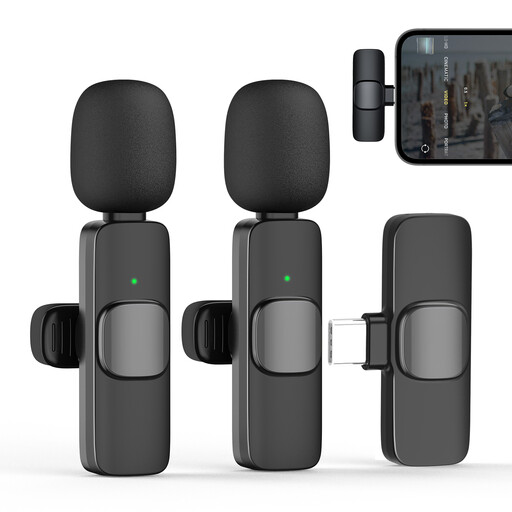
Moman CP1X(C) 2.4 GHz lavalier microphone, Type-C, 1TX&1RX

Moman CP1X(C), 2.4 GHz, Type-C, 1TX&1RX

For commentary with a transmitter worn close to your body and a Type-C receiver. Check that the connector and included wind protection suit your recording setup.

View at Joybuy

Moman MC1(C) 2.4 GHz lavalier microphone for USB-C, 1TX&1RX

Moman MC1(C), 2.4 GHz, USB-C, 1TX&1RX

For speaking with the microphone worn close to your body, while keeping your phone free to move as you walk. Check that the USB-C receiver is compatible with your smartphone.

View at Joybuy

Frequently asked questions

Will any USB-C microphone work with any USB-C smartphone?

No. The model, operating system, case and recording app all need to be compatible. RØDE specifies iOS 17 or later or Android 12 or later for the VideoMic Me-C+; Zoom explicitly warns against using the Am7 with USB-C iPhones and iPads.

How can I prepare for a long recording while walking?

Fit the windshield, check the microphone’s position and make a continuous test recording using the same app. Check your phone’s battery and storage, and, if you’re using a wireless set, the charge on every device you need. The manufacturer’s battery-life figures are no substitute for testing your actual setup.

What else might I need alongside the microphone?

It depends on the model and your phone. RØDE lists an additional USB connection cable for the VideoMic GO II, and a furry windshield for strong winds is sold separately. For wireless sets, check that the receiver version and, if needed, phone adaptor match what’s included in the specific set.

Can I simply record conversations with other people along my route?

There isn’t a blanket yes-or-no answer. Section 201 of the German Criminal Code (StGB) makes it an offence, among other things, to record another person’s non-public speech without authorisation. If identifiable people are recorded for anything other than purely private use, or their recordings are processed, you’ll also need to check the data protection requirements that apply to the specific situation. The Federal Commissioner for Data Protection and Freedom of Information (BfDI) lists consent as one possible legal basis, but not the only one. This does not provide a general answer as to whether incidental public background sounds may be recorded.

Do I always need an individual frequency allocation to use a wireless microphone in Germany?

Not in every case: the German Federal Network Agency publishes general frequency allocations, each with its own frequency and usage conditions. Check the technical specifications to find out which conditions apply to a particular wireless set. The general allocation published by the German Federal Network Agency on 15 April 2026 explicitly replaces the earlier allocations listed in it.