First, measure the distance between the potential camera position and the watch, then check that your hands and tools will fit within the frame. For a mainly overhead view, a document camera with an adjustable arm could work, provided you have enough space for the base and cable. If you need to change angles frequently, consider a webcam on a suitable mount. A short stated focusing distance alone doesn’t prove that tiny watch parts will appear large enough in the video.
Who is this set-up for?
Filming small watch parts
If screws or gears need to be clearly visible, the working distance, focus and framing all need to work together. IPEVO, HUE and OBSBOT’s focusing specifications can help you compare models, but they don’t, on their own, tell you how large a component will appear in the video.
Filming the whole repair
If you want to keep the watch, your hands and your tools in view from above throughout the repair, plan the camera position so the work surface stays clear. IPEVO describes the V4K PRO as a document camera; OBSBOT says the Meet 2 has a tripod thread, but you’ll still need a suitable mount.
Filming in a shared room
A tighter frame and a cover between recordings can help when planning your set-up. OBSBOT and Logitech describe covers for certain models; the Federal Commissioner for Data Protection and Freedom of Information notes that video recordings can, in principle, affect people’s personal rights.
What should you look for when choosing?
| What matters |
What to look for when buying |
Who is it important to? |
| Showing small parts |
Measure the potential distance from the watch, then check the focus and subject size in the video mode you plan to use. |
If I want screws or gears to be visible, the framing at my actual work space matters. Around 31% of consumers put clearly visible small components first. |
| Overhead view and work surface |
Measure the space for the base, mounting height and cable run; check the frame with your hands and tools in position. |
If both hands need to stay in view during the repair, I need a position that doesn’t block my work area. Around 25% of consumers prioritise an unobstructed overhead view. |
| Privacy in the room |
Point the camera at the workbench and check the edges of the preview before recording. |
If I share a room, I want to keep private areas and other people out of the frame as much as possible. Around 25% of consumers prioritise controlling what is in the frame and what is recorded. |
| Lighting and movement |
Check the available combinations of resolution and frame rate, then make a test recording with your planned lighting. |
If my hands are moving or watch parts are reflecting light, I want to assess the picture with my lighting set-up. Around 19% of consumers put lighting and how movement is captured first. |
Common buying mistakes
-
Assuming 4K or digital zoom means the camera is suitable for macro shots
Resolution, focusing distance and digital zoom describe different features. None of them, on its own, tells you how large a watch screw will appear in your planned shot.
Check the working distance and sample framing with the specific part you want to film.
-
Planning an overhead view without leaving room for the set-up
A tripod thread isn’t the same as a camera arm. The base, mount and cable can all limit where you can position the camera on the table.
Measure the complete set-up on the table you plan to use before choosing a camera style.
Depending on your set-up, an overhead view may require a suitable mount or a different arrangement.
-
Assuming a cover provides complete privacy protection
A webcam cover is useful between recordings, but it doesn’t control what appears in the frame while recording is in progress.
Check the edges of the frame before each recording and, where possible, point the camera only at the work surface.
Brands to consider
IPEVO
The V4K PRO is a USB document camera for a separately positioned view of your work surface.
- IPEVO specifies autofocus from 10 cm, a maximum capture area of 34,2 × 25,5 cm, USB-A and a 150 cm cable.
- These specifications alone don’t tell you whether tiny watch parts will be clear in your set-up.
HUE
The HD Pro is a flexible USB camera with manually adjustable focus.
- HUE specifies 1080p, a flexible neck and manual focus from 1 cm.
- You may need to refocus after changing the distance. The camera’s close position must not get in the way of your hands or lighting.
OBSBOT
The Meet 2 is a compact webcam with AF/MF and a tripod thread; the Tiny 2 has a motorised pan-and-tilt design.
- OBSBOT specifies focus from 10 cm, a 1/4-20 thread and a cover included with the Meet 2.
- The thread doesn’t replace a suitable overhead mount. OBSBOT also specifies a 10 cm minimum focusing distance for the Tiny 2; its design and system requirements differ from those of the Meet 2.
Logitech
The MX Brio is most relevant if you want to switch between a video-call view and the occasional presentation of your work surface.
- Logitech describes a Show Mode for a downward-facing view of the table and an integrated privacy shutter.
- Show Mode doesn’t prove that watch details will be clear at macro scale; the framing also depends on the position of your monitor.
Joybuy products
This selection from Joybuy includes cameras for video and tabletop recording. For each model, check whether it suits the PC recording set-up you have in mind.
 No image available
KINSI Mini Vlog Camera, 4K, 64 MP
The title describes a vlogging camera; check whether you can connect it for the PC recording set-up you want.
The title lists a 330° rotating lens, a 1.72 inch touchscreen, Face Recognition, Wi-Fi, Type-C and a tripod.
The product description says that a MicroSD card is required and not included.
View at Joybuy
 No image available
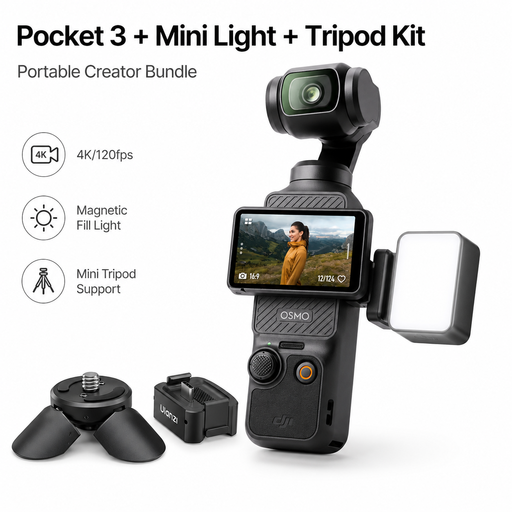
DJI Osmo Pocket 3 Standard Combo + ULANZI LM001 Magnetic Mini Video Light, Pocket 3 Adapter & Mini Tripod
This bundle is described as a vlogging camera kit; check whether you can connect the camera for the PC recording set-up you want.
The product title lists a 1-Inch-CMOS sensor, 4K/120fps and a 3-axis gimbal.
According to the title, the bundle includes a ULANZI LM001 Magnetic Mini Video Light, a Pocket 3 Adapter and a Mini Tripod.
View at Joybuy
Frequently asked questions
Is a 4K webcam enough to film tiny watch parts clearly?
Resolution alone won’t tell you. At your planned working distance, check that the camera can focus and that the specific part appears large enough in the frame. Focusing distance and video mode are separate features.
How do I set up the camera for PC recording?
In OBS, choose a video capture source and select the connected camera. Then check the resolution and frame rate available: according to OBS, an unsupported setting may mean that no picture appears from the source.
What should I know if something goes wrong after buying?
For a consumer purchase in Germany, the statutory warranty you have against the seller is separate from any voluntary guarantee. Check the specific terms of any additional guarantee offered.
Can I publish a video featuring my flatmate?
Under § 22 KunstUrhG, publishing or publicly displaying an identifiable image of someone generally requires their consent; statutory exceptions and other rights may be relevant in individual cases. Where possible, frame the recording so that other people are not captured. Whether data protection law also applies to a particular private recording cannot be determined in general terms for a shared bedroom.


