At a small painting desk, a computer-connected webcam is a good fit if you record while painting and want to put the equipment away afterwards. Logitech says the MX Brio has a Show Mode that tilts downwards, but this does not guarantee that the whole sheet will be in frame. If you want to record without a computer running, consider a compact camera with built-in zoom. A mirrorless camera is best suited to those who want to choose their lens and setup carefully. Whichever option you choose, check that the sheet and your hands are visible in your actual setup, and that the colours look right under your room lighting.
Who are the different options suitable for?
Artists working at a small desk
If you want the whole sheet in shot, you need to position the camera so it doesn’t get in the way of your hands or brushstrokes. Logitech describes the MX Brio’s Show Mode as a way to show what’s on your desk; only a test recording will tell you whether the whole sheet is visible.
Watercolour tutorials with consistent colours
If you want to show pigments and paper across several stages, remember to take your room lighting and white balance into account. Canon Europe explains that different light sources can cause colour casts.
Recording without a computer running
If you want to film independently, you can weigh up a built-in zoom against a camera with an interchangeable lens of your choice. Sony lists an integrated 18–50-mm lens for the ZV-1 II; Canon and Nikon describe interchangeable-lens cameras, where the framing depends on the lens you choose.
What should you look for when buying?
Webcam connected to a computer
A good fit if: You record on a computer and want to put the equipment away after painting. Logitech says the MX Brio can be tilted downwards for Show Mode; Elgato lists a 1/4-inch thread for the Facecam 4K.
Worth noting: A presentation mode doesn’t guarantee that the whole sheet will be visible. The Facecam 4K has fixed focus; Elgato specifies a focus range of 30–120 cm at 4K.
Compact camera with built-in lens
A good fit if: You want to record without a computer running and adjust the framing using a built-in zoom. Sony lists an 18–50-mm lens for the ZV-1 II.
Worth noting: You can’t swap the lens for one with a different angle of view, so check that your sheet fits in frame from the available mounting height.
Mirrorless camera with interchangeable lens
A good fit if: You want to plan the angle of view by choosing a suitable lens, or use the camera for other video recordings too. Canon lists RF and RF-S lenses for the EOS R50 V.
Worth noting: Camera body specifications alone won’t tell you whether the framing will work at your painting desk. Nikon lists up to 125 minutes of continuous footage for the Z 30; this is not a guarantee for every recording mode or setup.
Existing iPhone with a compatible Mac
A good fit if: You already own the compatible devices and want to try a desk view before buying a camera. Apple describes Desk View as a simulated overhead view.
Worth noting: Check that the devices, recording app, sheet coverage and image quality work for your setup.
| What you need |
What to look out for |
Who this matters most to |
| Whole sheet in frame |
Check the paper size, camera height and secure mounting with a test recording. |
If I want to see the whole sheet and my hands, I test the framing from the planned camera position; around 36% of consumers put a complete, unobstructed view of the sheet first. |
| Colours and paper |
Test under your intended room lighting, and check the white balance and lighting together. |
If I want pigments and paper to look true to life under my room lighting, I look for a suitable white balance; around 29% of consumers prioritise consistent colour reproduction. |
| Simple recording process |
Decide whether you want the computer running while you paint, and allow space for cables and a mount. |
If I want to clear my desk quickly after filming, I choose a setup that works with my computer and available space; around 21% of consumers prioritise a simple setup. |
| Long painting sessions |
Test the required recording length in your intended mode, and check the power supply and storage for the specific model. |
If I want to film a painting session with as few unexpected interruptions as possible, I check the required take length; around 14% of consumers prioritise recording with minimal interruptions. |
Common pitfalls
-
Assuming “Desk View” means a complete overhead view
A tilting webcam body or simulated desk view doesn’t guarantee that the whole sheet and your hands will be in frame from your position.
Test your own paper size with a recording from the intended camera position. Logitech describes Show Mode as a way to show what’s on your desk; Apple calls its Desk View a simulated overhead view.
Depending on your desk, you may need a different mount or an adjusted setup.
-
Comparing only the 4K specification
Resolution alone tells you nothing about the focus distance or how colours will look under your room lighting. For the Facecam 4K, Elgato specifies a fixed focus range of 30–120 cm at 4K.
Check the focus distance, framing, lighting and white balance together in your intended setup.
-
Judging a mirrorless camera body without a specific lens
With an interchangeable-lens camera, the framing at your painting desk depends on the lens you choose. The camera body specifications alone won’t tell you whether the whole sheet will fit in frame from your planned camera height.
Match the angle of view of the specific lens to your paper size and mounting height, and check what’s included in the set you choose.
You may need an additional suitable lens or secure mount for your planned setup.
-
Taking the maximum recording time as a guaranteed session length
Nikon’s figure of up to 125 minutes for the Z 30 is a manufacturer’s maximum, not a guarantee for every mode or setup.
Test a recording of the required length using your intended settings.
Depending on your recording process, you may need to plan for power or several takes.
Key brands at a glance
Logitech
The MX Brio is a webcam for desk recording with a computer.
- Logitech describes a tilting Show Mode and manual white balance settings via software.
- Show Mode doesn’t guarantee that an A4 watercolour sheet of any size will be fully in frame.
Elgato
The Facecam 4K is a USB webcam for a fixed recording position at a computer.
- Elgato lists a 1/4-inch thread and a focus range of 30–120 cm at 4K.
- The focus is fixed; check that your computer and connection are suitable for your planned setup.
Sony
The ZV-1 II is a compact camera with built-in zoom for recording without changing lenses.
- Sony lists an integrated 18–50-mm lens.
- As the lens is built in, the angle of view from your mounting height needs to suit the sheet.
Canon
The EOS R50 V is an interchangeable-lens camera for a carefully planned angle of view.
- Canon lists RF and RF-S lenses, as well as 4K video features.
- Whether the sheet fits in frame at a small desk depends on the lens you choose.
Nikon
The Z 30 is an interchangeable-lens camera for independent video recording.
- Nikon lists 4K UHD at 30p and up to 125 minutes of continuous footage.
- The recording time is a manufacturer’s maximum, not a guarantee for every mode; the lens determines the usable framing.
Joybuy products for filming at your painting desk
The models below include webcams for recording with a computer and pocket cameras for filming independently.
 No image available
Osmo Pocket 4P, Standard Combo, Black
As a pocket camera with a built-in lens, it’s one of the options for recording independently without a computer running.
- Variant: Standard Combo, Black.
View at Joybuy
 No image available
AOC 4K PRO Webcam
As a webcam for PC recording, it suits a computer-based setup; check the framing at your own painting desk.
- 4K resolution and Sony IMX363 sensor.
- PDAF autofocus and 75° angle of view.
- USB-A and USB-C connections.
View at Joybuy
 No image available
Logitech C922 Pro Stream Webcam
As a USB webcam, it’s one of the options for recording on a computer; check whether you can find a suitable camera position at a small desk.
View at Joybuy
 No image available
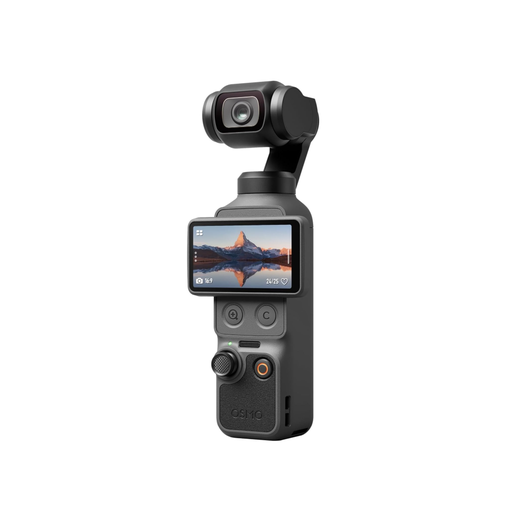
DJI Osmo Pocket 4, Standard Combo
As a pocket camera with a built-in lens, it’s an option for recording independently without a computer running.
- 1-inch CMOS sensor and 3-axis stabilisation.
- 2× lossless zoom, 107 GB of built-in storage and a rotating 2-inch screen.
- The 4K/240fps specification applies to slow-motion mode.
View at Joybuy
 No image available
Philips 4K UHD Webcam 4000 Series, SPL6408BT/00, EU version
As a webcam, this model is one of the options for recording with a computer; check the framing for your sheet and hands at your desk.
- 8-MP sensor and autofocus.
- Manual lens cover.
- Zoom and Teams compatibility according to the product name.
- Black, EU version.
View at Joybuy
Frequently asked questions
Is a webcam’s presentation mode enough to show a whole watercolour sheet?
Not necessarily. Logitech describes Show Mode as a way to show notes and sketches on your desk; make a recording from your actual camera position to check whether the whole sheet is visible.
How can I get started with the smallest possible setup?
If you have a compatible iPhone and Mac, you can try Apple’s Desk View first. Apple describes it as a simulated overhead view; also check the device requirements, recording app, framing and lighting.
What should I adjust when the daylight and room lighting change?
Check the white balance with a short recording under the lighting you actually paint in. Canon Europe explains that different light sources can create different colour casts; keep the lighting as consistent as possible during a take.
What happens if I want to return an online purchase or it’s faulty?
In Germany, online purchases are generally covered by a 14-day right to cancel; the start of the period and any exceptions should be checked, as explained by the Verbraucherzentrale on 13 August 2026. For faulty goods, statutory rights against the seller are separate from a voluntary guarantee.
Can I simply publish a painting video if other identifiable people appear in it?
Not necessarily. The State Commissioner for Data Protection and Freedom of Information of Rhineland-Palatinate explains that filming people generally requires their consent or another legal basis. This does not amount to general permission to publish every image or audio recording.


