If the connection is only weak where you study, first check where your router is and how the signal gets there. Simply buying a new router is not proven to solve signal problems caused by thick internal walls. A wired access point avoids the wireless link between rooms; a wireless mesh system needs to be placed where it has a good connection to the main unit, while powerline performance depends on your home’s electrical wiring. If you’re considering replacing your router, also check that it’s compatible with your broadband connection, receives updates and can be expanded later.
Who should consider this?
Students studying behind thick walls
You attend live lectures in a room separated from the router and mainly want to improve the connection there. Telekom Deutschland and FRITZ! explain how building materials and the route a signal takes can affect Wi-Fi coverage.
Students without a way to run a cable
You can’t run an Ethernet cable to your study area, so you need to weigh up a wireless mesh node in a suitable intermediate spot against a powerline connection that you’ve tested at home. Telekom Deutschland, TP-Link and devolo describe these different ways to connect.
Households considering a new router
You’re also looking to replace an older router. In that case, check that the new one supports your broadband connection, receives updates and lets you extend your Wi-Fi later. For example, the FRITZ!Box 7690 is listed as a DSL router.
What should you look for when buying?
Keep or replace your router
A good fit if: Your current router supports your broadband connection and still receives suitable updates, or you want to change one of these things.
The trade-off: Simply replacing your router is not proven to fix a weak wireless signal through thick walls.
Extend Wi-Fi to your study area
A good fit if: The connection is mainly weak in a distant room and you can place an access point, mesh node or powerline device where it can work effectively.
The trade-off: A wired access point needs a cable route, wireless mesh needs a good connection to the main unit, and powerline needs compatible electrical wiring.
| Priority |
What to check when buying |
Who is this especially important to? |
| A stable connection where you study |
Try moving the router and check reception in your study area; Telekom Deutschland recommends choosing a suitable location. |
If I attend lectures in a room with a poor signal, the connection needs to reach that room in particular. Around 36% of consumers prioritise this coverage. |
| Extending Wi-Fi without an Ethernet cable |
Find an intermediate spot for a wireless mesh node where reception is still reasonable, or test the powerline connection using the sockets you plan to use. Telekom Deutschland and devolo highlight the importance of placement and the possibility of interference. |
If I can’t run a cable, I need a practical way to connect the router and my study area. Around 29% of consumers prioritise a wireless set-up. |
| A router that supports your broadband connection |
Check whether you have DSL, cable or fibre, and whether you already have a modem or ONT; Wi-Fi specifications don’t replace this compatibility check. |
When replacing my router, I want a device that works with my broadband connection and planned Wi-Fi set-up. Around 21% of consumers prioritise this compatibility. |
| Find the cause before spending more |
Compare the connection near the router with the one in your study area; if needed, check your fixed broadband service separately using the Bundesnetzagentur’s broadband measurement tool. |
If I don’t yet know whether the Wi-Fi or broadband connection is causing dropouts, I want to investigate before buying. Around 14% of consumers prioritise diagnosis before purchase. |
Avoid common buying mistakes
-
Assuming a high Wi-Fi data rate guarantees reception through walls
A router’s advertised data rate doesn’t tell you how stable the wireless connection will be in your particular study room. Building materials and metal can affect the signal.
Check reception and stability where you study before deciding whether to move the router, use a wired connection or extend your Wi-Fi.
-
Placing the repeater in a room that already has poor coverage
A wireless repeater needs a reasonable connection to the main unit. If reception is already poor where you place it, it may not reliably improve the signal.
Look for an intermediate spot and check the connection indicator on the device you choose. Telekom Deutschland recommends moving Speed Home WLAN closer to the router or other boosters if the connection is weak.
-
Ignoring your home’s electrical wiring when considering powerline
Electrical interference and certain sockets can affect data transmission over your mains wiring. The advertised data rate doesn’t guarantee the connection you’ll get in your study area.
Test the sockets you plan to use in your home and check the returns policy before buying. devolo describes how electrical devices can cause interference.
-
Choosing a router based only on its Wi-Fi standard
Routers also differ in the type of broadband connection they’re designed for. A DSL router isn’t automatically the right choice for cable or fibre.
Before buying, check whether you use DSL, cable or fibre and whether you have a modem or ONT. The manufacturer describes the FRITZ!Box 7690 as a DSL router.
Brands to consider
FRITZ!
FRITZ! offers DSL routers such as the FRITZ!Box 7690, as well as FRITZ! repeaters to extend networks and support compatible connections.
- FRITZ! describes the 7690 as a DSL router and documents how the FRITZ!Repeater 1200 AX can work as an additional Wi-Fi access point connected via LAN.
- These model and set-up details don’t show how well the connection will reach through the walls of a particular room.
TP-Link
TP-Link’s Deco range includes mesh systems. The manufacturer combines Wi-Fi with powerline connections between units in the Deco PX10.
- According to TP-Link, the mains wiring can help connect the PX10 units.
- The advertised powerline data rate doesn’t predict what your home’s electrical wiring will actually achieve.
Telekom
Speedport routers and Speed Home WLAN may suit compatible Telekom mesh set-ups, or a mesh system with its own dedicated base unit.
- Telekom Deutschland describes both set-up options for Speed Home WLAN.
- With a router that doesn’t support mesh, the first Speed Home WLAN unit needs to stay connected by Ethernet cable for the base-unit set-up described. Check that your specific devices are compatible before buying.
devolo
devolo offers powerline Wi-Fi kits as a possible way to extend your network when the wireless signal between rooms is a problem.
- According to the manufacturer, the devices use your mains wiring to connect.
- devolo notes that electrical devices can interfere with transmission and some sockets may deliver lower data rates. Powerline isn’t a one-size-fits-all replacement for a router.
Suitable products at Joybuy
This selection includes wireless mesh systems, Wi-Fi repeaters and a LAN-connected access point to extend your connection to your study area.
 No image available
TP-Link Deco BE22 (2-Pack)
This two-unit mesh system is an option if you want to extend Wi-Fi across several rooms.
Wi-Fi 7; dual-band; two Gigabit WAN/LAN ports per unit; router and access point modes.
View at Joybuy
 No image available
TP-Link Deco M4 AC1200 (3-Pack)
Three mesh units may suit you if you want a co-ordinated system to cover several rooms.
AC1200 dual-band Wi-Fi; three units; two Gigabit ports per unit; automatically switches to the strongest signal, according to the product description.
View at Joybuy
 No image available
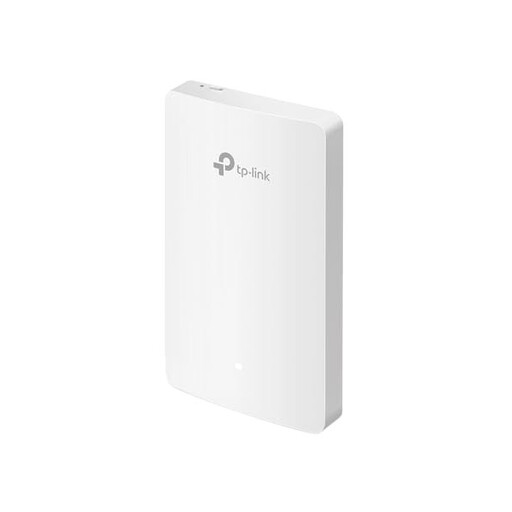
TP-Link EAP235-Wall Omada Wi-Fi 6
This wall-mounted access point may suit you if you can run an Ethernet cable close to your study area.
Four Gigabit ports; Omada SDN. As an access point, it needs an Ethernet connection to your existing network.
View at Joybuy
 No image available
MERCUSYS ME80X Wi-Fi 6
Repeater mode may suit you if you want to extend Wi-Fi without an Ethernet connection to the node; a signal-strength indicator helps you choose where to place it.
AX3000 dual-band; 574 Mbps at 2.4 GHz and 2402 Mbps at 5 GHz; Gigabit LAN port; access point mode also available.
View at Joybuy
 No image available
TP-Link RE235BE BE3600 Wi-Fi 7
This range extender may suit you if the planned position is still within your router’s range.
Dual-band; Multi-Link Operation; 2.5-Gigabit Ethernet port; compatible with EasyMesh. The extender must first connect within the range of your existing router.
View at Joybuy
Frequently asked questions
How can I tell whether dropouts are caused by Wi-Fi or my broadband connection?
Compare the connection where you study with one near the router, and check your fixed broadband service separately. The Bundesnetzagentur’s broadband measurement tool compares your actual connection speed with the speed agreed in your contract; a single Wi-Fi test in a distant room doesn’t prove there’s a problem with your broadband service.
Where should I place a wirelessly connected mesh node?
Don’t put it somewhere it can barely receive a signal itself. Telekom Deutschland recommends moving Speed Home WLAN closer to the router or other boosters if the connection indicator shows a weak signal.
Can I connect an additional Wi-Fi transmitter via LAN?
Yes, if the device you choose supports this mode. FRITZ! documents the FRITZ!Repeater 1200 AX as an additional Wi-Fi access point connected via LAN; integrating it into a FRITZ!Box mesh network requires specific software versions.
Are advertised powerline speeds guaranteed where I study?
No. devolo lists electrical interference and sockets with low transmission rates as possible causes. Test the connection using the sockets you plan to use in your home.
What does the CE marking mean on a Wi-Fi device?
According to the Bundesnetzagentur, the CE marking represents the manufacturer’s own declaration that the product meets the relevant requirements. It isn’t an independent test of Wi-Fi range.


