Who is this computer for?

People analysing weather data

If you import weather station data and regularly create spreadsheets and charts, consider your file sizes and the limits of your software. The German Weather Service makes climate data available to download, while Microsoft Support states that an Excel worksheet is limited to 1,048,576 rows.

People sharing a workspace

If several people use the same computer, it’s important to have separate settings and documents, along with the right connections for your existing monitors. Microsoft Support explains how to set up multiple Windows user accounts, each with its own settings and documents.

People planning more extensive analysis

If you want to process larger datasets locally, compare the memory actually installed with the upgrade options for the specific configuration. Lenovo notes that some memory options for the ThinkCentre M70q Gen 5 range are available only on selected models or in certain regions.

What should you look for when buying?

Compact Windows mini PC

A good fit if: desk space is limited and your software runs on Windows.

Things to consider: HP lists different configurations for the Pro Mini 400 G9, including 8 GB RAM and a 256 GB SSD, as well as 16 GB RAM and a 512 GB SSD. Be sure to check the exact specification.

Upgradeable desktop or tower

A good fit if: you genuinely need specific internal upgrades and can set aside more desk space.

Things to consider: check the case and expansion slots on the specific configuration. The upgrade options of a larger Dell model won’t necessarily be available on a Micro model.

Mac mini

A good fit if: the apps, files and peripherals you need work with macOS, and you already have a separate display.

Things to consider: Apple lists different memory and SSD capacities for different Mac mini configurations. Check the specification of the specific model.

Mini PC kit or barebone

A good fit if: you want to choose and install the RAM, SSD and operating system yourself.

Things to consider: ASUS also offers NUC 14 Pro kit versions without supplied RAM or a pre-installed operating system.

What you need What to check before buying Who this matters most to
Working with data Compare typical file sizes and the apps you use at the same time with the RAM and SSD storage actually installed. If you use Excel, also bear in mind the limit for an individual worksheet. If I want to analyse weather data across several files or apps, I’ll first check what my workflow requires. Around 33% of consumers are likely to put data processing first.
Sharing the computer Check that it’s compatible with the apps you use and set up a separate user account for each person. Agree on shared storage and backups. When sharing a computer, I want to keep my own settings and documents while still being able to access agreed shared files. Around 27% of consumers are likely to prioritise separate working environments.
Desk space and monitors Check the footprint, mounting options and video outputs of the exact model against your existing monitors and any adapters you need. If desk space is limited or I need to connect several existing monitors, I’ll check the computer’s size and connections. Around 20% of consumers are likely to consider desk space and monitor connections first.
Upgrades and included equipment Check whether it’s a kit or a complete PC, then confirm the installed RAM, free slots, SSD, operating system and any accessories needed to get it fully set up. If I want to add components later, I also need to know what else I’ll need to get a usable computer. Around 20% of consumers are likely to weigh up upgrade options and the included equipment first.

Avoiding buying pitfalls

  • Confusing the maximum supported RAM with the RAM installed

    The maximum supported by a product range doesn’t tell you how much RAM is installed in a specific computer. For example, HP lists Pro Mini 400 G9 configurations with 8 GB and 16 GB RAM.

    Check the exact product listing for the installed memory, available slots and upgrade requirements.

    Upgrading later may mean paying for compatible memory modules and installation.

  • Assuming a barebone is a ready-to-use PC

    ASUS lists NUC 14 Pro kits that may not include RAM or a pre-installed operating system.

    Compare what’s included and choose a version that suits your experience and planned workflow.

    Depending on the kit, you may need to choose the RAM, SSD and operating system separately, then set everything up yourself.

  • Assuming a more powerful computer will handle any large Excel file

    Microsoft Support sets a limit of 1,048,576 rows for an individual Excel worksheet. More PC resources won’t remove this software limit.

    Check the size of your largest typical file and how you plan to import or analyse it before choosing your hardware.

Key brands at a glance

HP

The documented Pro Mini 400 G9 configurations show how compact Windows business PCs can suit workspaces with limited desk space.

  • HP lists 8 GB RAM and a 256 GB SSD for model 938A5EA#ABD, and 16 GB RAM and a 512 GB SSD for model 937U0EA#ABD.
  • Specifications vary by model. General claims about security or performance don’t tell you how quickly a specific weather data analysis will run.

Dell

Dell offers the Pro Micro QCM1250 as a configurable compact desktop. A larger case is a different option if you need specific upgrades.

  • Dell lists a range of processor and operating system options for the QCM1250.
  • A configurable model range doesn’t tell you which combination is included in a particular listing. You can’t assume a larger Dell case’s upgrade options are available on the Micro.

Lenovo

The ThinkCentre M70q Gen 5 range is a compact Tiny desktop option, with different memory configurations to compare.

  • Lenovo lists up to 64 GB DDR5 and up to two M.2 SSD drives for the range.
  • Lenovo notes that some configurations are available only on selected models or in certain regions. The maximum specifications don’t necessarily apply to an individual listing.

Apple

The Mac mini is a compact macOS alternative if the analysis software you need to use is compatible with macOS.

  • Apple’s technical specifications for the Mac mini with M6 list different memory and SSD configurations, as well as display support.
  • This doesn’t mean that a particular Windows app is compatible with macOS or that a display is included.

ASUS

The NUC 14 Pro range highlights the difference between a pre-configured mini PC and a kit that you configure yourself.

  • ASUS lists versions as both mini PCs and kits.
  • Some kit versions are sold without a pre-installed operating system or supplied RAM. The model overview alone won’t tell you which version is included in a specific listing.

Joybuy products for a shared workspace

Here’s a selection of compact mini and Micro PCs for a shared desk. For each listing, check that the operating system, connections and specification suit the apps, monitors and weather data you use.

HP Z2 Mini G1a with Ryzen AI Max+ Pro 395, 128 GB RAM and 2 TB SSD

HP Z2 Mini G1a, Ryzen AI Max+ Pro 395, 128 GB, 2 TB

The compact mini PC design suits a workspace with limited desk space.

Listed in the product name: 128 GB RAM and a 2 TB SSD.

View at Joybuy

HP EliteDesk AI Mini 8 G1i 623K2ET with Core Ultra 9 285T, 64 GB RAM and 1 TB SSD

HP EliteDesk AI Mini 8 G1i 623K2ET, Core Ultra 9 285T, 64 GB, 1 TB

The mini PC design is a practical choice for a shared workspace where space is at a premium.

Specifications include 64 GB DDR5-5600 RAM, a 1 TB M.2 SSD, DisplayPort, HDMI and VESA mount compatibility.

Windows 11 Pro is listed as the operating system.

View at Joybuy

Thunderobot Mini PC Workstation AI Max+ 395 with 128 GB LPDDR5X and a 1 TB SSD

Thunderobot Mini PC Workstation AI Max+ 395, 128 GB, 1 TB SSD

This mini PC design could be a good fit if desk space is limited.

Listed in the product name: 128 GB LPDDR5X at 8000 MT/s and a 1 TB SSD.

Other listed features include a side-mounted SSD interface, a quick-release network card interface and Wi-Fi 7.

View at Joybuy

ACEMAGIC E3B with AMD Ryzen 7 7735HS, 24 GB RAM and a 512 GB NVMe SSD

ACEMAGIC E3B, Ryzen 7 7735HS, 24 GB, 512 GB NVMe SSD

This mini desktop design is made for a workspace where space is at a premium.

Specifications include 24 GB LPDDR5, a 512 GB NVMe SSD and two M.2-2280 slots.

The product name lists three display outputs supporting 4K at 60 Hz, HDMI, DisplayPort, USB-C and Windows 11 Pro. Check that the outputs work with your existing monitors.

View at Joybuy
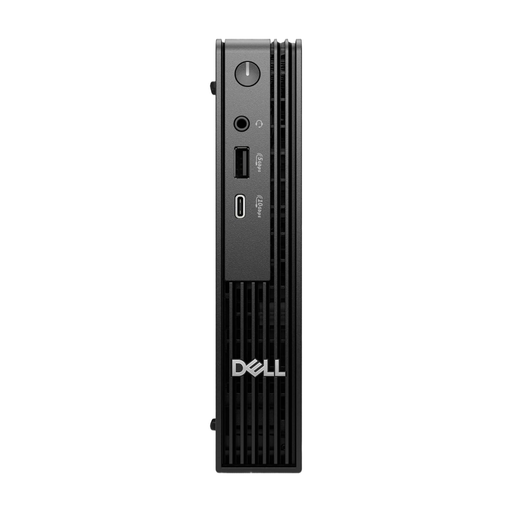
Dell Pro Micro QCM1250 MJ5TK with Core i7-14700T, 16 GB RAM and a 512 GB NVMe SSD

Dell Pro Micro QCM1250 MJ5TK TPM, Core i7-14700T, 16 GB, 512 GB

The Micro desktop design is well suited to a workspace with limited desk space.

Specifications include 16 GB DDR5 RAM, a 512 GB NVMe SSD and Windows 11 Pro.

View at Joybuy

Frequently asked questions

Will a more powerful PC help if a weather file won’t fit in an Excel worksheet?

No, not if you’ve reached the limit for an individual worksheet: Microsoft Support sets this at 1,048,576 rows per sheet. If you reach the limit, try a different way to import or analyse the data. More RAM won’t increase the worksheet limit.

How do I set up a computer for several people?

On Windows, you can set up a separate user account for each person, with their own settings and documents. You should also agree which weather files will be shared and how they’ll be backed up.

Will I need to add components to a mini PC kit?

It depends on the specific version. ASUS also offers NUC 14 Pro kits without supplied RAM or a pre-installed operating system, so check exactly what’s included.

What warranty applies if I buy a faulty PC?

Under EU consumer law, when you buy from a trader as a consumer, you’re entitled to a minimum legal guarantee of two years from the date you receive the goods. An additional manufacturer’s warranty doesn’t replace these legal rights. This applies to consumer purchases. Your Europe explains the EU rules.

What should I know about labelling and disposing of the computer later?

Electrical and electronic equipment is covered by relevant EU product regulations. A CE mark is the manufacturer’s declaration, not a general independent quality seal. In Germany, electrical and electronic waste must not be put in household rubbish. The Federal Environment Agency notes that local collection points generally accept it free of charge.