Choose your camera based on working distance, framing and mounting. A USB document camera suits a small, computer-connected overhead view; an interchangeable-lens camera gives you flexibility over framing; and a camcorder lets you switch between wide shots and close-ups. A gimbal camera is mainly designed for moving shots. At your intended filming position, also check window light, colour reproduction, sound and whether the power supply will last for your planned recording time.
Who films weaving?
Close-up filming at the loom
If you want to show hands, threads and individual steps from a fixed overhead view, the frame and focusing distance matter more than resolution alone. IPEVO lists a maximum shooting area of 34,2 × 25,5 cm and a focus range starting at 10 cm for the V4K PRO.
Instructors giving longer demonstrations
If you’re filming a continuous sequence of steps while explaining what you’re doing, check the sound, recording time and whether the setup leaves your hands free. Panasonic notes that recording on the DC-G97 may be interrupted in high ambient temperatures.
Filming from different angles
If you need wide shots and moving footage as well as close-ups, a zoom lens, interchangeable lenses and a gimbal each serve a different purpose. Sony lists a 20× optical zoom for the FDR-AX43A; DJI describes the Osmo Pocket 4 as a mechanically stabilised gimbal camera.
What to consider when choosing
USB document camera
A good fit if: you’re filming at a computer and the weaving is directly beneath the camera in a small frame.
Things to consider: your setup will include a USB connection and a computer. Check that your work area and hands fit within the camera’s shooting area.
Interchangeable-lens camera
A good fit if: you want to switch between wide views and thread close-ups, and choose a lens to suit your camera’s position.
Things to consider: the lens and mount are part of your choice. The right focusing distance depends on the lens you select and how far away the camera is.
Camcorder with a fixed zoom lens
A good fit if: you want to change the framing between a wide view of the loom and the work area without changing lenses.
Things to consider: Sony lists very different minimum focusing distances for the FDR-AX43A at the wide-angle and telephoto ends.
Compact gimbal camera
A good fit if: you also want to film moving shots around the loom.
Things to consider: stabilisation is no substitute for a fixed overhead mount. Check that the distance and framing will show the details you need.
| Buying priority |
What to check |
Who it matters to |
| Threads and hand movements |
Compare your work area and camera distance with the focus range and shooting area. |
If I want to show threads and hand movements from above, the whole work area needs to be in focus and in frame at my chosen distance. Around 29% of consumers put a clear close-up view first. |
| Window light and colour |
Check the white balance and exposure at your planned filming location; if you’re using extra artificial light, look out for flicker. |
When the light from the window changes, I want to be able to check fabric colours at the actual filming location. Around 23% of consumers prioritise control over lighting and colour. |
| Longer recordings |
Check the recording conditions, storage and power supply for the time you plan to film. |
If my demonstration involves a continuous sequence of weaving steps, I want to avoid interruptions and plan for enough storage and power. Around 18% of consumers prioritise recording for as long as possible without interruption. |
| Clear explanations |
Test the microphone position and sound with the loom running in your final setup. |
If I’m explaining as I weave, my voice needs to be clear with the microphone in its chosen position. Around 18% of consumers prioritise clear sound. |
| Moving shots |
Decide whether you need moving shots; with compact cameras, check the focusing distance too. |
If I also want to film around the loom, I need a suitable moving angle as well as a fixed view of my work. Around 12% of consumers prioritise being able to change perspectives. |
Common buying and filming mistakes
-
Assuming resolution alone guarantees a sharp, suitably sized view of your weaving
Whether threads and hand movements are visible also depends on the frame and focusing distance. With a zoom lens, the minimum focusing distance can change depending on your framing.
First decide on your work area and camera distance, then check the framing you need from that exact position.
-
Assuming a recording with no time limit is guaranteed for every shoot
Panasonic lists 4K/30p recording on the DC-G97 with no fixed time limit, but notes that high ambient temperatures may interrupt recording.
Test a complete demonstration in similar conditions, and check your storage and power supply.
-
Relying on the built-in microphone without checking how far away you’ll be speaking
IPEVO recommends speaking 30 to 70 cm from the V4K PRO’s microphone. The position you choose for an overhead view may put you at a different distance.
Make a test recording of your voice and the sound of the loom from your final camera position.
An external microphone may require an additional setup.
-
Assuming gimbal stabilisation can replace a fixed mount
The DJI Osmo Pocket 4’s stabilisation doesn’t mean you can mount it above your own loom for a fixed view that frames your work correctly.
Plan moving shots separately from your fixed view of the work, and check what mounting equipment you’ll need.
Brands to consider
IPEVO
The V4K PRO is a USB document camera for an overhead view of a limited work area, connected to a computer.
- IPEVO lists a focus range starting at 10 cm and a maximum shooting area of 34,2 × 25,5 cm.
- A USB connection and computer are part of the setup. IPEVO recommends speaking 30 to 70 cm from the built-in microphone.
Canon
The EOS R50 V is a video-focused interchangeable-lens camera that lets you vary your framing.
- Canon lists an APS-C sensor, Dual Pixel CMOS AF and 4K/60p for the EOS R50 V.
- Canon says the model doesn’t have in-body image stabilisation. The focusing distance and frame depend on the lens you choose.
Sony
The ZV-E10 II takes interchangeable lenses, while the FDR-AX43A is a camcorder with a fixed zoom lens – a different approach to filming.
- Sony lists 4K/60p for the ZV-E10 II; the specified kit includes a 16–50-mm lens. Sony lists a 20× optical zoom for the FDR-AX43A.
- Sony lists the FDR-AX43A’s minimum focusing distance as approximately 1 cm at the wide-angle end and approximately 80 cm at the telephoto end.
Panasonic
The LUMIX DC-G97 is an option for demonstrations where 4K/30p and connections for monitoring sound are important.
- Panasonic lists microphone and headphone sockets, as well as recording with no fixed time limit.
- The manufacturer notes that high ambient temperatures may interrupt recording.
DJI
The Osmo Pocket 4 is a compact gimbal camera for additional moving shots.
- DJI lists mechanical stabilisation, a focus range starting at 0,2 m and standard 4K video at up to 60 fps.
- These specifications don’t show whether small thread details will appear large enough in frame from your intended distance.
Joybuy products for weaving demonstrations
The products below range from compact cameras for moving shots to USB webcams for filming on a PC. For a fixed overhead view, check the frame, focus and mounting at your actual loom.
 No image available
Osmo Pocket 4P Standard Combo, Black
For compact video recording; the product description lists a 3-axis gimbal.
According to the product description, 4K/240 fps is supported only in slow-motion mode.
View at Joybuy
 No image available
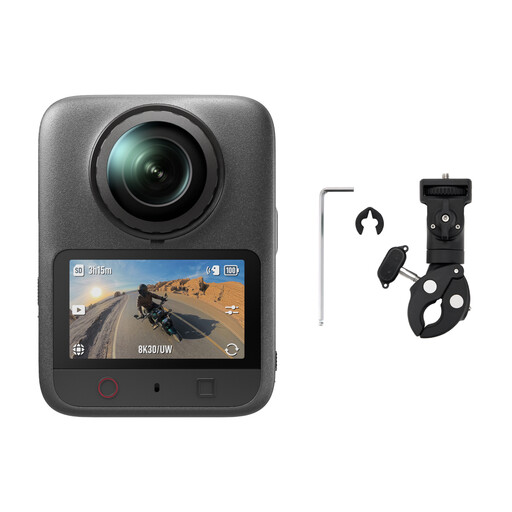
DJI Osmo 360 II Limitless Riding Combo
For additional angles; the product description lists stabilised 360° recording.
View at Joybuy
 No image available
Full HD 1080P webcam with microphone
For PC-based recording or streaming; the product description lists autofocus and automatic light correction.
1080p at 30 fps, 720p at 60 fps, a 120° field of view and an omnidirectional microphone, according to the product description.
View at Joybuy
 No image available
AOC webcam for PC with microphone, 4K
For PC recording with an adjustable angle; the product description lists HDR and automatic light correction.
4K UHD at 30 fps, a 99° field of view and a built-in microphone with noise cancellation, according to the product description.
View at Joybuy
 No image available
AOC 4K PRO webcam with Sony IMX363 sensor
For PC recording; the product description lists autofocus and automatic light correction.
A 75° field of view, PDAF autofocus and two microphones, according to the product details.
View at Joybuy
Frequently asked questions
How do I check a camera before filming by a window?
Set up the camera where you plan to film and check that your hands and work area are in frame and in focus. Film a short sequence using bright yarn and dark fabric, then check the white balance: Canon explains that natural light affects colour differently depending on the conditions.
Can extra artificial lighting cause flicker in video?
Yes, some artificial light sources can cause visible flicker. For affected footage, Sony recommends using its flicker reduction feature if available. Check the result in a test recording using the lighting you’ll actually use.
Can I use the IPEVO V4K PRO without another device?
No. The IPEVO V4K PRO is a USB document camera and needs a compatible computer with a USB port for its intended use. Also check which resolutions your recording software can handle.


