Which camera suits you?

Performers with limited desk space

If you mainly want to show the cards and your hands, what matters is the frame from the camera's intended position. IPEVO lists a maximum capture area of 34,2 × 25,5 cm for the V4K PRO; Insta360 describes DeskView as a view of the desk from the monitor.

Performers who want to switch views

If you want to show both your face and individual moves, Show Mode or DeskView may suit your setup. Logitech describes a Show Mode for the MX Brio; Insta360 lists DeskView for several Link models.

Performers using a separate mount

If you can position the camera independently of the monitor, you can tailor the focus distance and capture format more precisely to your setup. Elgato lists a 1/4-inch thread and a fixed-focus range of 30–120 cm for the Facecam MK.2; Hama describes the C-600 Pro as having autofocus.

What to look for when buying

USB document camera with an arm

A good fit if: The card area is always the main focus and you have room on the desk for the camera base. IPEVO lists a maximum capture area of 34,2 × 25,5 cm and autofocus from 10 cm for the V4K PRO.

Bear in mind: The base takes up desk space. Check that the arm, cards and lighting will all fit together in your setup.

Tiltable webcam with Show Mode or DeskView

A good fit if: You want to switch between showing your face and the desk, and can attach the camera to a monitor positioned appropriately. Logitech describes Show Mode for the MX Brio; Insta360 lists DeskView for several Link models.

Bear in mind: A view of the desk from the monitor is not automatically a straight-down view. Check the actual angle at your desk.

Webcam on a separate mount

A good fit if: You can position the camera independently of the monitor. According to the manufacturer, the Elgato Facecam MK.2 has a 1/4-inch thread and a fixed-focus range of 30–120 cm.

Bear in mind: The mount and lighting need to fit your setup; the Facecam MK.2 has a fixed focus distance.

What you need What to check when buying Who this matters most to
Capture all the cards and hands Check the field of view or capture area, as well as the angle and space needed for the mount, with the cards laid out. IPEVO lists a maximum capture area of 34,2 × 25,5 cm for the V4K PRO. If I want to show the cards and both hands, the frame needs to work from where I plan to place the camera. This is a priority for around 29% of consumers.
Keep card details in focus Compare the actual distance between the lens and the cards with the focus range of the exact model. If the cards are at different heights, check the focus again. If I’m filming cards at close range, I want to make sure they stay in focus. Sharp card details are the top priority for around 29% of consumers.
Show quick moves Check the frame rate and the resolution you want together: Logitech lists 4K at 30 fps or 1080p at 60 fps for the MX Brio. For the Facecam MK.2, Elgato specifies uncompressed 1080p60 over USB 3.0. If I’m demonstrating quick moves, I want the action to remain easy to follow. Smooth footage is the top priority for around 24% of consumers.
Keep the setup simple Check the USB connection, any required software, the mount and the shadows cast by your hands at your desk. Hama lists USB-A for the C-600 Pro; Insta360 says DeskView requires the Link Controller. If I want to use the camera at my existing desk without a major rearrangement, the connection and positioning matter. This is a priority for around 18% of consumers.

Common buying mistakes

  • Assuming DeskView gives you a true overhead view

    Insta360 distinguishes the perspective-corrected DeskView from Overhead Mode, which requires a separate mount.

    Before buying, check that the view from your monitor position shows the cards and moves clearly.

  • Looking only at the highest resolution

    Focus distance and frame rate vary by model and capture format. Elgato lists a fixed focus range of 30–120 cm for the Facecam MK.2; Logitech specifies different frame rates for 4K and 1080p on the MX Brio.

    Compare the distance to the cards and the movement quality you want with the specifications for the exact model variant.

  • Confusing models with similar names

    Brio 500, MX Brio and Brio 4K are different models. Elgato identifies 10WAA9901 as the original Facecam; the Facecam MK.2 specifications do not automatically apply to it.

    Check the full model name or part number against the features you need for your setup.

Brands to consider

IPEVO

USB document cameras such as the V4K and V4K PRO are designed to provide their own view of the desk.

  • IPEVO lists autofocus from 10 cm and a maximum capture area of 34,2 × 25,5 cm for the V4K PRO.
  • Check that the camera base will fit on your small desk. The V4K and V4K PRO specifications are not interchangeable.

Logitech

The manufacturer describes the MX Brio and Brio 500 as having Show Mode; the Brio 4K is a separate model.

  • Logitech lists 4K at 30 fps or 1080p at 60 fps for the MX Brio, as well as a tilt towards the desk.
  • Show Mode alone does not guarantee a straight-down view; check the angle with your own setup.

Insta360

DeskView is a mode for temporarily showing the desk from the monitor.

  • The guide lists DeskView for Link, Link 2, Link 2C, Link 2 Pro and Link 2C Pro.
  • Insta360 distinguishes DeskView from Overhead Mode, which uses a separate mount and is listed in the guide for the original Link.

Elgato

The Facecam MK.2 can be attached to a suitable mount using its 1/4-inch thread.

  • Elgato specifies a fixed-focus range of 30–120 cm and uncompressed 1080p60 over USB 3.0 for the Facecam MK.2.
  • The fixed focus limits where you can position the camera; these specifications do not automatically apply to the original Facecam.

Hama

According to the manufacturer, the C-600 Pro is a USB-A webcam with autofocus and automatic exposure adjustment.

  • Hama lists Full HD, autofocus and automatic exposure adjustment.
  • No specific overhead mode is described for this model. How well it works for filming cards depends on the mount.

Joybuy products

The Joybuy webcams and ConferenceCam below have different specifications for positioning, focus and capture format. Check whether you can position each model at a small desk so that the cards and your hands stay in frame.

Full HD 1080P webcam with microphone

Full HD 1080P webcam with microphone

An option if you want to position the camera flexibly to show cards and hands; check that the wide field of view suits your desk.

Full HD 1080p at 30 fps, 120° lens, automatic light correction, flexible integrated tripod and 360° rotating lens.

View at Joybuy

AOC 4K webcam with privacy cover

AOC 4K webcam with privacy cover

If you need to tilt and swivel the camera, check in advance that the mount has enough room to move at your intended position.

4K UHD at 30 fps, 99° field of view, 180° tilt and 360° swivel; automatic light correction and privacy cover.

View at Joybuy

AOC 4K PRO webcam with Sony IMX363 sensor

AOC 4K PRO webcam with Sony IMX363

If the cards move closer or further away during your demonstration, the listed autofocus may be worth considering; position the camera accordingly.

PDAF autofocus, 75° viewing angle, 1080p at 60 fps and a desktop tripod base; USB-A and USB-C.

View at Joybuy
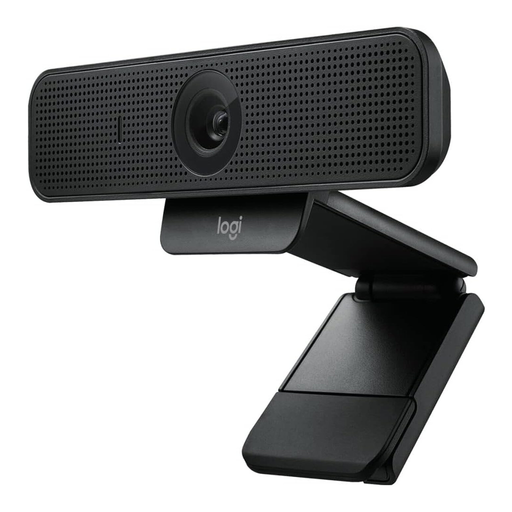
Logitech C925e Business Webcam

Logitech C925e Business Webcam

If you want to attach the camera to your monitor, check that the integrated clip lets you get the angle you need for the cards.

HD 1080p, 78° field of view and autofocus; RightLight 2, privacy shutter and two integrated microphones.

View at Joybuy

Logitech ConferenceCam

Logitech ConferenceCam

If you want to change the camera angle, compare the available pan and tilt range with the space on your desk.

1920 × 1080 pixels, 78° viewing angle, autofocus, and pan, tilt and zoom functions; USB-A. Footprint: 10,4 × 15 × 15,4 cm.

View at Joybuy

Frequently asked questions

How can I check that all the cards will fit in frame before buying?

Lay out your largest planned arrangement of cards, leaving room for both hands, then check the frame from the intended camera position. Compare the measurements with the capture area listed for the exact model; for example, IPEVO lists a maximum of 34,2 × 25,5 cm for the V4K PRO.

How do I set up a webcam in OBS?

Add the camera to OBS as a video capture device, then choose the device, resolution and frame rate in the source properties. OBS says that an unsupported format may result in no video being output.

Do I need USB 3.0 for the Elgato Facecam MK.2?

USB 3.0 is required for the uncompressed video formats specified by Elgato; according to the manufacturer, the model only supports MJPEG over USB 2.0. Also check that the fixed focus range of 30–120 cm suits your recording distance.

Can I film other people during a card demonstration and publish the video?

There is no straightforward answer without knowing the circumstances of the recording and how the video will be used. If personal data is processed, the explanations from the Federal Commissioner for Data Protection state that a legal basis under Art. 6 GDPR is required; valid consent can provide such a basis. Before publishing, check the rights of the people concerned in your specific situation.