If you’re joining from your own computer, a personal USB webcam is usually the obvious choice. If several people are sitting around the same table, the camera’s field of view, microphone and speaker setup matter more. Logitech describes MeetUp as an all-in-one device for small rooms, while a personal webcam such as the Jabra PanaCast 20 is designed for individuals. Before joining a call in a shared house, also check which housemates or areas of your home could be picked up on camera or by the microphone.
Who is each option for?
A study group around a shared-house table
If several people are sitting together in front of one computer, the camera’s field of view, microphone and speaker setup should suit the seating arrangement. Logitech and AVer describe cameras for small rooms, while EMEET offers a 360° camera designed to sit in the centre of the table.
Someone joining on their own
If you’re joining from your own screen, a personal webcam is a good place to start. Jabra describes the PanaCast 20 as a camera for personal video calls.
Students in a shared living space
If you’re joining from a room shared with others, check whether housemates or private areas could appear on camera or be picked up by the microphone. Germany’s Data Protection Conference specifically identifies people in the household as a potential video-conferencing risk.
What should you look for when buying?
Personal USB webcam
A good fit if: You’re joining on your own from a laptop or monitor and want to show yourself rather than the whole shared house.
Bear in mind: A personal webcam won’t necessarily capture a study group spread around the room.
All-in-one camera for the table
A good fit if: Several people are sitting side by side and want to use one shared device for the camera, microphones and speakers.
Bear in mind: A wide field of view may also show more of your shared living space, so check the seating positions beforehand.
Centrally positioned 360° camera
A good fit if: The group is sitting around a table and you want to place the camera in the middle; EMEET describes the Meeting Capsule Gen 2 as suitable for this setup.
Bear in mind: A 360° view may also capture housemates or personal belongings. EMEET specifies 1080p for the panoramic view.
| What you need |
What to check before buying |
Who it matters to |
| Getting everyone in shot |
Consider the seating arrangement, camera position and field of view together. The 120° specification for the AVer CAM340+ and the 360° view of the EMEET Meeting Capsule Gen 2 refer to different models and setups. |
If we’re sitting side by side at one computer, I want to check that everyone will fit in the shot without showing too much of the room. Around 36% of consumers prioritise a group view. |
| Making voices around the table easy to hear |
Check whether the microphone and speakers suit the distances and seating arrangement, or whether you’ll need a separate audio device. A wide field of view doesn’t guarantee that everyone will be easy to hear. |
When several people are speaking around the table, it’s important to me that everyone in the study group can follow the conversation. Around 29% of consumers prioritise clear group audio. |
| Joining on your own with minimal setup |
Check the connection, computer requirements and power supply for the specific model. The AVer CAM340+ requires USB 3.1 for 4K or 60 fps. |
If I’m joining on my own computer, I want a suitable camera without having to set up unnecessary room equipment. Around 21% of consumers prioritise joining individually and keeping setup simple. |
| Protecting your privacy in a shared house |
Check the camera’s field of view and microphone before joining. A lens cover blocks the image, but it doesn’t automatically mute the microphone. |
I want to avoid accidentally showing housemates or private areas. Around 14% of consumers prioritise privacy in their living space. |
Buying mistakes to avoid
-
Assuming a webcam rated for individuals will work as a group-room camera
CHIP’s best-of list ranks webcams; that doesn’t automatically mean it assesses the picture and sound for a shared-house group spread around a room.
First check how many people will be there and how they’ll be sitting, then consider the field of view and audio setup.
Depending on the setup, you may need an additional audio device or a different camera position.
-
Assuming a 4K specification applies to every operating mode
According to AVer, the CAM340+ cannot use its 4x zoom and 4K or 60 fps at the same time. USB 3.1 is required for 4K or 60 fps.
For the specific model, compare resolution, frame rate, zoom and connection together.
-
Using a wide-angle camera without checking what’s behind you
People in your household may be captured on camera or by the microphone during a video call. Germany’s Data Protection Conference highlights this as a potential risk.
Set the field of view deliberately and check the camera and microphone before joining. If you plan to record, consider that separately.
Key brands at a glance
Logitech
According to Logitech, MeetUp models are designed for small rooms. Brio and MX Brio webcams, by contrast, are aimed mainly at individual users.
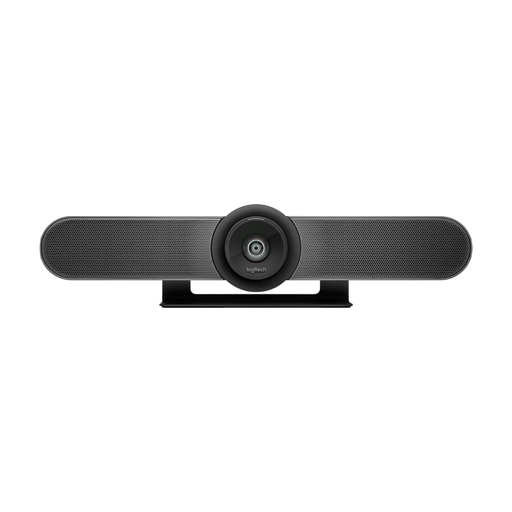
- Logitech describes MeetUp as having a USB connection, microphone array and built-in speaker.
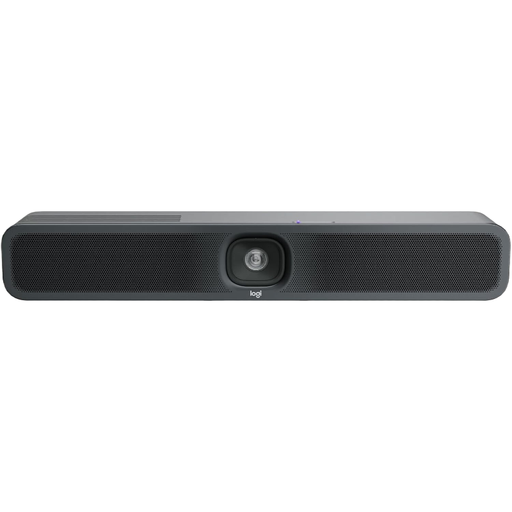
- According to the manufacturer, MeetUp 2 has a 120° diagonal field of view and supports PC or BYOD use, but it isn’t compatible with RoomMate.
AVer
The CAM340+ is a compact USB conference camera for small rooms. The CAM130 is a different model which, according to AVer, adds built-in lighting and a lens cover.
- AVer specifies a 120° field of view and a directional microphone for the CAM340+.
- According to AVer, the 4x zoom cannot be used at the same time as 4K or 60 fps; USB 3.1 is required for 4K or 60 fps. The CAM340+ isn’t described as having a built-in speaker.
Jabra
Jabra describes the PanaCast 20 as a personal webcam; the PanaCast is a separate model offering a panoramic view.
- According to Jabra, the PanaCast 20 has a privacy cover that can block the image when the camera isn’t in use.
- The 180° specification applies to the PanaCast and shouldn’t be assumed to apply to the PanaCast 20.
EMEET
EMEET describes the Meeting Capsule Gen 2 as an all-in-one 360° camera designed to sit in the centre of a table, with people gathered around it.
- The manufacturer specifies a 1080p panoramic view, eight microphones and a speaker.
- These manufacturer specifications aren’t an independent assessment of how clearly people can be heard in a shared house.
Joybuy products for your study group
This selection includes personal webcams and conference cameras for joining a call together around a table.
 No image available
AOC webcam with 4K and lens cover
For joining on your own when a lens cover is important; check the field of view if you want several people to appear in shot.
99° field of view and built-in microphone with noise cancellation.
The product description specifies 4K video and a sliding cover.
View at Joybuy
 No image available
Logitech ConferenceCam
For a small group sharing one computer, when you want to use a camera and speakerphone together.
78° field of view, 180° pan and USB-A connection.
The description specifies a full-duplex speakerphone and a microphone range of 2.4 m; arrange your seating accordingly.
View at Joybuy
 No image available
Insta360 Link 2C Standard Bundle, Graphite Black
For joining on your own or with several people in front of the computer; the description specifies auto-framing for individuals or groups.
4K webcam with 1/2" sensor, autofocus, HDR and gesture control.
The description specifies a microphone with AI noise cancellation and a physical privacy switch.
View at Joybuy
 No image available
Logitech MeetUp all-in-one conference camera
For several students sharing a table, when you want microphones and speakers built into the conference camera.
4K video and 120° field of view.
The description specifies automatic framing, motorised pan and tilt, a microphone array and a built-in speaker. Check which parts of your shared home will appear in the wide-angle view.
View at Joybuy
 No image available
Logitech MeetUp 2 4K all-in-one conference camera
For joining together using one computer, when you need an all-in-one device with a microphone and speaker.
The product specifications include 4K video, autofocus and noise cancellation.
A USB connection and external power supply are listed. Logitech describes MeetUp 2 as supporting PC and BYOD use; this model isn’t compatible with RoomMate.
View at Joybuy
Frequently asked questions
How should you position a camera for a group study session?
Position the camera to suit the seating arrangement: Logitech describes MeetUp as being placed at the front of a small room, while EMEET’s Meeting Capsule Gen 2 is designed for the centre of the table. Check exactly what’s in shot before your housemates come into the room.
What should you check after connecting the camera?
Select the intended camera, microphone and playback devices in your video-conferencing software, then test the seats where the group will be sitting. According to AVer, the CAM340+ requires USB 3.1 for 4K or 60 fps; its data sheet says the firmware can be updated through PTZApp.
Who is responsible if an item bought online in Germany develops a fault?
Your statutory rights for faulty goods apply against the seller; these are separate from any voluntary manufacturer’s warranty. Online purchases also generally come with a 14-day right to cancel, which you exercise with the retailer. Germany’s consumer advice centre explains the difference.
Can a shared-house study group transmit or record video and audio of everyone present?
Housemates may be captured on camera or by the microphone during a video call; Germany’s Data Protection Conference highlights this as a potential risk. This doesn’t mean that every private live call requires one specific form of consent. Under Section 201 of the German Criminal Code (StGB), unauthorised recording of another person’s non-public speech is a criminal offence; recording is different from ordinary live participation.


