Quiz hosts at a desk on their own
If you’ll be doing most of the talking, check the framing and audio from where you’ll actually be sitting. HP lists a 66° field of view for the 320 FHD, while Logitech gives the C920s a fixed 78° field of view.


If you’re hosting solo, choose a frame that shows your space and test your voice on a call with the usual house-share background noise. If several players need to be on screen at once, a wider field of view becomes more important; pay particular attention to how clearly people can be heard from seats further away. Viewing angles are manufacturer specifications, not proof of how well the audio will work in your home.
If you’ll be doing most of the talking, check the framing and audio from where you’ll actually be sitting. HP lists a 66° field of view for the 320 FHD, while Logitech gives the C920s a fixed 78° field of view.
If several people are in the same room, the framing and speech clarity need to work from every seat. EMEET lists a 90° field of view and two omnidirectional microphones for the C960 Basic; how well it performs depends on the room.
If you occasionally need to show objects or clues, camera positioning matters. Logitech describes the Brio 500 as having Show Mode; check in advance that it can show your desk and the object as you want.
A good fit if: you mainly want yourself on screen and would prefer to keep your housemates out of shot.
Consider: A tighter frame may cut off movement or objects on the desk.
A good fit if: the group will be sitting together in front of the same camera and needs to be visible.
Consider: A wider field of view can show more of the group’s shared space; test how clearly people can be heard from the seats at the back, too.
A good fit if: you want to switch between showing your face and pointing out clues on the desk while hosting.
Consider: Extra features may need setting up; Logitech says Logi Tune is required for the Brio 500’s Auto-Framing.
| Priority | What to check when buying | Who will find this important? |
|---|---|---|
| Clear audio | Check the microphone position and audio source; make a test call with the usual house-share background noise. | If I want to ask quiz questions clearly despite voices from around the house, I’ll test the microphone and app in typical conditions. Around 31% of consumers put audio first when hosting. |
| A private frame | Check the preview from your actual seat; check the camera angle and cover. | If I don’t want housemates or private areas to appear in the quiz video by accident, I’ll check the frame before starting. Around 25% of consumers prioritise keeping their frame private. |
| Playing as a group | Decide where everyone will sit and how far away; test the picture and speech from every seat. | If several players need to be on screen at once, I’ll check that their answers come through clearly, too. Around 19% of consumers prioritise playing as a group. |
| Picture in room lighting | Check the preview at the planned quiz time and assess the room’s lighting. | If I want my face to be recognisable in the available light, I’ll assess the picture in my own room rather than relying on the resolution specification alone. Around 13% of consumers pay particular attention to picture quality in room lighting. |
| Easy set-up | Check that the connection is compatible with your computer; select the camera and microphone in the quiz app. | If I want the webcam to work before the quiz without unnecessary set-up, I’ll check the connection and app in advance. Around 12% of consumers prioritise a straightforward set-up. |
Microphone and noise-filter specifications don’t show how voices and background noise will interact in your house share.
Make a test call with the room’s usual background noise, and select your preferred audio source in the quiz app.
A wider field of view may show more of the shared room and private areas. The viewing angles listed by HP and EMEET relate to different models and aren’t a direct comparison of quality.
Decide in advance who should be visible, then check the preview from the camera’s actual position.
Logitech says Logi Tune is required for RightSight Auto-Framing on the Brio 500.
If this feature matters to your choice, check the software and controls on your computer before the quiz.
According to Logitech, the C920s has a fixed 78° field of view and a privacy shutter; the Brio 500 adds features such as Auto-Framing and Show Mode.
EMEET lists a 90° field of view, USB-A and two omnidirectional microphones for the C960 Basic.
HP lists a 66° field of view, USB-A, a built-in microphone and a lens cover for the 320 FHD.
AnkerWork describes the PowerConf C302 as automatically adjusting its field of view to suit different numbers of people, with built-in microphones.
According to Trust, the Oran is a Full HD webcam with a built-in microphone and sliding privacy cover.
The models below are worth considering for hosting a quiz at your desk. Check the framing, audio and set-up with your own quiz app and the usual house-share background noise.
 No image available
Worth considering for solo hosting if you’d like to adjust the frame using software.
Listed features include an 80° field of view, autofocus, built-in microphone, USB connection and privacy shutter. Test the audio in your quiz app.
 No image available
Described as a webcam for quiz calls; check the framing and audio from where you’ll be sitting.
The product title lists autofocus, dual microphones, a lens cover, 75° field of view, and USB-A and USB-C. Noise reduction is also listed.
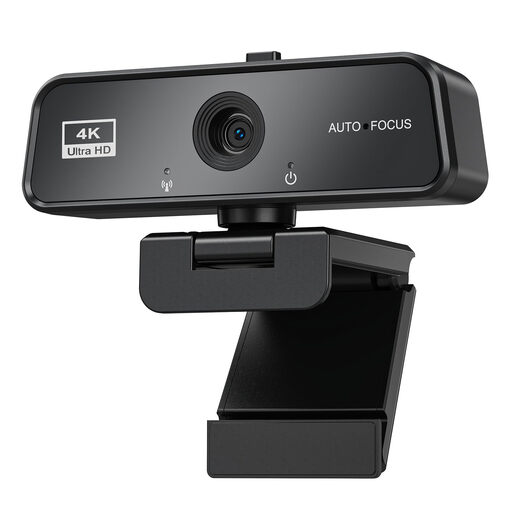 No image available
Worth considering for quiz calls if you’re looking for a webcam with a built-in microphone and cover.
Listed features include 3840×2160 at 30 FPS, autofocus, automatic light correction, USB 3.0 and a sliding cover. The description states that it’s compatible with Windows and Mac.
 No image available
Worth considering for hosting at your desk if you’d like to position the camera using an adjustable tabletop tripod.
Listed features include a 78° field of view, built-in stereo microphone and autofocus. The description also mentions exposure correction and 1080p at 30 FPS.
 No image available
Worth considering for solo hosting if a magnetic privacy cover and Auto-Framing suit your set-up.
The description lists a 78° horizontal viewing angle, USB 2.0, built-in stereo microphones with noise reduction and AI Auto-Framing. Dell Peripheral Manager is listed for advanced features.
You can’t tell from the number of microphones or a manufacturer’s noise-cancellation claim alone. Select your preferred audio source in your quiz app and test it with typical house-share background noise. If you use Microsoft Teams, you can also check its noise suppression during a test call.
First, check that the connection on your particular model is compatible with your computer. Set the camera up in its intended position, select the camera and microphone in your calling software, then test the framing and speech from all the seats you plan to use. EMEET describes these steps for the C960; Microsoft explains how to select devices in Teams.
Not necessarily: § 201 StGB covers the unauthorised recording of another person’s non-public spoken words on an audio medium. Whether a particular recording is authorised depends on the circumstances. The provision does not give a blanket answer to every question about live transmission without recording.
Position the camera deliberately and check the preview from your actual seat before the quiz starts. A lens cover helps between calls, but it doesn’t replace checking the frame while you’re live. The BfDI notes that images can affect people’s personal rights; if you’re planning to make a recording, discuss it separately with everyone affected.