For a family call from a noisy office, first test your microphone and call app’s noise cancellation in similar conditions, then compare them with a headset microphone. Choose your webcam based on framing, lighting, connectivity and privacy: a higher resolution alone won’t solve noise problems. In its guidance from January 2016, the Data Protection Conference stressed that permission to use the internet privately at work is relevant. So check your employer’s rules.
Which webcam is right for you?
Calling from a noisy desk
If you want your family to hear you clearly despite conversations in the office, test your microphone and app settings with realistic background noise. Zoom Support notes that a noisy environment may require stronger noise cancellation.
Calling with a visible office background
If you want to keep the frame tight and cover the camera after your call, check whether people, screens or documents are in view. The German Federal Office for Information Security recommends considering privacy when taking part in video conferences.
Calling from different workspaces
If you often have to set up your camera and audio again, check the connection and device permissions, and run a quick test before your call. Microsoft Support explains that the appropriate Windows camera and microphone permissions must be enabled.
What should you look for when buying?
Start with an audio test at the desk where you plan to use the webcam. Then decide what framing, privacy cover and set-up effort will work for your call.
| What matters |
What to check before buying |
Who is this especially important for? |
| Clear speech |
Test the microphone with typical office noise and check which microphone is actually selected in the app. |
If I’m calling from a noisy office, I want my family to hear my voice clearly without nearby conversations drowning it out. Around 42% of consumers put audio first. |
| Privacy and framing |
Check the preview from the intended position and see whether the webcam has a privacy cover. |
When I’m making a personal call, I don’t want to show office content or other people by accident. Around 25% of consumers prioritise privacy and framing. |
| Picture quality in office lighting |
Check the image from your actual seat and compare exposure correction and autofocus. |
If the lighting at my desk changes, I want to remain clearly visible during a family call. Around 17% of consumers consider picture quality in office lighting first. |
| Easy set-up |
Check the connection and operating system requirements, then test the camera, microphone and speakers in advance. |
If I move between workspaces, I want to connect the webcam without spending ages searching for permissions or audio settings. Around 16% of consumers put easy set-up first. |
Which buying mistakes should you avoid?
-
Assuming higher resolution will solve office noise
Picture resolution and microphone selection affect different parts of a call. A higher resolution tells you nothing about how clearly your voice will come through with conversations in the background.
First test the audio in similar conditions, then decide which picture features you actually need.
-
Assuming noise cancellation guarantees clear speech
Manufacturers’ claims about noise cancellation don’t prove how clearly your voice will come through in your particular office.
Make a test call with conversations in the background, and compare it with a headset microphone if necessary.
-
Accidentally showing office content on camera
The frame may include people, screens or documents. A privacy cover only protects your privacy when it’s closed.
Check the preview before your call, position the camera carefully and cover it afterwards.
Which brands are worth considering?
Logitech
The C920s and Brio 500 differ in their picture and privacy features, as well as the microphone specifications provided by the manufacturer.
- Logitech lists Full HD 1080p at 30 fps, a 78° field of view and a privacy cover for the C920s. For the Brio 500, the manufacturer describes automatic light correction and noise-cancelling microphones.
- Microphone specifications come from the manufacturer and don’t show how clearly speech will come through when people are talking at the same time in your office.
AnkerWork
According to the manufacturer, the PowerConf C300 is aimed at buyers looking for Full HD 1080p at 60 fps and features for conference calls.
- AnkerWork lists two microphones with noise isolation and automatic adjustments for conference calls on this model.
- Noise isolation claims come from the manufacturer; they aren’t the result of a comparison test in your workplace.
Insta360
According to the manufacturer, the Link 2 Pro combines selectable audio modes with additional picture features.
- Insta360 lists a 4K video mode, AI noise cancellation, a moving camera head and several microphone modes.
- The manufacturer’s specifications don’t prove that speech will be clearer in your office. For the Link Controller, Insta360 lists Windows 10 or later, excluding ARM-based Windows, and macOS 11.0 or later.
Webcams at Joybuy
The Joybuy products below include webcams for video calls with built-in microphones; some models also have privacy covers or additional picture features. Test the audio with typical office noise before factoring in extra picture features.
 No image available
Full HD 1080P Webcam with Microphone, USB Plug & Play
An option if you’re looking for a built-in microphone and a physical privacy cover. Test the noise cancellation in your office environment.
The product title lists Full HD 1080P and USB Plug & Play.
Shop at Joybuy
 No image available
AOC 4K Webcam with 99° field of view
An option if you want a built-in microphone and sliding privacy cover. Check whether the wide field of view shows too much of your office.
The product title lists 4K and Noise Cancellation; the product details list a 99° field of view and a sliding privacy cover.
Shop at Joybuy
 No image available
AOC 4K PRO Webcam with Sony IMX363
If a tighter frame matters to you, check the stated 75° field of view and the lens cover. You should still test the built-in microphone where you plan to use it.
The product title lists 4K, PDAF autofocus and two microphones.
Shop at Joybuy
 No image available
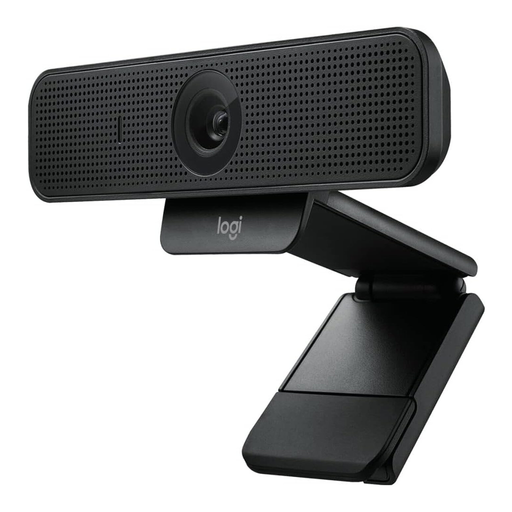
Logitech C925e Business Webcam, HD 1080p
An option if you’re looking for a webcam with a privacy cover and two built-in microphones. Check the framing at your desk before making a personal call.
The product title lists a 78° field of view and autofocus; the product details list PC and Mac compatibility.
Shop at Joybuy
 No image available
Logitech C922 Pro Stream Webcam
Consider this model if a built-in stereo microphone and desk tripod would be useful for your call. Test the microphone yourself in your call app to see how well it handles office noise.
The product title lists a USB connection.
Shop at Joybuy
Frequently asked questions
Should I use the webcam or a headset microphone for my call?
Compare both microphones with a test recording in typical office noise. Zoom offers noise cancellation settings, but you can’t tell from a webcam’s specifications alone which combination will pick up your voice best.
What should I check if my new webcam doesn’t work during a call?
Check the connection and device selection in your call app. On Windows, the relevant camera and microphone permissions must be enabled. Then test the picture and audio before your family call.
Can I use my work computer or office network for a family call?
Check your employer’s rules before using work devices or the office network for personal reasons. In its guidance from January 2016, the Data Protection Conference highlights that permission for private internet use is relevant to the assessment. The guidance doesn’t replace your employer’s current rules.
How can I stop office content appearing during a personal call?
Check the camera preview before your call and adjust the frame so that no unwanted people, screens or documents are visible. Close the privacy cover after your call if your webcam has one.
What’s the difference between a fault and a warranty?
Your statutory rights apply against the seller; a warranty is a voluntary service offered by the manufacturer or retailer. Germany’s consumer advice centre highlights this distinction. If a product is faulty, the first step is generally to ask for it to be repaired or replaced.


